
Last updated on
Oct 31, 2026

PH RF-1 2008 free printable template
We are not affiliated with any brand or entity on this form

Fill out
Complete the form online in a simple drag-and-drop editor.

eSign
Add your legally binding signature or send the form for signing.

Share
Share the form via a link, letting anyone fill it out from any device.

Export
Download, print, email, or move the form to your cloud storage.
Why pdfFiller is the best tool for your documents and forms


End-to-end document management
From editing and signing to collaboration and tracking, pdfFiller has everything you need to get your documents done quickly and efficiently.
Accessible from anywhere
pdfFiller is fully cloud-based. This means you can edit, sign, and share documents from anywhere using your computer, smartphone, or tablet.
Secure and compliant
pdfFiller lets you securely manage documents following global laws like ESIGN, CCPA, and GDPR. It's also HIPAA and SOC 2 compliant.
What is PH RF-1
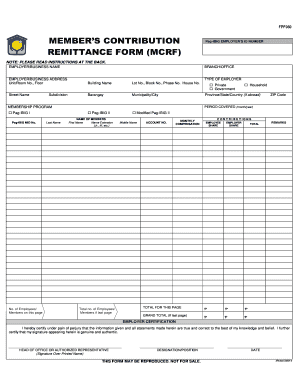
The Philippine Employer’s Remittance Report is a government form used by employers in the Philippines to report and remit health insurance contributions to PhilHealth.
pdfFiller scores top ratings on review platforms




Made filling out a PDF the most easiest experience ever!
Awesome and very easy to navigate aroud system
Who needs PH RF-1?
Explore how professionals across industries use pdfFiller.

PH RF-1 is needed by:
-
Employers contributing to PhilHealth
-
Payroll administrators in Philippine companies
-
HR managers handling employee benefits
-
Accountants managing employer contributions
-
Business owners in the Philippines
Comprehensive Guide to PH RF-1
What is the Philippine Employer’s Remittance Report?
The Philippine Employer’s Remittance Report, also known as the RF-1 form, serves as a critical tool for employers in the Philippines to report and remit health insurance contributions to the Philippine Health Insurance Corporation (PhilHealth). This report plays a vital role in ensuring that employees receive the necessary health insurance coverage they are entitled to.
Essential elements of the report include the employer's Tax Identification Number (TIN), employee names, PhilHealth numbers, salary brackets, and the corresponding contribution amounts. Accurate completion of this form is crucial for compliance with health insurance regulations.
Purpose and Benefits of the Philippine Employer’s Remittance Report
This remittance report is essential for both employers and employees. It enables employers to remain compliant with legal requirements regarding health insurance contributions and provides employees with the necessary health coverage they require. Proper and timely remittance reporting supports the tracking of employee contributions, ensuring that all individuals are adequately registered within the PhilHealth system.
Benefits of accurate reporting include streamlined compliance processes, prevention of legal issues, and enhanced employee trust in their health benefits. Employers can avoid complications arising from non-compliance or inaccurate submissions.
Who Needs the Philippine Employer’s Remittance Report?
The primary audience for the Philippine Employer’s Remittance Report comprises employers in various sectors across the Philippines. This report is obligatory for companies employing staff who are covered by PhilHealth. Specific industries, particularly those with numerous employees or those mandated by law to provide health insurance, must file this report.
Conversely, businesses that do not employ individuals or are not engaged in formal employment relationships are not required to submit this report. Understanding these requirements ensures that all eligible employers fulfill their obligations.
Key Features of the Philippine Employer’s Remittance Report
The RF-1 form includes several key features that make filling it out manageable. Important elements include:
-
Fillable fields for employer and employee information
-
Checkboxes for confirming the accuracy of the report
-
Instructions for each section of the form
-
Reporting deadlines and submission requirements clearly outlined
Significant details needed include the employer's TIN, employee names in alphabetical order, and the contributions calculated based on salary brackets. Accurate and timely submission is mandated, with penalties potentially incurred for late filings.
How to Fill Out the Philippine Employer’s Remittance Report Online (Step-by-Step)
Filling out the RF-1 form is simplified through the use of online tools such as pdfFiller. Follow these steps for efficient completion:
-
Access the RF-1 form template on pdfFiller.
-
Input the employer’s TIN and PhilHealth number in the designated fields.
-
List down employee names, ensuring correct spellings and order.
-
Calculate and fill in the total contribution amounts based on salary brackets.
-
Review the filled form for accuracy and completeness.
-
Save and submit the form as per the guidelines.
Common mistakes to avoid include inaccuracies in TIN or PhilHealth numbers, misspelled names, and omitted contribution data. Validating information before submission is crucial to avoid delays or penalties.
Submission Guidelines for the Philippine Employer’s Remittance Report
Employers have several methods available for submitting the completed RF-1 report. Options include online submissions through the PhilHealth portal or via physical submission to the nearest PhilHealth office. It is essential to adhere to the stipulated deadlines, ensuring forms are submitted no later than the 10th day following the month they pertain to.
Different submission formats may apply, and employers should be aware of any associated fees for late submissions. Employers should confirm details specific to their submissions by consulting PhilHealth guidelines.
Consequences of Not Filing or Late Filing the Philippine Employer’s Remittance Report
Failure to file the Philippine Employer’s Remittance Report or submitting it late can result in significant penalties for employers. These consequences include legal ramifications and potential disruption to employees' health insurance coverage.
Employers who miss the submission deadline may face fines or legal actions. However, there may be remedial actions available for businesses that act promptly to rectify any filing issues, which should be explored to mitigate the impact.
Security and Compliance for the Philippine Employer’s Remittance Report
Document security is paramount when handling sensitive information such as health insurance contributions. Utilizing pdfFiller for filling out the RF-1 form ensures that data is protected through robust security features, including 256-bit encryption and compliance with regulations like HIPAA and GDPR.
Employers are responsible for safeguarding employee information, adhering to data protection laws, thus fostering trust and transparency in their reporting processes.
Use pdfFiller for Efficient Handling of the Philippine Employer’s Remittance Report
pdfFiller offers an excellent solution for employers managing the RF-1 form. Users benefit from the ability to fill, sign, and manage their documents efficiently without the need for downloads. The platform's intuitive features allow easy edits and eSignatures, promoting a smoother workflow for document management.
Testimonials from satisfied users highlight the platform's effectiveness and user-friendliness, enhancing employer confidence in utilizing digital solutions for their reporting needs.
Sample or Example of a Completed Philippine Employer’s Remittance Report
For reference, users can access a visual example of a completed RF-1 form, which serves as a valuable guide during the completion process. Utilizing sample documents helps prevent common mistakes that can arise from incomplete or inaccurate forms.
Employers are encouraged to leverage templates available on pdfFiller to aid in their report preparation, ensuring compliance and accuracy when filing their remittance reports.
How to fill out the PH RF-1
-
1.Access the Philippine Employer’s Remittance Report on pdfFiller by searching for the form name or navigating to the relevant government forms section.
-
2.Open the form in pdfFiller, where you will find fillable fields, checkboxes, and instructions to guide you through the process.
-
3.Before filling out the form, gather all necessary information including your Employer TIN, PhilHealth numbers of employees, their names, salary brackets, and the corresponding contribution amounts.
-
4.Begin filling out the form by entering your complete Employer TIN and PhilHealth number in the specified boxes.
-
5.Proceed to list employee names in alphabetical order, ensuring accuracy in spelling as this is important for record-keeping.
-
6.Input each employee's PhilHealth number, salary bracket, and calculated contribution amounts into the form's designated fields.
-
7.Review all information for accuracy, double-checking that names and numbers match documents like payslips or employment records.
-
8.If corrections are needed, follow the instructions provided within the form for making adjustments and validating changes.
-
9.Once completed, affix the signature of an authorized officer and print their name, designation, and the date of certification in the designated area.
-
10.Finalize the document by saving your work in pdfFiller, and choose the option to download the form or submit it electronically as per your preference.

Who is eligible to submit the Philippine Employer’s Remittance Report?
Employers in the Philippines who contribute to PhilHealth and have employees enrolled under the health insurance scheme are eligible to submit this form.
What is the deadline for submitting this report?
The Philippine Employer’s Remittance Report must be submitted by the 10th day of the month following the applicable reporting period.
How do I submit the Philippine Employer’s Remittance Report?
You can submit the report either electronically through the PhilHealth online portal or by physically delivering it to the nearest PhilHealth office.
What supporting documents do I need when submitting this form?
No additional supporting documents are required for submitting the Philippine Employer’s Remittance Report, but ensure all employee data is correct and verifiable.
What are common mistakes to avoid when completing this form?
Common mistakes include incorrect PhilHealth numbers, misspelling employee names, and failing to sign the document, which can lead to delays.
How long does processing take for this report?
Processing times can vary, but the report is usually processed within a few business days when submitted correctly to PhilHealth.
How can I correct errors after submission?
If you discover errors after submission, follow the correction instructions provided within the form or contact PhilHealth for guidance on the correction process.
PH RF-1 Form Versions
Related Content
Related Forms




Related Catalogs
Get the latest insights from our blog


If you believe that this page should be taken down, please follow our DMCA take down process
here
.
This form may include fields for payment information. Data entered in these fields is not covered by PCI DSS compliance.