
Last updated on
Nov 6, 2026

CURE Auto Insurance Application for Benefits - Personal Injury Protection 2010-2026 free printab...
pdfFiller is not affiliated with any government organization

Fill out
Complete the form online in a simple drag-and-drop editor.

eSign
Add your legally binding signature or send the form for signing.

Share
Share the form via a link, letting anyone fill it out from any device.

Export
Download, print, email, or move the form to your cloud storage.
Why pdfFiller is the best tool for your documents and forms


End-to-end document management
From editing and signing to collaboration and tracking, pdfFiller has everything you need to get your documents done quickly and efficiently.
Accessible from anywhere
pdfFiller is fully cloud-based. This means you can edit, sign, and share documents from anywhere using your computer, smartphone, or tablet.
Secure and compliant
pdfFiller lets you securely manage documents following global laws like ESIGN, CCPA, and GDPR. It's also HIPAA and SOC 2 compliant.
What is CURE Auto Insurance Application for Benefits - Personal Injury Protection
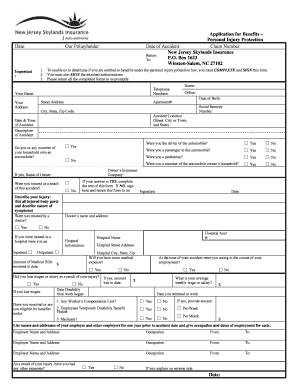
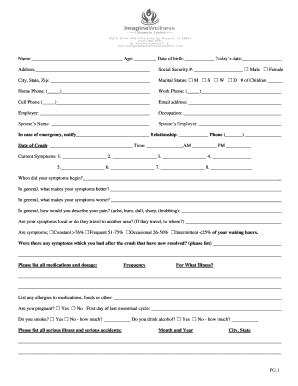
The Personal Injury Protection Benefits Application is a healthcare form used by individuals in New Jersey to apply for benefits under the Personal Injury Protection Law following an accident.
pdfFiller scores top ratings on review platforms




I have just started working with PDF filler. It seems to be meeting all my expectations.
Worked for what I needed, a bit of a learning curve but not bad.
Who needs CURE Auto Insurance Application for Benefits - Personal Injury Protection?
Explore how professionals across industries use pdfFiller.

CURE Auto Insurance Application for Benefits - Personal Injury Protection is needed by:
-
Individuals who have been injured in an accident
-
Residents of New Jersey seeking medical benefits
-
Claimants filing for personal injury protection
-
Legal representatives handling accident claims
-
Medical providers submitting related documentation
Comprehensive Guide to CURE Auto Insurance Application for Benefits - Personal Injury Protection
What is the Personal Injury Protection Benefits Application?
The Personal Injury Protection Benefits Application is a crucial form under New Jersey law that helps individuals claim necessary benefits following a motor vehicle accident. This application facilitates access to essential Personal Injury Protection (PIP) benefits which cover various post-accident financial needs.
PIP benefits primarily include medical expenses, lost wages, and rehabilitation costs. To obtain these benefits, applicants must follow an application process that requires specific personal information and detailed accident descriptions. Applicants should be prepared to provide their name, date of birth, and pertinent details surrounding the incident.
Purpose and Benefits of the Personal Injury Protection Benefits Application
This form holds significant relevance as it ensures applicants can claim PIP benefits efficiently. One of the primary purposes of the Personal Injury Protection Benefits Application is to cover critical medical expenses that arise from motor vehicle accidents.
-
PIP benefits cover a range of medical costs, providing financial relief during recovery.
-
Additionally, these benefits may also include compensation for lost wages and rehabilitation expenses.
-
Timely completion of the application ensures swift access to necessary medical care, which is vital in the recovery process.
Who Should Use the Personal Injury Protection Benefits Application?
This application is tailored for individuals who are eligible for PIP benefits under New Jersey’s framework. Anyone involved in a motor vehicle accident that results in injury should consider filing this form to access financial relief.
Specific situations necessitating this form may include severe injuries or accidents that require extensive medical treatment. Factors influencing the eligibility to apply may encompass the type of accident and the injuries sustained by the individuals involved.
How to Fill Out the Personal Injury Protection Benefits Application Online
Filling out the Personal Injury Protection Benefits Application has been streamlined online through platforms like pdfFiller. To access and complete the application, users can follow these straightforward steps:
-
Navigate to the pdfFiller website and locate the PIP application form.
-
Begin filling out the fields, starting with your personal information, including name and date of birth.
-
Provide detailed accident information essential for the claim.
-
Review the application thoroughly for accuracy and completeness before submission.
Accuracy is critical in this process; ensure that all the details you provide are correct to avoid delays in processing your application.
Common Mistakes to Avoid When Submitting the Personal Injury Protection Benefits Application
Submitting the Personal Injury Protection Benefits Application incorrectly can lead to delays or denial of benefits. It's essential to recognize common mistakes made during the application process:
-
Missing signatures or incorrect personal information can hinder processing.
-
Failing to include necessary documentation, such as medical bills, may result in incomplete applications.
To ensure correctness, applicants should double-check every section of the application before submitting it to the claims department.
Submission Process for the Personal Injury Protection Benefits Application
Understanding the submission process is vital to ensure your application is processed swiftly. There are different methods through which applicants can submit their forms:
-
Online submission through platforms like pdfFiller.
-
Paper submission by mailing the completed application to the designated address.
Applicants should be aware of key deadlines and general processing timeframes, which can affect when they receive their benefits. Ensure that forms are sent to the appropriate location in Princeton, New Jersey, for timely processing.
What Happens After You Submit the Personal Injury Protection Benefits Application?
After submitting the Personal Injury Protection Benefits Application, applicants can anticipate a specific processing timeline during which their application will be reviewed. Communication regarding the status of the application is typically provided, allowing applicants to stay informed.
-
Applicants should track their application status through the designated channels.
-
Maintaining copies of all submitted documentation is crucial for personal records and potential follow-ups.
How pdfFiller Helps You Complete the Personal Injury Protection Benefits Application
pdfFiller offers valuable features that enhance the completion of the Personal Injury Protection Benefits Application. Users benefit from:
-
An easy-to-use interface for online editing, signing, and submitting forms with efficiency.
-
Strong security measures to protect sensitive information provided during the application process.
The platform includes additional resources that guide users through form completion, ensuring a smooth and secure experience.
Ensuring Your Personal Injury Protection Benefits Application is Secure
Data privacy and security are critical when handling personal information for the Personal Injury Protection Benefits Application. pdfFiller prioritizes compliance with both HIPAA and GDPR regulations, ensuring user information is protected.
Utilization of 256-bit encryption technology is a standard practice, safeguarding documents from unauthorized access. For additional safety, follow these tips when filling out forms online:
-
Always ensure you are on a secure internet connection.
-
Do not share your personal information via unsecured channels.
Best Practices for Retaining Evidence Post Submission
After submitting the Personal Injury Protection Benefits Application, it’s important to maintain records associated with your claim. Keeping thorough documentation can be beneficial for any future follow-ups or renewals of claims.
-
Document all correspondence related to your claim for reference.
-
Maintain these records as long as necessary, especially during periods of appeal or further claims.
Effective management of these documents can assist you in navigating the claims process more efficiently.
How to fill out the CURE Auto Insurance Application for Benefits - Personal Injury Protection
-
1.To access and open the Personal Injury Protection Benefits Application on pdfFiller, visit the site and use the search function to locate the form using its name.
-
2.Once the form is open, review all the fillable fields and checkboxes available. The interface allows you to click on each field for guided entry.
-
3.Before starting, gather necessary information including your personal details, accident specifics, medical treatments received, and any relevant medical bills.
-
4.Begin by entering your name, date of birth, and other personal information in the corresponding fields clearly indicated on the form.
-
5.Next, provide detailed information about the accident, including the date, location, and circumstances surrounding it in the designated sections.
-
6.After entering accident details, fill out the section regarding medical treatments you've received, ensuring you include all relevant medical provider information.
-
7.Review the entire form for accuracy, ensuring all sections are completed and all necessary information is included to prevent processing delays.
-
8.Finalize your application by signing and dating the form in the specified areas, ensuring your signature matches your legal name.
-
9.Once you are satisfied with the completed application, save your work using the save feature on pdfFiller. You can also download it for your records.
-
10.If required, submit the completed form and any accompanying medical bills electronically through pdfFiller, or print it out and send it to the claims department in Princeton, New Jersey.

Who is eligible to apply for the Personal Injury Protection Benefits?
Individuals residing in New Jersey who have suffered injuries in an automobile accident and wish to claim benefits under the Personal Injury Protection Law are eligible to apply.
Are there any deadlines for submitting this application?
Yes, it is essential to submit the Personal Injury Protection Benefits Application promptly following an accident to ensure timely processing of your claim and benefits.
What documents are required to submit with this form?
Along with the application, you may need to provide medical bills, medical records, and any evidence of the accident to support your claim for benefits.
How do I submit the completed application?
You can submit the completed Personal Injury Protection Benefits Application electronically via pdfFiller, or print and mail it directly to the designated claims department in Princeton, New Jersey.
What common mistakes should I avoid when completing the form?
Common mistakes include leaving fields blank, providing incorrect personal information, and failing to sign or date the form before submission.
How long does it take to process the application?
Processing times can vary. Generally, once submitted, it may take several weeks for the claims department to review and process your application.
Can I get help filling out the form?
Yes, assistance is often available from legal representatives, healthcare providers, or customer support on platforms like pdfFiller to help with filling out the application correctly.
Related Content
Related Forms





Related Catalogs
Get the latest insights from our blog



If you believe that this page should be taken down, please follow our DMCA take down process
here
.
This form may include fields for payment information. Data entered in these fields is not covered by PCI DSS compliance.