
Last updated on
Nov 6, 2026

Get the free IR56G Form Template - Departing Employees
We are not affiliated with any brand or entity on this form

Fill out
Complete the form online in a simple drag-and-drop editor.

eSign
Add your legally binding signature or send the form for signing.

Share
Share the form via a link, letting anyone fill it out from any device.

Export
Download, print, email, or move the form to your cloud storage.
Why pdfFiller is the best tool for your documents and forms


End-to-end document management
From editing and signing to collaboration and tracking, pdfFiller has everything you need to get your documents done quickly and efficiently.
Accessible from anywhere
pdfFiller is fully cloud-based. This means you can edit, sign, and share documents from anywhere using your computer, smartphone, or tablet.
Secure and compliant
pdfFiller lets you securely manage documents following global laws like ESIGN, CCPA, and GDPR. It's also HIPAA and SOC 2 compliant.
What is IR56G Form
The IR56G Form Template is a tax document used by employers in Hong Kong to report the income of departing employees.
pdfFiller scores top ratings on review platforms




The search option brought up the forms I needed. In on instance multiple versions were on different sites. I was able to bring in to the appropriate version by typing in the URL, I found that to be a real time saver.
Once you understand it, it is quite nice to work with.
Who needs IR56G Form?
Explore how professionals across industries use pdfFiller.

IR56G Form is needed by:
-
Employers reporting departing employees' income.
-
HR professionals managing employee exits.
-
Accountants preparing tax documentation.
-
Tax advisors assisting in compliance.
-
Individuals leaving their job in Hong Kong.
Comprehensive Guide to IR56G Form
What is the IR56G Form Template - Departing Employees?
The IR56G form template serves as a critical tax document for employers in Hong Kong, specifically designed for reporting the income of employees who are departing the organization. This form plays a significant role in maintaining tax compliance by ensuring that all relevant income details, including the departure date and total earnings, are accurately documented. It is essential for employers to understand the importance of this Hong Kong tax form to avoid potential fines or penalties.
Essential details required in the IR56G form template include the departing employee's last working day and comprehensive income amounts for the final assessment period. Correctly filling out this departing employees form not only helps in compliance but also aids in a smooth transition for both employers and employees.
Purpose and Benefits of the IR56G Form Template - Departing Employees
The primary purpose of the IR56G form template is to ensure that employers meet their tax obligations in Hong Kong. It helps document an employee's income accurately during their last tenure at the company, which is vital for the Inland Revenue Department (IRD) reporting process.
Using the IR56G template offers numerous benefits, including significant time savings and enhanced accuracy in employer tax reporting. The organized format of the Hong Kong ird form allows for easy data entry, reducing the chances of errors and ensuring that all submissions are compliant with local regulations.
Who Needs the IR56G Form Template - Departing Employees?
The IR56G form template is essential for various stakeholders involved in the employment process. Typically, employer representatives such as HR personnel or finance officers must complete and submit this form whenever an employee resigns or is terminated.
Understanding when to use this departing employees form is crucial. Scenarios requiring the IR56G include voluntary resignations, layoffs, and retirement situations, ensuring that all departing employees have their income accurately reported before they exit the company.
How to Fill Out the IR56G Form Template - Departing Employees Online (Step-by-Step)
Filling out the IR56G form template online ensures a streamlined process. Follow these steps to complete the form using pdfFiller:
-
Access the document through pdfFiller's platform.
-
Fill in the employee's departure date in the designated field.
-
Enter the contact details of the representative handling the submission.
-
Input the income amounts for the relevant period of employment.
-
Sign the document digitally as required.
-
Review all entries for accuracy before final submission.
Utilizing features like interactive fields and digital signatures makes the process efficient and user-friendly, allowing users to fill out the IR56G form template with ease.
Field-by-Field Instructions for the IR56G Form Template
When completing the IR56G form template, attention to detail is paramount. Key fields include:
-
Departure date: Clearly indicate the employee's final working day.
-
Contact information: Ensure the representative's phone number and name are accurate.
-
Signatures: Make sure the form is signed by an authorized employer representative.
To avoid common errors, double-check that each field is filled properly and that all necessary signatures are secured before submission. This step mitigates the risk of processing delays.
Submission Methods and Delivery of the IR56G Form Template
Employers have several options for submitting the IR56G form template. Submission methods include:
-
Digital submission through the Hong Kong IRD’s portal.
-
Physical submission via mail or in-person delivery to the relevant IRD office.
Employers should be mindful of submission deadlines, as late submissions may incur penalties or delays in processing. Knowing the timelines associated with each method helps in planning accordingly.
What Happens After You Submit the IR56G Form Template?
Once the IR56G form template is submitted, employers can expect a confirmation from the Inland Revenue Department. Typically, processing times may vary, so it's essential to keep track of any correspondence.
Potential issues, such as incomplete information or discrepancies in reported income, may arise after submission. Addressing these promptly by contacting IRD can prevent further complications and ensure compliance with all regulations.
Security and Compliance for the IR56G Form Template - Departing Employees
The security of sensitive employee information during the form submission process cannot be overstated. Employers must take steps to protect this data, particularly personal information that could be vulnerable to breaches.
pdfFiller offers robust security measures, including 256-bit encryption and compliance with various standards such as SOC 2 Type II, HIPAA, and GDPR. This commitment to security ensures that all submitted documents are processed securely and in accordance with applicable regulations.
Why Use pdfFiller for Your IR56G Form Template Needs?
Choosing pdfFiller for handling the IR56G form template offers distinct advantages. The platform provides a user-friendly interface for editing and filling out forms with advanced features that simplify the process.
Users benefit from professional controls, easy navigation, and comprehensive support. This seamless experience allows employers to fill out the IR56G form template accurately and efficiently, ensuring compliance and timely submission.
Sample Completed IR56G Form Template - Departing Employees
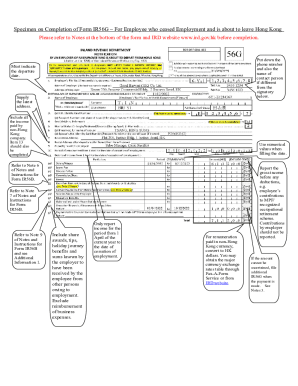
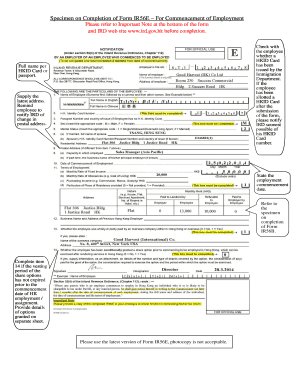
To aid in understanding the proper completion of the IR56G form, a sample completed form serves as an invaluable reference. This visual example showcases key areas, such as the departure date and income amounts, along with notes indicating critical information included in the sample.
Reviewing a sample IR56G form template can clarify the expectations for completing the form and highlight common practices in accurately reporting departing employee information.
How to fill out the IR56G Form
-
1.Access the IR56G Form Template on pdfFiller by searching for 'IR56G' in the document library or directly entering the URL provided by your administrator.
-
2.Once open, familiarize yourself with the layout of the form, noting the fillable fields that require your input.
-
3.Before starting the completion process, gather necessary information such as the departing employee's name, departure date, contact details, and salary information to ensure accuracy.
-
4.Begin filling in the fields as prompted. Input the employee’s departure date in the designated section along with relevant personal details.
-
5.Use pdfFiller’s tools to navigate between fields easily. Click on each field to enter information, ensuring you follow the labels for clarity.
-
6.After filling out all required fields, review the information carefully. Confirm that the details provided are correct and complete.
-
7.Remember to check for any instructions on the form, such as required signatures or additional documents that may need to accompany the form.
-
8.Once you are satisfied with the entries, utilize the save feature to keep the information on pdfFiller or download the filled form to your device.
-
9.You can submit the completed form through your chosen submission method, which may include emailing it to the relevant tax authority or printing it for records.

Who is eligible to use the IR56G Form?
Employers in Hong Kong with employees who are leaving or have left the company are eligible to use the IR56G Form to report income accurately.
What is the deadline for submitting the IR56G Form?
The IR56G Form should be submitted to the Hong Kong Inland Revenue Department as soon as possible after the employee's departure date, typically within one month.
How can I submit the IR56G Form?
You can submit the completed IR56G Form electronically via the Hong Kong Inland Revenue Department's online services or by mailing a printed copy to their office.
What supporting documents are required with the IR56G Form?
When submitting the IR56G Form, employers may need to include copies of the departing employee's final payslips and any applicable tax exemption certificates.
What are common mistakes to avoid when filling out the IR56G Form?
Common mistakes include entering incorrect employee information, missing fields, and failing to sign the form. Double-check your entries to ensure they are accurate.
How long does it take to process the IR56G Form?
Processing times can vary, but typically, the Hong Kong Inland Revenue Department takes around 4 to 6 weeks to process submitted IR56G Forms.
Is notarization required for the IR56G Form?
No, the IR56G Form does not require notarization. However, it must be signed by an authorized representative from the employer's side.
Related Content
Related Forms




Get the latest insights from our blog


If you believe that this page should be taken down, please follow our DMCA take down process
here
.
This form may include fields for payment information. Data entered in these fields is not covered by PCI DSS compliance.