
Last updated on
Oct 16, 2026

Get the free philips lifeline care plan agreement
We are not affiliated with any brand or entity on this form

Fill out
Complete the form online in a simple drag-and-drop editor.

eSign
Add your legally binding signature or send the form for signing.

Share
Share the form via a link, letting anyone fill it out from any device.

Export
Download, print, email, or move the form to your cloud storage.
Why pdfFiller is the best tool for your documents and forms


End-to-end document management
From editing and signing to collaboration and tracking, pdfFiller has everything you need to get your documents done quickly and efficiently.
Accessible from anywhere
pdfFiller is fully cloud-based. This means you can edit, sign, and share documents from anywhere using your computer, smartphone, or tablet.
Secure and compliant
pdfFiller lets you securely manage documents following global laws like ESIGN, CCPA, and GDPR. It's also HIPAA and SOC 2 compliant.
What is Lifeline Care Agreement
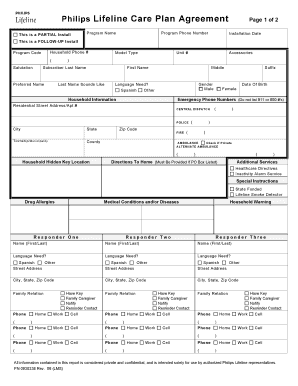
The Philips Lifeline Care Plan is a service agreement designed for individuals seeking personal emergency response assistance and healthcare monitoring.
pdfFiller scores top ratings on review platforms




Who needs Lifeline Care Agreement?
Explore how professionals across industries use pdfFiller.

Lifeline Care Agreement is needed by:
-
Seniors needing emergency medical assistance
-
Caregivers managing health and safety for loved ones
-
Individuals with chronic health conditions
-
Families looking for peace of mind in home care
-
Healthcare providers coordinating patient care
Comprehensive Guide to Lifeline Care Agreement
What is the Philips Lifeline Care Plan?
The Philips Lifeline Care Plan is designed to provide essential support to individuals who may need medical assistance. This care plan outlines various types of assistance available to users and their families, enhancing their overall safety and peace of mind. Enrolling in the Philips Lifeline Care Plan offers numerous benefits that positively impact users' lives.
-
The care plan provides quick access to emergency assistance, making it invaluable for individuals at risk.
-
Family members can feel reassured knowing their loved ones have a reliable safety net in place.
-
Types of assistance covered under the Philips Lifeline Care Plan include emergency response services, fall detection, and health monitoring options.
Purpose and Benefits of the Philips Lifeline Care Plan
The Philips Lifeline Care Plan plays a crucial role in improving the safety and wellbeing of users, particularly seniors and those with health conditions. It offers peace of mind by ensuring that help is available at a moment's notice, which is vital for those who may experience emergencies. Many testimonials highlight how this plan fosters a sense of security and enhances the quality of life.
-
Statistics indicate that using the Philips Lifeline Care Plan significantly reduces response times in emergencies.
-
The care plan is essential for individuals with chronic health issues, providing them with necessary support and resources.
-
Users report feeling more independent and secure because of the immediate access to help the plan provides.
Who Needs the Philips Lifeline Care Plan?
The target audience for the Philips Lifeline Care Plan primarily includes seniors and individuals facing ongoing health challenges. These demographics can greatly benefit from the support and assistance the plan offers. Identifying scenarios where the plan provides critical support helps illustrate its importance.
-
Seniors living alone may find the care plan essential for ensuring their safety and reducing their anxiety.
-
Individuals with chronic illnesses can rely on the plan during crises where immediate medical attention is required.
-
Caregivers can use the Philips Lifeline Care Plan to relieve some of their responsibilities, knowing help is always available for their loved ones.
Eligibility Criteria for the Philips Lifeline Care Plan
Potential users must understand the eligibility criteria for enrolling in the Philips Lifeline Care Plan. Generally, the requirements are straightforward, but certain stipulations may apply based on age, health status, or residency.
-
The care plan is typically open to seniors aged 65 and above and those with chronic medical conditions.
-
Eligibility may depend on residency within specific service areas, ensuring local support is available.
-
Users can easily verify their eligibility status through a quick online assessment provided by Philips Lifeline.
How to Fill Out the Philips Lifeline Care Plan Online (Step-by-Step)
Successfully completing the online application for the Philips Lifeline Care Plan involves several steps. Following these guidelines will help ensure a smooth submission process.
-
Access the application form on the pdfFiller platform.
-
Input necessary personal information, ensuring accuracy to avoid common mistakes.
-
Review the sections for completeness and clarity before submission.
-
Utilize pdfFiller's features to save and edit the form as needed.
Common Errors and How to Avoid Them
Applicants often encounter several common errors when filling out the Philips Lifeline Care Plan form. Recognizing these pitfalls and implementing practical solutions can help streamline the submission process.
-
Inaccurate personal details, such as incorrect contact information, can lead to delays in processing.
-
Leaving required fields blank may result in forms being returned for corrections.
-
Thoroughly reviewing the application for accuracy and clarity is crucial before submission.
Submission Methods and Tracking Your Philips Lifeline Care Plan
Understanding the submission methods available for the Philips Lifeline Care Plan is essential for timely processing. Users have multiple options for submitting their applications and can track the progress after submission.
-
The form can be submitted online through the pdfFiller platform for immediate processing.
-
Users may also opt to mail their applications, though this method may extend processing times.
-
After submitting, applicants can expect an email confirmation and a detailed timeline for processing.
Security and Compliance for the Philips Lifeline Care Plan
Data security is a top priority for the Philips Lifeline Care Plan users. pdfFiller employs stringent measures to ensure all submitted information is protected.
-
The platform uses 256-bit encryption to safeguard sensitive information submitted during the application process.
-
Compliance with HIPAA and GDPR regulations fortifies users' data protection rights.
-
Users can be assured of confidentiality as they complete and submit forms securely.
How pdfFiller Can Simplify the Philips Lifeline Care Plan Process
pdfFiller enhances the overall experience for users of the Philips Lifeline Care Plan by providing numerous user-friendly features. These capabilities simplify the form-filling process and help users stay organized.
-
Features such as text editing, document annotation, and eSigning streamline the registration experience.
-
Users can securely share documents from any location due to the cloud-based nature of pdfFiller.
-
Accessibility from any browser means users can fill out their applications at their convenience.
Take the Next Steps with Your Philips Lifeline Care Plan
Taking immediate action with the Philips Lifeline Care Plan is crucial for those who could benefit from its services. Enrolling in the care plan promotes individual safety and peace of mind.
-
Using pdfFiller facilitates an efficient application process, ensuring users secure their care plans promptly.
-
Additional resources and customer support are available to assist users every step of the way.
How to fill out the Lifeline Care Agreement
-
1.To access the Philips Lifeline Care Plan form on pdfFiller, visit the website and use the search bar to find the specific form by its name.
-
2.Once located, click on the form to open it in the pdfFiller interface, where you'll see the available fields ready for input.
-
3.Before filling out the form, take a moment to gather necessary information, such as personal identification details, medical information, and emergency contacts.
-
4.Begin at the top of the form, filling out each field as prompted. Utilize pdfFiller's text boxes to enter your information securely and accurately.
-
5.If you need to make adjustments, you can easily click on any filled field to edit or delete information as necessary.
-
6.After completing the form, use the review function to check for any missing fields or potential errors to ensure accuracy.
-
7.Once you are satisfied with the entries, choose to save the document by clicking the save icon or download it for your records.
-
8.Finally, submit the completed form through pdfFiller by following the on-screen prompts for electronic submission or print it out for mailing.

Who is eligible for the Philips Lifeline Care Plan?
Eligibility for the Philips Lifeline Care Plan typically includes seniors and individuals with medical needs requiring emergency assistance. It's ideal for those living alone or needing support in emergencies.
What is the application deadline for the Care Plan?
There is no specific application deadline for the Philips Lifeline Care Plan. You can apply at any time, particularly when you anticipate needing personal emergency assistance.
How can I submit the completed Care Plan form?
The completed Care Plan form can be submitted electronically via pdfFiller, or printed and mailed to the designated Philips Lifeline address. Make sure to follow the submission instructions provided.
Are there any supporting documents required for this form?
Generally, you may need to provide personal identification, medical history, and emergency contact information. Always verify specific requirements on the form itself.
What are common mistakes to avoid when filling out the Care Plan form?
Common mistakes include leaving fields blank, providing incorrect contact information, and failing to review the completed form for errors. Be thorough to ensure accuracy.
How long does it take to process the Care Plan application?
Processing times for the Philips Lifeline Care Plan can vary, but typically, you should expect a response within a few days after submission. Check for any updates through your provided contact information.
What should I do if I encounter issues while filling the form on pdfFiller?
If you face issues, refer to the pdfFiller help section or contact their support for assistance. They can guide you through technical difficulties in form completion.
Related Forms


Related Catalogs
Get the latest insights from our blog


If you believe that this page should be taken down, please follow our DMCA take down process
here
.
This form may include fields for payment information. Data entered in these fields is not covered by PCI DSS compliance.