
Last updated on
Nov 9, 2026

IRS Instruction 1125-E 2012 free printable template
pdfFiller is not affiliated with IRS

Fill out
Complete the form online in a simple drag-and-drop editor.

eSign
Add your legally binding signature or send the form for signing.

Share
Share the form via a link, letting anyone fill it out from any device.

Export
Download, print, email, or move the form to your cloud storage.
Why pdfFiller is the best tool for your documents and forms


End-to-end document management
From editing and signing to collaboration and tracking, pdfFiller has everything you need to get your documents done quickly and efficiently.
Accessible from anywhere
pdfFiller is fully cloud-based. This means you can edit, sign, and share documents from anywhere using your computer, smartphone, or tablet.
Secure and compliant
pdfFiller lets you securely manage documents following global laws like ESIGN, CCPA, and GDPR. It's also HIPAA and SOC 2 compliant.
What is IRS Instruction 1125-E
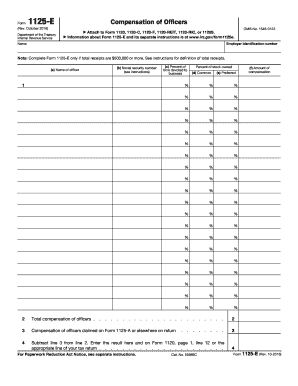
The IRS Form 1125-E is a tax document used by certain entities to report deductions for compensation of officers with total receipts of $500,000 or more.
pdfFiller scores top ratings on review platforms




Who needs IRS Instruction 1125-E?
Explore how professionals across industries use pdfFiller.

IRS Instruction 1125-E is needed by:
-
Corporations with substantial officer compensation
-
Non-profit organizations paying officers
-
Startups exceeding $500,000 in receipts
-
S Corporations needing officer deduction reporting
-
Partnerships with compensated officers
Comprehensive Guide to IRS Instruction 1125-E
What is IRS Form 1125-E?
IRS Form 1125-E is a tax form utilized by organizations with total receipts exceeding $500,000 to report the compensation of officers. This form plays a vital role in tax reporting, ensuring that entities maintain compliance with IRS regulations. Specific organizations, such as corporations and partnerships, are required to file this form to accurately declare the compensation paid to their officers, which is crucial for deducting these costs correctly in their tax filings.
Purpose and Benefits of IRS Form 1125-E
The primary purpose of IRS Form 1125-E is to report officer compensation, which directly impacts an organization's tax deductions. By providing detailed information, organizations can maximize their deductions, leading to potential savings on their overall tax liability. However, inaccuracies or omissions in the reporting process may result in audits or penalties, highlighting the importance of careful and precise completion of the form.
Key benefits include:
-
Accurate reporting aids in legitimate tax deductions.
-
Reduces risk of IRS penalties due to misreporting.
Who Needs to File IRS Form 1125-E?
IRS Form 1125-E must be filed by various entities that meet specific criteria. Generally, corporations and partnerships with total receipts over $500,000 are obligated to submit this form. It is essential that these organizations understand their eligibility requirements to ensure compliance with IRS mandates.
Organizations typically required to file this form include:
-
Tax-exempt organizations filing Form 990.
-
C corporations filing Form 1120.
-
S corporations filing Form 1120S.
How to Fill Out IRS Form 1125-E Online (Step-by-Step)
Filing IRS Form 1125-E electronically can streamline the process. Follow these steps to complete the form:
-
Access the IRS Form 1125-E template online.
-
Input accurate officer names and compensation amounts in the designated fields.
-
Review each section carefully to avoid common errors.
-
Complete all required signatures before submission.
It is vital to use accurate data for reporting to ensure compliance and avoid potential issues with the IRS.
Field-by-Field Instructions for IRS Form 1125-E
Understanding each field in IRS Form 1125-E is crucial for accurate reporting. Key fields include:
-
Officer names: Enter full names as they appear on tax documents.
-
Compensation amounts: Report all forms of compensation accurately.
-
Signatures: Ensure authorized personnel sign the form to validate it.
Familiarizing yourself with these sections will help ensure compliance and reduce the likelihood of errors in your submission.
How to Download and Print IRS Form 1125-E PDF
To effectively download and print IRS Form 1125-E, follow these guidelines:
-
Visit the official IRS website to access the IRS Form 1125-E PDF.
-
Download the form to your device.
-
Use a standard printer setup to print the form.
Consider utilizing pdfFiller for easy handling of the form, including editing and filling features that enhance the user experience.
Submission Methods and Delivery for IRS Form 1125-E
Organizations must carefully consider their submission methods for IRS Form 1125-E. Available methods include:
-
Electronically filing via IRS e-file systems.
-
Mailing the completed form to the appropriate IRS address.
It is crucial to adhere to submission deadlines to avoid penalties and ensure timely processing of your tax returns.
What Happens After You Submit IRS Form 1125-E?
After submitting IRS Form 1125-E, organizations should monitor the status of their filing. The IRS may respond in various ways, including confirmations of receipt or requests for further information. If issues arise, such as corrections needed, immediate action is necessary to amend any errors or omissions in the filing.
Security and Compliance for IRS Form 1125-E
Handling IRS Form 1125-E requires awareness of data protection and privacy compliance. Utilizing platforms like pdfFiller ensures that sensitive information is secure, with strong security measures in place.
Organizations should be familiar with compliance regulations, such as:
-
HIPAA for health-related data.
-
GDPR for data protection in international contexts.
Following best practices when managing sensitive data is imperative to maintain security during the filing process.
Maximize Your Efficiency with pdfFiller for IRS Form 1125-E
pdfFiller offers unique capabilities for efficiently managing IRS Form 1125-E. Users can edit, e-sign, and manage forms directly within the platform.
Benefits of using pdfFiller include:
-
User-friendly interface for quick form completion.
-
Enhanced security features to protect sensitive information.
Utilizing pdfFiller not only simplifies the process of filling out IRS Form 1125-E but also boosts overall efficiency.
How to Fill Out Small Business Tax Forms Online with pdfFiller
Struggling with your Schedule C or not sure how to file business taxes as a sole proprietor, LLC, or self-employed professional? This step-by-step pdfFiller tutorial walks you through completing IRS Schedule C quickly and accurately — no printing, no scanning, no stress. Whether you're handling small business tax deductions, tracking self-employed taxes, or preparing your full business tax return, pdfFiller makes it simple right in your browser.

How to fill out the IRS Instruction 1125-E
-
1.Access pdfFiller and search for 'IRS Form 1125-E' in the form library.
-
2.Open the form, ensuring you have a blank version ready for completion.
-
3.Before filling, gather necessary information such as total receipts, details of officer compensation, and any relevant financial documents.
-
4.Navigate through the fields using the pdfFiller interface; click on each textbox to enter your information.
-
5.For compensation details, provide exact figures for each officer and ensure accuracy in your reporting.
-
6.Review each filled section for completeness and correctness, making any necessary edits.
-
7.Once finalized, use pdfFiller’s review tools to check for errors or missing information.
-
8.Save your completed form in pdfFiller to ensure your data is secure.
-
9.Download the filled form as a PDF for your records or printing.
-
10.Submit your completed form as instructed by the IRS, adhering to their submission guidelines.

Who is eligible to use IRS Form 1125-E?
Entities with total receipts of $500,000 or more that pay compensation to their officers are eligible to use IRS Form 1125-E to report deductions.
What are the deadlines for submitting Form 1125-E?
IRS Form 1125-E is typically due on the same date as your business tax return. For most businesses, this is either March 15th or April 15th, depending on your entity type.
How should IRS Form 1125-E be submitted?
You can submit IRS Form 1125-E alongside your tax returns, either electronically via e-file or by mailing a paper return to the IRS, ensuring all associated forms are included.
What supporting documents are needed with Form 1125-E?
Supporting documents may include records showing compensation amounts, Board meeting minutes approving officer compensation, and any necessary financial statements justifying the deductions.
What are common mistakes to avoid with Form 1125-E?
Common mistakes include providing incorrect compensation amounts, failing to attach the form to the main tax return, and missing deadlines for submission. Always double-check entered data.
What is the processing time for Form 1125-E?
Processing time can vary. Generally, you can expect the IRS to take several weeks to process submitted forms, especially during peak tax season.
What if I have further questions about filling out Form 1125-E?
If you have specific questions about filling out IRS Form 1125-E, refer to the official IRS website for guidance or consult with a tax professional for tailored advice.
IRS Instruction 1125-E Form Versions
Related Content
Related Forms


Related Catalogs
Get the latest insights from our blog


If you believe that this page should be taken down, please follow our DMCA take down process
here
.
This form may include fields for payment information. Data entered in these fields is not covered by PCI DSS compliance.