
Last updated on
Oct 31, 2026
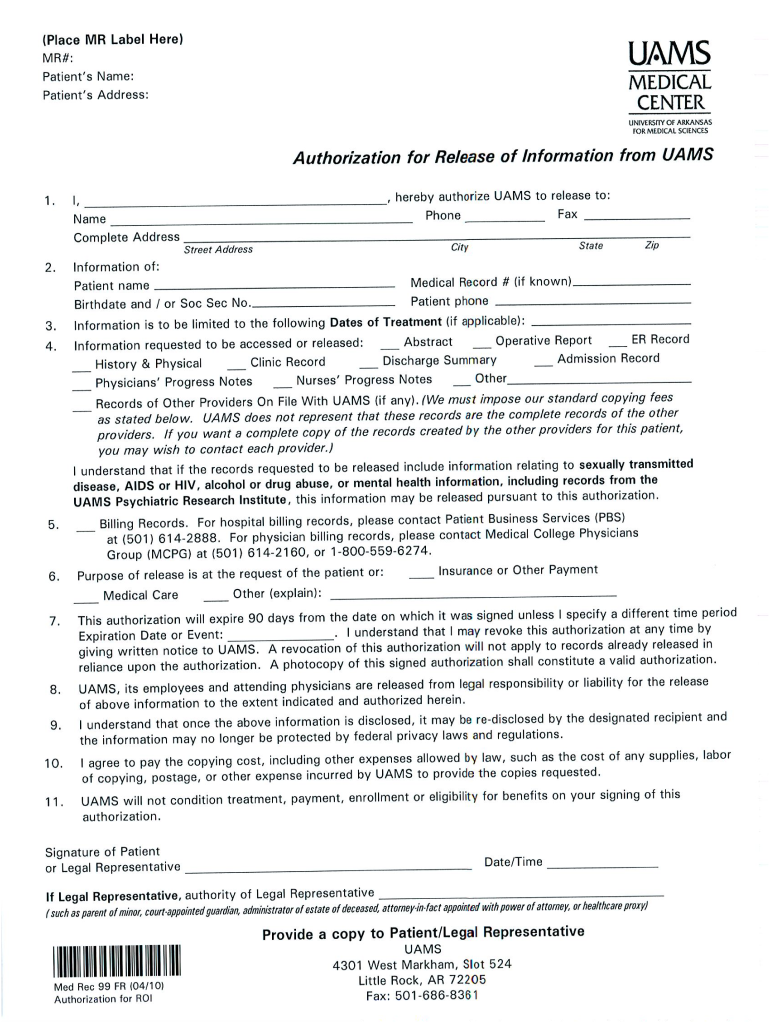
Get the free uams doctors excuse
We are not affiliated with any brand or entity on this form

Fill out
Complete the form online in a simple drag-and-drop editor.

eSign
Add your legally binding signature or send the form for signing.

Share
Share the form via a link, letting anyone fill it out from any device.

Export
Download, print, email, or move the form to your cloud storage.
Why pdfFiller is the best tool for your documents and forms


End-to-end document management
From editing and signing to collaboration and tracking, pdfFiller has everything you need to get your documents done quickly and efficiently.
Accessible from anywhere
pdfFiller is fully cloud-based. This means you can edit, sign, and share documents from anywhere using your computer, smartphone, or tablet.
Secure and compliant
pdfFiller lets you securely manage documents following global laws like ESIGN, CCPA, and GDPR. It's also HIPAA and SOC 2 compliant.
What is UAMS Release Form
The UAMS Doctors Excuse is a document used by patients to formally request an excuse from their healthcare provider for absence due to medical reasons.
pdfFiller scores top ratings on review platforms




Who needs UAMS Release Form?
Explore how professionals across industries use pdfFiller.

UAMS Release Form is needed by:
-
Patients seeking medical leave from work or school.
-
Students requiring validation for absence in educational institutions.
-
Employees needing official documentation for HR policies.
-
Individuals attending legal or court-related proceedings.
-
Caregivers managing responsibilities while addressing health issues.
Comprehensive Guide to UAMS Release Form
What is a UAMS Doctor’s Excuse?
A UAMS doctor’s excuse is an official document provided by a medical professional, outlining the medical reasons for a patient’s absence from work or school. This document is significant for individuals needing to validate their time away for health-related issues. Typically, anyone who requires verified proof of their absence, such as students and employees, will need this type of excuse.
Purpose and Benefits of a UAMS Doctor’s Excuse
Individuals often need a doctor’s excuse to support requests for job leave or school absence. The purpose of a UAMS doctor’s excuse extends beyond merely validating absence; it also provides documentation that can help mitigate concerns from employers or educational institutions. Some benefits of having a formal excuse from a medical professional include:
-
Enhancing credibility when justifying time off.
-
Providing assurance to employers or school administrations about the legitimacy of the absence.
-
Facilitating a smoother transition back to the workplace or classroom.
Who Needs a UAMS Doctor’s Excuse?
A UAMS doctor’s excuse is necessary for various groups, primarily students and employees who need to justify non-attendance due to health issues. Circumstances that necessitate a doctor’s excuse can include:
-
Medical appointments or illnesses requiring time away from work or class.
-
Chronic conditions that may affect attendance regularly.
-
Recovery periods following surgery or procedures.
How to Obtain a UAMS Doctor’s Excuse
Obtaining a UAMS doctor’s excuse involves several steps. To make sure you receive the necessary documentation, follow this guide:
-
Schedule an appointment with your healthcare provider.
-
During your visit, clearly communicate your need for a doctor’s excuse.
-
Discuss the specific dates and details regarding your absence.
-
Ask the provider to complete the excuse form accurately.
-
Request a copy of the excuse for your records.
How to Fill Out the UAMS Doctor’s Excuse Online
Using pdfFiller, you can easily fill out the UAMS doctor’s excuse form online. Here are detailed instructions for completing the form:
-
Access the UAMS doctor’s excuse template on pdfFiller.
-
Enter your personal information as requested on the form.
-
Include the date(s) of your absence and reason for your visit.
-
Ensure that your healthcare provider signs the document digitally or manually.
-
Save the completed form for submission.
Common Errors to Avoid with the UAMS Doctor’s Excuse
When completing the UAMS doctor’s excuse, individuals often make common errors that can jeopardize the document's acceptance. Here are frequent mistakes to look out for:
-
Omitting necessary personal details such as name and date.
-
Failing to ensure the healthcare provider's signature is present.
-
Leaving out critical absence dates or reasons.
-
Submitting incomplete information.
Where to Submit the UAMS Doctor’s Excuse
Submitting your UAMS doctor’s excuse can be done in several ways, depending on your institution or employer’s requirements. Common submission options include:
-
Electronic submission through email or a dedicated online portal.
-
Faxing the documented excuse to the appropriate office.
-
Hand-delivering a printed version to the designated personnel.
Be sure to verify submission deadlines and the processing times for the method you choose, as these can vary significantly.
Security and Compliance When Using a UAMS Doctor’s Excuse
When handling a UAMS doctor’s excuse, maintaining document security and compliance with privacy regulations is crucial. Using pdfFiller ensures that:
-
Your information is protected by 256-bit encryption.
-
The platform complies with SOC 2 Type II, HIPAA, and GDPR standards.
-
Your sensitive information is handled with the utmost care and confidentiality.
What Happens After You Submit Your UAMS Doctor’s Excuse?
Once you submit your UAMS doctor’s excuse, various outcomes may follow. Common next steps include:
-
Awaiting confirmation from your employer or school regarding the receipt of the document.
-
Receiving updates on your status concerning the absence request.
-
Following up as necessary to ensure there are no pending issues.
Experience Simple Document Management with pdfFiller
pdfFiller offers an intuitive solution for creating, editing, and managing your UAMS doctor’s excuse forms. By leveraging pdfFiller, you benefit from features such as:
-
Easy eSigning capabilities for quick approval.
-
The ability to securely share your documents online.
-
Comprehensive tools to edit and manage all your PDF needs effortlessly.
How to fill out the UAMS Release Form
-
1.To access the UAMS Doctors Excuse form on pdfFiller, first, visit the pdfFiller website and use the search bar to find the form by its name.
-
2.Click on the form to open it in the pdfFiller interface.
-
3.Before filling out the form, gather any necessary information, including your name, date of the appointment, and any specific medical details accurately.
-
4.Once you have all required information, start navigating through the form fields in pdfFiller, clicking on each field to enter your details where applicable.
-
5.Use pdfFiller's editing tools to adjust text size or formatting if needed. Ensure all mandatory fields are completed.
-
6.After filling in the form, review all your entries for accuracy and completeness to avoid common mistakes.
-
7.If required, utilize pdfFiller’s comment or note tools to add additional context or details needed for the form.
-
8.Once you are satisfied with the form, save your changes, and choose to download it to your device or submit it digitally directly from pdfFiller.
-
9.Follow any prompts for submission if you are sending it directly to an institution or employer.

Who is eligible to use the UAMS Doctors Excuse form?
Any patient who has had a medical appointment with a UAMS physician and needs a formal excuse for absence can use this form.
What are the deadlines for submitting this doctors excuse?
While there may not be a specific deadline for submitting the UAMS Doctors Excuse, it is advisable to submit it as soon as possible after your appointment to meet workplace or school requirements.
How can I submit the completed UAMS Doctors Excuse form?
You can submit the completed form either by downloading it and submitting it in person or by using the digital submission option provided on pdfFiller, if allowed.
Are there any required documents needed before filling out the form?
Typically, you won't need additional documents, but it's helpful to have any previous medical notes or appointment confirmation details handy to accurately complete the form.
What common mistakes should I avoid while completing this form?
Ensure you fill in all required fields, double-check names and dates for accuracy, and avoid using vague language to describe your medical situation.
How long does it take to process the UAMS Doctors Excuse submission?
Processing times may vary, but generally, you can expect a response within a few business days. Always check with the intended recipient for their specific processing times.
What if I need to correct a mistake on the form after submitting?
If you notice a mistake after submission, contact the recipient directly to explain the error and ask for guidance on how to proceed with corrections.
Related Forms






Related Catalogs
Get the latest insights from our blog


If you believe that this page should be taken down, please follow our DMCA take down process
here
.
This form may include fields for payment information. Data entered in these fields is not covered by PCI DSS compliance.