
Last updated on
Oct 2, 2026

WBDG 4296 1998-2026 free printable template
pdfFiller is not affiliated with any government organization

Fill out
Complete the form online in a simple drag-and-drop editor.

eSign
Add your legally binding signature or send the form for signing.

Share
Share the form via a link, letting anyone fill it out from any device.

Export
Download, print, email, or move the form to your cloud storage.
Why pdfFiller is the best tool for your documents and forms


End-to-end document management
From editing and signing to collaboration and tracking, pdfFiller has everything you need to get your documents done quickly and efficiently.
Accessible from anywhere
pdfFiller is fully cloud-based. This means you can edit, sign, and share documents from anywhere using your computer, smartphone, or tablet.
Secure and compliant
pdfFiller lets you securely manage documents following global laws like ESIGN, CCPA, and GDPR. It's also HIPAA and SOC 2 compliant.
What is WBDG 4296
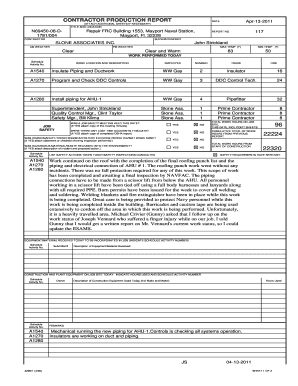
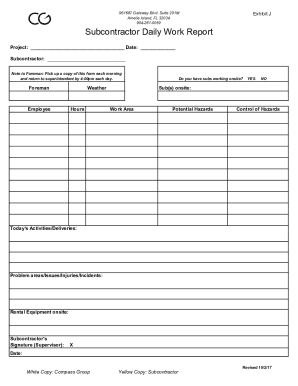
The Contractor Production Report is a business form used by contractors and superintendents to document daily construction activities and ensure compliance with contract specifications.
pdfFiller scores top ratings on review platforms




Who needs WBDG 4296?
Explore how professionals across industries use pdfFiller.

WBDG 4296 is needed by:
-
Contractors responsible for daily project reporting
-
Superintendents overseeing construction operations
-
Authorized QC Managers verifying safety and quality
-
Construction site safety officers ensuring compliance
-
Project managers tracking construction progress
-
Subcontractors providing activity updates
Comprehensive Guide to WBDG 4296
Understanding the Contractor Production Report
The Contractor Production Report is crucial in the construction industry, serving as a comprehensive record of daily activities. This document outlines essential construction activities and their significance in ensuring contractor compliance with contract specifications. It provides a clear definition of the report and highlights its importance as a reliable source for daily construction logs.
By maintaining accurate documentation, the Contractor Production Report aids construction professionals in tracking progress and staying aligned with project requirements.
Purpose and Benefits of the Contractor Production Report
Utilizing the Contractor Production Report offers practical applications for various stakeholders in construction projects. This report helps in tracking construction activities accurately and ensures proper documentation for safety and quality control.
-
Facilitates the management of trade hours and work locations
-
Enhances accountability and transparency among project teams
Moreover, it serves as a critical resource for managing project timelines and ensuring that every safety guideline is followed effectively.
Who Needs the Contractor Production Report?
Several roles within a construction project benefit from using the Contractor Production Report. Key personnel include contractors, superintendents, and authorized Quality Control (QC) managers, each responsible for signing the report and certifying the accuracy of the documented information.
-
Contractors oversee the overall project execution
-
Superintendents manage daily site operations
-
Authorized QC Managers ensure compliance with quality standards
These roles are integral to maintaining effective communication among construction project stakeholders.
Key Features of the Contractor Production Report
Essential components of the Contractor Production Report ensure comprehensive data collection. Key fields include the date, report number, and the location of construction activities.
-
Checkboxes allow for easy user completion
-
Clear instructions guide the filling process
-
Documentation of safety meetings and weather conditions is crucial
Every feature is designed to facilitate smooth and accurate reporting, enhancing the utility of the report.
How to Fill Out the Contractor Production Report Online
Completing the Contractor Production Report online is straightforward when following a step-by-step approach. Before filling out the report, pre-filling requirements must be gathered, including project details and safety actions taken.
-
Access the digital form through the provided platform
-
Enter the required information in the specified sections
-
Check for accuracy before submission
Taking these steps ensures that the report is completed correctly and efficiently.
Signing and Submitting the Contractor Production Report
The process of signing and submitting the Contractor Production Report is vital for compliance. Users have the choice between digital signatures and traditional wet signatures, each serving a legal purpose.
-
Online submission offers convenience
-
In-person methods may be required in certain contexts
After submission, tracking the report status is crucial for confirming that all parties have received and acknowledged the document.
Common Errors to Avoid with the Contractor Production Report
To ensure accurate completion of the Contractor Production Report, it is essential to identify common errors that may occur during the filling process. Frequent mistakes include omissions or inaccuracies in critical fields.
-
Validation checklists can help mitigate omissions
-
Reviewing for completeness ensures compliance
Understanding the consequences of errors can help users take steps to rectify mistakes before submission.
The Role of pdfFiller in Completing Your Contractor Production Report
pdfFiller plays a vital role in simplifying the process of managing the Contractor Production Report. As a cloud-based solution, it offers features that allow users to edit, fill, and sign the report easily.
-
Cloud-based accessibility allows for on-the-go document handling
-
Robust security measures ensure safe document management
These capabilities make pdfFiller an ideal choice for professionals seeking efficiency and reliability in their reporting tasks.
Key Takeaways for Using the Contractor Production Report
The Contractor Production Report is invaluable for ensuring compliance and operational efficiency in construction reporting. By leveraging its features, users can enhance their documentation processes and maintain accurate construction records.
Utilizing tools like pdfFiller can further optimize the experience, leading to better overall project management.
How to fill out the WBDG 4296
-
1.To access the Contractor Production Report on pdfFiller, navigate to the pdfFiller website and log in to your account.
-
2.Once logged in, use the search bar to find 'Contractor Production Report.' Click on the form title to open it.
-
3.Begin filling in your report by entering the date in the 'Enter Date (DD/MMM/YY)' field. Make sure to use the correct date format.
-
4.Next, input the contractor count number in the 'Enter Cnt# Here' field and include the title and location of the construction contract in the designated section.
-
5.As you proceed, document daily weather conditions and any relevant safety meetings conducted during the day. Use the checkboxes available for quick completion.
-
6.Assess the work performed by providing detailed descriptions in the appropriate fields and accurately record the trade hours and specific work locations.
-
7.Ensure that your submission is fully detailed to comply with contract specifications. Review the entire form for completeness and correctness before signing.
-
8.Once you finish filling out all the necessary fields, save your progress or submit the form directly through pdfFiller. You can download a copy for your records by clicking the download option.

Who is eligible to fill out the Contractor Production Report?
The Contractor Production Report is intended for contractors, superintendents, and authorized QC managers involved in construction projects. Each role must provide a signature to certify compliance with contract specifications.
Are there any deadlines for submitting this report?
While specific deadlines may vary by project or client requirements, it is essential to submit the Contractor Production Report daily to maintain accurate documentation of construction activities and compliance.
What are the submission methods for the Contractor Production Report?
The Contractor Production Report can be submitted electronically through pdfFiller. Review the filled form for accuracy, then save and download a copy, or submit it directly through the platform as instructed.
What supporting documents are needed with this report?
Supporting documents typically include daily logs, safety meeting records, and any incident reports that may need to accompany the Contractor Production Report to verify activities and compliance.
What common mistakes should I avoid when filling out this form?
Common mistakes include missing required signatures, inaccurate date formats, and incomplete sections regarding work performed or safety measures. Double-check all entries before submission to ensure compliance.
How long will it take to process the Contractor Production Report?
Processing times vary but submitting through pdfFiller can expedite the review process. Ensure timely submission to avoid delays in record keeping and project tracking.
Can I edit the Contractor Production Report after submitting?
Once submitted, editing the Contractor Production Report may not be possible. For corrections, consult the receiving authority and request guidance on resubmission if needed.
Related Content
Related Forms





Related Catalogs
Get the latest insights from our blog



If you believe that this page should be taken down, please follow our DMCA take down process
here
.
This form may include fields for payment information. Data entered in these fields is not covered by PCI DSS compliance.