
Last updated on
Oct 31, 2026

Whitworth University Weekly Planning Calendar 2008 free printable template
pdfFiller is not affiliated with any government organization

Fill out
Complete the form online in a simple drag-and-drop editor.

eSign
Add your legally binding signature or send the form for signing.

Share
Share the form via a link, letting anyone fill it out from any device.

Export
Download, print, email, or move the form to your cloud storage.
Why pdfFiller is the best tool for your documents and forms


End-to-end document management
From editing and signing to collaboration and tracking, pdfFiller has everything you need to get your documents done quickly and efficiently.
Accessible from anywhere
pdfFiller is fully cloud-based. This means you can edit, sign, and share documents from anywhere using your computer, smartphone, or tablet.
Secure and compliant
pdfFiller lets you securely manage documents following global laws like ESIGN, CCPA, and GDPR. It's also HIPAA and SOC 2 compliant.
What is Whitworth University Weekly Planning Calendar
The Whitworth University Weekly Planning Calendar is a planning document used by students to organize their weekly academic schedule effectively.
pdfFiller scores top ratings on review platforms




Works Great. Amazing product. Thank you!
So for I have had a great experience using it.Thanks Rick
Who needs Whitworth University Weekly Planning Calendar?
Explore how professionals across industries use pdfFiller.

Whitworth University Weekly Planning Calendar is needed by:
-
Students at Whitworth University
-
Academic advisors at universities
-
Educational support staff
-
Time management coaches
-
Participants in college planning workshops
Comprehensive Guide to Whitworth University Weekly Planning Calendar
1. What is the Whitworth University Weekly Planning Calendar?
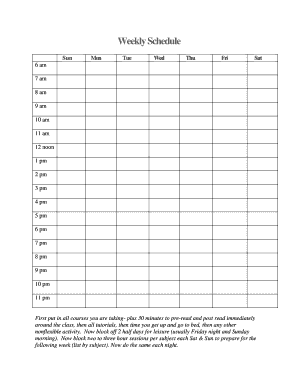
The Whitworth University Weekly Planning Calendar is a structured tool designed specifically for students to effectively organize their academic schedules. It serves as a means to align weekly commitments, enabling users to track their courses and activities efficiently. This calendar includes fillable fields such as Name, Semester, Year, and associated credits, ensuring that all necessary details for academic planning are captured seamlessly.
-
Definition of the calendar form aids in clarity of its purpose.
-
Promotes organized academic activity through structured layout.
-
Facilitates tracking of credits alongside personal information.
2. Purpose and Benefits of the Whitworth University Weekly Planning Calendar
This calendar is vital for managing time effectively throughout the week, ensuring students can visualize their commitments. By employing this planning tool, users significantly improve their overall time management, which directly correlates with academic success. Using this calendar helps students to not only schedule courses but also to balance other responsibilities associated with college life.
-
Organizes weekly schedules to prevent overlaps and provide clarity.
-
Visual representation of commitments enhances student awareness.
-
Improved time management leads to higher chances of academic success.
3. Key Features of the Whitworth University Weekly Planning Calendar
The calendar is designed with user-friendliness in mind, featuring a structured layout that covers time slots from Monday to Friday. Each field is carefully placed to allow for easy data entry, including spaces for credits and personal identification details. The ease of use and fillable fields make the form accessible for a diverse range of users.
-
Laid out time slots facilitate scheduling weekly activities.
-
Clear fields for entering credits enhance the utility of the calendar.
-
User-friendly aspects contribute to an efficient planning process.
4. Who Should Use the Whitworth University Weekly Planning Calendar?
The intended audience for the Whitworth University Weekly Planning Calendar includes students who are currently enrolled at Whitworth University and those attending other institutions. It serves as an excellent resource for individuals aiming to enhance their academic planning processes. Furthermore, faculty and academic advisors can benefit from using the calendar to assist students in managing their time effectively.
-
Students enrolled at various educational institutions.
-
Anyone seeking to refine their academic organization skills.
-
Faculty who provide guidance on effective time management.
5. How to Fill Out the Whitworth University Weekly Planning Calendar Online
To fill out the calendar online, users must first access the form via pdfFiller. Step-by-step instructions guide individuals through each field, ensuring names, semesters, and credit information are input accurately. Additionally, tips on validating entries help to minimize common errors effectively, streamlining the overall filling process.
-
Access the calendar form through the pdfFiller platform.
-
Follow a detailed guide for field-by-field instructions.
-
Check for validation to prevent errors during completion.
6. How to Submit Your Whitworth University Weekly Planning Calendar
Once the Whitworth University Weekly Planning Calendar is completed, users can submit their forms through various methods, including email, in-person handoff, or online submission. Each submission method may have specific document requirements, and understanding how to track submissions and confirmation processes ensures that students remain on top of their records.
-
Multiple submission methods are available: email, in-person, online.
-
Documents required alongside the calendar may vary by submission method.
-
Following submission, tracking processes confirm receipt and progress.
7. Security and Compliance when Using the Whitworth University Weekly Planning Calendar
When utilizing the Whitworth University Weekly Planning Calendar, it’s essential to be aware of the security measures in place to protect sensitive information. pdfFiller implements data protection protocols that conform to HIPAA, GDPR, and SOC 2 standards, ensuring secure document handling that addresses privacy concerns effectively.
-
Data protection measures ensure user information remains secure.
-
Compliance with international standards enhances trust in the platform.
-
Privacy concerns are addressed through robust security practices.
8. Explore How pdfFiller Can Help You with the Whitworth University Weekly Planning Calendar
pdfFiller elevates the experience of filling out the Whitworth University Weekly Planning Calendar by offering beneficial tools and features. Users can easily edit and manage their calendar forms while taking advantage of options like eSigning and cloud storage. By utilizing pdfFiller, students can streamline their document management and improve overall efficiency.
-
Edit and manage the calendar form seamlessly using pdfFiller.
-
Features like eSigning simplify the submission process.
-
Cloud storage options ensure easy access from anywhere.
How to fill out the Whitworth University Weekly Planning Calendar
-
1.Access the Whitworth University Weekly Planning Calendar on pdfFiller by visiting the website and searching for the form using its name.
-
2.Once you find the form, click on 'Open' to load it within pdfFiller's editing interface.
-
3.Familiarize yourself with the layout of the form, noting the fillable fields labeled 'Name', 'Semester', 'Year', and the time slots.
-
4.Before filling out the form, gather important information such as your class schedule, credit information for courses, and personal details needed for the 'Name', 'Semester', and 'Year' fields.
-
5.Start by clicking inside the 'Name' field and type your full name as you wish it to appear on the calendar.
-
6.Proceed to fill in the 'Semester' and 'Year' fields with the appropriate academic details relevant to your planning period.
-
7.Move to the weekly time slots and fill in each slot with the corresponding class or activity you plan to undertake, ensuring to note the credit hours next to them.
-
8.Once you’ve completed all fields, take a moment to review your entries for accuracy and completeness.
-
9.Use the function on pdfFiller to save your updates and create a digital copy of your completed calendar.
-
10.Finally, choose your preferred option to download the form or submit it as required. You can save it to your device or email it directly to your academic advisor or relevant recipient.

Who is eligible to use the Whitworth University Weekly Planning Calendar?
The Whitworth University Weekly Planning Calendar is primarily designed for students enrolled at Whitworth University who need to organize their weekly academic schedules.
What information do I need to fill out the form?
Before filling out the form, gather the names of your courses, class timings, credit details, and your personal information for the 'Name', 'Semester', and 'Year' sections.
How do I submit the completed planning calendar?
Once you have completed the Whitworth University Weekly Planning Calendar, you can download it in PDF format or email it directly to your academic advisor. Make sure to keep a copy for your records.
Are there any common mistakes to avoid while filling out the form?
Common mistakes include forgetting to enter credit hours for classes, inaccuracies in class timings, and leaving any required fields blank. Ensure all information is complete and accurate.
Can I edit the form after saving it?
Yes, you can reopen the Whitworth University Weekly Planning Calendar on pdfFiller to make additional edits at any time before submitting it.
Is there a deadline for submitting the planning calendar?
While the form does not specify a deadline, it is recommended to complete and submit it as early as possible within the semester to ensure effective planning.
What if I need assistance while filling out the form?
If you encounter difficulties filling out the form, consider reaching out to your academic advisor or a student support service at Whitworth University for help with the planning process.
Whitworth University Weekly Planning Calendar Form Versions
Related Forms





Related Catalogs
Get the latest insights from our blog


If you believe that this page should be taken down, please follow our DMCA take down process
here
.
This form may include fields for payment information. Data entered in these fields is not covered by PCI DSS compliance.