
Last updated on
Oct 31, 2026

RIT Business Mileage Reimbursement Worksheet free printable template
pdfFiller is not affiliated with any government organization

Fill out
Complete the form online in a simple drag-and-drop editor.

eSign
Add your legally binding signature or send the form for signing.

Share
Share the form via a link, letting anyone fill it out from any device.

Export
Download, print, email, or move the form to your cloud storage.
Why pdfFiller is the best tool for your documents and forms


End-to-end document management
From editing and signing to collaboration and tracking, pdfFiller has everything you need to get your documents done quickly and efficiently.
Accessible from anywhere
pdfFiller is fully cloud-based. This means you can edit, sign, and share documents from anywhere using your computer, smartphone, or tablet.
Secure and compliant
pdfFiller lets you securely manage documents following global laws like ESIGN, CCPA, and GDPR. It's also HIPAA and SOC 2 compliant.
What is RIT Business Mileage Reimbursement Worksheet
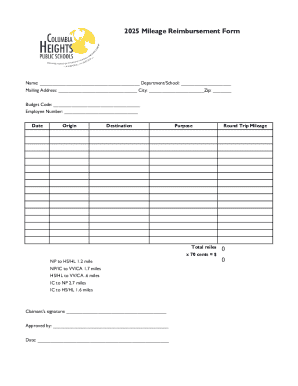
The Business Mileage Reimbursement Worksheet is an expense report form used by employees to report and request reimbursement for business-related travel.
pdfFiller scores top ratings on review platforms




It's great! Only problem I had was trying to erase a hi-lited area I accidentally added. The software wanted me to pay for an upgrade for the eraser which I think is ridiculous guys. Other than that, awesome.
Extremely easy to use, easy to navigate and includes all the necessary tools to hand including signature. I highly recommend this software which is ideally suited for personal use, small business or corporate with highly competitive rates.
Who needs RIT Business Mileage Reimbursement Worksheet?
Explore how professionals across industries use pdfFiller.

RIT Business Mileage Reimbursement Worksheet is needed by:
-
Employees at Rochester Institute of Technology
-
Frequent business travelers
-
HR departments managing travel expenses
-
Financial departments processing reimbursements
-
Travel coordinators planning business trips
Comprehensive Guide to RIT Business Mileage Reimbursement Worksheet
What is the Business Mileage Reimbursement Worksheet?
The Business Mileage Reimbursement Worksheet is a crucial tool for employees at the Rochester Institute of Technology who travel for business purposes. This form serves as a formal request for reimbursement of travel-related expenses. Its importance lies in accurately documenting travel details, enabling employees to recover costs incurred while conducting business activities.
The worksheet allows employees to efficiently report their mileage and associated travel expenses, ensuring organizational compliance with reimbursement policies.
Purpose and Benefits of the Business Mileage Reimbursement Worksheet
The primary purpose of the Business Mileage Reimbursement Worksheet is to facilitate claims for reimbursement. By providing a structured format, it streamlines the process of documenting travel expenses. Employees benefit from this efficiency, making it easier to receive timely reimbursements for their travel costs.
Additionally, the organization can effectively manage travel expenses, maintaining accurate records and ensuring adherence to budgetary constraints. This form ultimately promotes transparency in expense reporting and fiscal responsibility.
Key Features of the Business Mileage Reimbursement Worksheet
-
Sections for travel date, purpose of travel, total mileage, and additional comments.
-
A signature line for the employee, essential for validating the request.
-
Clear instructions for completing each field, minimizing errors.
-
The ability to calculate total reimbursement based on mileage driven.
-
Compliance with organizational policies regarding business travel reporting.
Who Needs the Business Mileage Reimbursement Worksheet?
The Business Mileage Reimbursement Worksheet is primarily designed for employees who frequently travel for work-related purposes. Such travelers may include sales representatives, consultants, and other staff members who need to commute for meetings or site visits.
Situations that necessitate the completion of this form for reimbursement typically involve travel that is pre-approved by a manager and is related to business operations.
Eligibility Criteria for the Business Mileage Reimbursement Worksheet
To qualify for mileage reimbursement, employees must meet specific eligibility criteria. Eligible expenses often include mileage incurred while driving personal vehicles for work-related travel. Employees should also understand the required details necessary for submission, including the purpose of travel, distance traveled, and dates.
Adhering to these guidelines ensures a smoother claims process and prevents delays in reimbursement.
How to Fill Out the Business Mileage Reimbursement Worksheet Online (Step-by-Step)
Filling out the Business Mileage Reimbursement Worksheet electronically is straightforward with pdfFiller. Here’s how:
-
Access the worksheet using the pdfFiller platform.
-
Enter the travel date and purpose in their respective fields.
-
Document the total mileage covered during business travel.
-
Add comments if necessary for further clarification.
-
Review all entries for accuracy before signing.
-
Submit the form according to your organization’s policy.
Common Errors and How to Avoid Them
When completing the Business Mileage Reimbursement Worksheet, certain mistakes are commonly made. Employees may forget to enter specific travel dates or neglect to add comments that could support their claims.
To avoid these pitfalls, it’s advisable to double-check all entries and ensure that signature requirements are met. Familiarizing oneself with the form will lead to a more accurate and complete submission.
Digital Signature vs. Wet Signature Requirements
Employees can choose between digital and wet signatures when submitting the Business Mileage Reimbursement Worksheet. The digital signature process offered by pdfFiller simplifies the signing procedure, allowing for quick and easy verification.
For those opting for a traditional wet signature, it remains essential to ensure all required fields are filled out before signing the form. This choice should align with company policy and personal preference.
Where to Submit the Business Mileage Reimbursement Worksheet
Submission methods for the Business Mileage Reimbursement Worksheet may vary based on company policy. Common submission options include internal email systems or designated online platforms.
Employees should be aware of deadlines associated with the submission of mileage claims to ensure prompt reimbursement. Knowing the preferred delivery options enhances efficiency in processing claims.
Secure Your Business Mileage Reimbursement with pdfFiller
Utilizing pdfFiller for the Business Mileage Reimbursement Worksheet is highly advisable. The platform offers a secure and user-friendly experience for filling out and submitting forms. With features such as 256-bit encryption, sensitive information remains protected throughout the process.
Choosing pdfFiller not only enhances ease of use but also ensures compliance with security standards, making it a trusted solution for managing travel reimbursement requests.
How to fill out the RIT Business Mileage Reimbursement Worksheet
-
1.Access the Business Mileage Reimbursement Worksheet by navigating to pdfFiller and searching for the form name.
-
2.Open the form to display the interactive fields available for completion.
-
3.Before you start filling out the form, gather all necessary information such as dates of travel, mileage, reasons for travel, and any comments you wish to include.
-
4.Begin by entering the date of travel in the designated field, ensuring you format it correctly.
-
5.Next, input the reason for travel, followed by the locations you traveled to and from in the provided sections.
-
6.Record the total miles traveled in the miles section, making sure to double-check your calculations for accuracy.
-
7.Use the comments section to add any additional notes that may be relevant to your reimbursement request.
-
8.Once all fields are filled, verify that everything is complete and accurate.
-
9.Sign and date the form in the specified area to certify your reimbursement request.
-
10.After final review, save your work on pdfFiller to store it securely.
-
11.Download the completed form for your records, or use pdfFiller’s submission options to send it directly to the appropriate department.

Who is eligible to use the Business Mileage Reimbursement Worksheet?
Employees of the Rochester Institute of Technology who have incurred business-related travel expenses can use the Business Mileage Reimbursement Worksheet to request reimbursement.
What information do I need to fill out this form?
You'll need details such as the date of travel, reason for the trip, locations traveled, miles driven, and any additional comments before completing the Business Mileage Reimbursement Worksheet.
How do I submit the completed form?
Once you have completed and signed the Business Mileage Reimbursement Worksheet, you can submit it directly through pdfFiller or download it to email or print for submission to your HR department.
Are there deadlines for submitting this form?
While specific deadlines may vary by department, it's advisable to submit the Business Mileage Reimbursement Worksheet as soon as possible after travel to ensure timely processing of your reimbursement.
What common mistakes should I avoid when filling out this form?
Common mistakes include incorrect mileage calculations, failure to include all necessary travel details, neglecting to sign and date the form, and missing the submission deadline.
How long does it take to process my reimbursement?
Processing times for reimbursements can vary, but generally, you should expect a response or payment within a few weeks after the Business Mileage Reimbursement Worksheet has been submitted.
Do I need to attach any supporting documents?
Typically, you do not need to attach additional documents with the Business Mileage Reimbursement Worksheet, but always check with your department for any specific requirements.
Related Content
Related Forms

Related Catalogs
Get the latest insights from our blog


If you believe that this page should be taken down, please follow our DMCA take down process
here
.
This form may include fields for payment information. Data entered in these fields is not covered by PCI DSS compliance.