
Last updated on
Nov 7, 2026
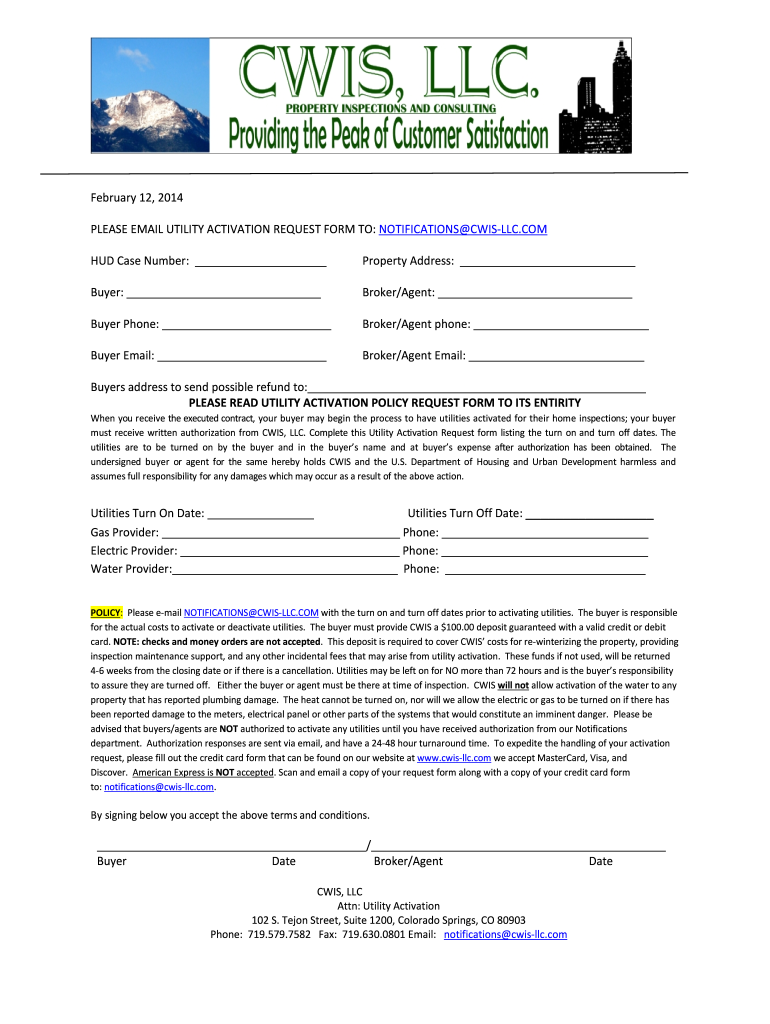
CWIS Utility Activation Request Form 2014-2026 free printable template
We are not affiliated with any brand or entity on this form

Fill out
Complete the form online in a simple drag-and-drop editor.

eSign
Add your legally binding signature or send the form for signing.

Share
Share the form via a link, letting anyone fill it out from any device.

Export
Download, print, email, or move the form to your cloud storage.
Why pdfFiller is the best tool for your documents and forms


End-to-end document management
From editing and signing to collaboration and tracking, pdfFiller has everything you need to get your documents done quickly and efficiently.
Accessible from anywhere
pdfFiller is fully cloud-based. This means you can edit, sign, and share documents from anywhere using your computer, smartphone, or tablet.
Secure and compliant
pdfFiller lets you securely manage documents following global laws like ESIGN, CCPA, and GDPR. It's also HIPAA and SOC 2 compliant.
What is CWIS Utility Activation Request Form
The Utility Activation Request Form is a real estate document used by buyers and their agents to request authorization for activating utilities prior to home inspections.
pdfFiller scores top ratings on review platforms




Who needs CWIS Utility Activation Request Form?
Explore how professionals across industries use pdfFiller.

CWIS Utility Activation Request Form is needed by:
-
Homebuyers needing utility activation for inspections
-
Real estate agents assisting clients with transactions
-
Property management companies overseeing utility setups
-
Real estate brokers coordinating closing documents
-
Home inspectors requiring utilities for assessment
Comprehensive Guide to CWIS Utility Activation Request Form
What is the Utility Activation Request Form?
The Utility Activation Request Form is a crucial document used in real estate transactions, specifically designed to activate home inspection utilities. It operates by gathering essential information necessary for the authorization of utility activation. A critical aspect of this form is that it requires explicit permission from the buyer, ensuring that both parties have a formal agreement in place.
Submitting this form is essential for a seamless home inspection process as it outlines the necessary steps and data points required for utility services to be initiated. Without proper authorization, utility activation cannot occur, making this form substantially important for both buyers and agents involved in real estate transactions.
Purpose and Benefits of the Utility Activation Request Form
The Utility Activation Request Form is vital for buyers and real estate agents, ensuring that utilities are activated promptly for home inspections. This action not only streamlines the activation process but also serves to protect both parties through documented authorization. The form simplifies the overall process by consolidating utility activation requests into a single document.
By utilizing this form, buyers can ensure that they are not left without essential utilities during their inspection period, thereby facilitating a smoother transitional process during the real estate transaction.
Who Needs the Utility Activation Request Form?
The Utility Activation Request Form is necessary for both buyers and agents participating in real estate transactions. Buyers are required to fill out the form to authorize utility activation for inspections, while agents may also need to complete this form on behalf of their clients. The form is crucial in various scenarios, either through direct representation by the agent or when the buyer acts independently.
Understanding when to complete this form is vital. Proper timing in filling out and submitting the form can prevent delays in the home inspection process and unnecessary complications thereafter.
Key Features of the Utility Activation Request Form
This form includes several key features that are essential for its proper use. Notably, it has multiple fillable fields where information about the buyer, agent, and utility providers can be entered. Essential elements include:
-
Buyer and agent contact information
-
Utility provider details
-
Turn on and off dates for utilities
-
A required deposit of $100, which plays a significant role in the activation process
-
Signature lines for both the buyer and broker/agent to authorize the request
How to Fill Out the Utility Activation Request Form Online (Step-by-Step)
Filling out the Utility Activation Request Form online is straightforward. Follow these steps to ensure successful completion:
-
Begin by entering your name and contact information in the designated fields.
-
Provide the utility provider details, including the name and contact number.
-
Select the utility turn on date and the expected turn off date.
-
Fill in any other required fields, making sure all information is accurate.
-
Review the entire form for completeness and accuracy before submission.
Taking these steps seriously can help avoid common errors during the submission process.
Submission Methods and Delivery of the Utility Activation Request Form
Once the Utility Activation Request Form has been filled out, it must be submitted via email to CWIS, LLC. Adhering to best practices for submissions is crucial to ensure the form reaches the correct recipients. For a seamless process, ensure you receive confirmation of receipt after submission, as this will indicate the form is in the processing queue.
After submission, be prepared for the next steps, which may involve communication from the utility providers or real estate agents about the activation status.
Security and Compliance for the Utility Activation Request Form
The security of the Utility Activation Request Form is paramount, especially considering the sensitive information it may contain. pdfFiller employs robust security measures, including 256-bit encryption, to protect documents during the form submission process. Compliance with regulations such as HIPAA and GDPR further ensures that user data remains confidential and secure.
Users can rest assured knowing that privacy measures are in place to safeguard their personal information when filling out and submitting the Utility Activation Request Form.
Common Errors and How to Avoid Them When Submitting the Utility Activation Request Form
Users often encounter several common errors when filling out the Utility Activation Request Form. These include incomplete fields, missing signatures, and incorrect dates. To avoid such pitfalls:
-
Double-check all entries for completeness before submission.
-
Verify that the correct utility provider information is included.
-
Make sure all required signatures are present.
If errors are detected after submission, take immediate action to correct them by contacting the relevant parties involved.
Sample or Example of a Completed Utility Activation Request Form
To assist users in filling out the Utility Activation Request Form, a sample or example of a completed form can be helpful. A filled form will demonstrate proper completion, highlighting sections such as buyer details, utility provider information, and signature areas. Additionally, downloadable templates may be available to guide users through the filling process more effectively.
Make the Process Seamless with pdfFiller
Utilizing pdfFiller to complete the Utility Activation Request Form can simplify the entire process. The platform offers easy-to-use features that facilitate form filling and submission, providing benefits such as cloud-based document management. With pdfFiller, users can tackle the form-filling process seamlessly, ensuring their documents are managed efficiently and securely.
How to fill out the CWIS Utility Activation Request Form
-
1.Access the Utility Activation Request Form on pdfFiller by searching its name in the platform's document library.
-
2.Once opened, familiarize yourself with the layout including fields, checkboxes, and signature lines.
-
3.Prior to filling out the form, gather necessary information such as turn-on and turn-off dates, utility provider details, and your contact information.
-
4.Begin by entering the HUD Case Number if applicable, followed by the buyer's details including their name and contact information.
-
5.Fill in the Utilities Turn On Date and Turn Off Date accordingly, ensuring accuracy for the utility providers.
-
6.Provide utility provider names and any account numbers if required.
-
7.Once all fields are filled in, check the document for any errors or missing information before proceeding.
-
8.Review the signature lines intended for both the Buyer and Broker/Agent, ensuring both parties are aware of their obligations.
-
9.After final review, save your document through pdfFiller's save feature, or download it in your desired format.
-
10.Email the completed form to CWIS, LLC for their approval as directed.
-
11.Ensure to keep a copy of the final document for your records.

Who is eligible to use the Utility Activation Request Form?
The form is primarily for homebuyers and real estate agents involved in a property transaction where utility activation is needed for inspections.
What information do I need before filling out the form?
Before completing the form, gather your turn-on and turn-off dates, utility provider's name, contact information, and any relevant account numbers.
How do I submit the completed Utility Activation Request Form?
After filling out the form, you must email it to CWIS, LLC for approval. Remember, utilities cannot be activated without their written authorization.
Is there a deposit required when submitting this form?
Yes, a $100 deposit is required to accompany the Utility Activation Request Form, ensuring utilities can be activated smoothly.
What are the common mistakes to avoid when filling out the form?
Avoid leaving fields blank, especially crucial information like utility provider details and dates. Always double-check for typos or unfinished sections.
What should I do if I need to change the utility activation dates?
If you need to modify the dates, fill out a new Utility Activation Request Form reflecting the updated dates and resubmit it for approval.
How long does it take to process the Utility Activation Request?
Processing times can vary, but typically, once submitted correctly, you should expect a response from CWIS, LLC within a few business days.
Related Forms





Get the latest insights from our blog


If you believe that this page should be taken down, please follow our DMCA take down process
here
.
This form may include fields for payment information. Data entered in these fields is not covered by PCI DSS compliance.