
Last updated on
Oct 31, 2026

Form 283129 2013 free printable template
pdfFiller is not affiliated with any government organization

Fill out
Complete the form online in a simple drag-and-drop editor.

eSign
Add your legally binding signature or send the form for signing.

Share
Share the form via a link, letting anyone fill it out from any device.

Export
Download, print, email, or move the form to your cloud storage.
Why pdfFiller is the best tool for your documents and forms


End-to-end document management
From editing and signing to collaboration and tracking, pdfFiller has everything you need to get your documents done quickly and efficiently.
Accessible from anywhere
pdfFiller is fully cloud-based. This means you can edit, sign, and share documents from anywhere using your computer, smartphone, or tablet.
Secure and compliant
pdfFiller lets you securely manage documents following global laws like ESIGN, CCPA, and GDPR. It's also HIPAA and SOC 2 compliant.
What is Form 283129
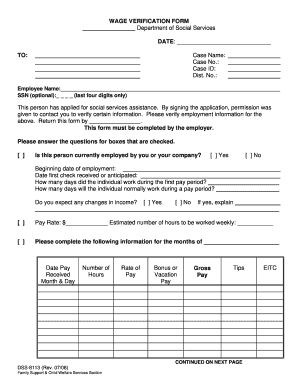
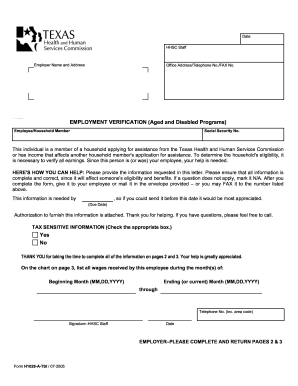
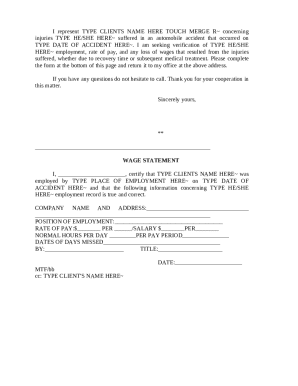
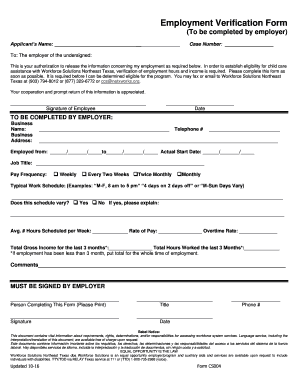
The Wage Verification Form is an official document used by Harris Health System to confirm an employee's gross income and employment status for assistance applications.
pdfFiller scores top ratings on review platforms




Who needs Form 283129?
Explore how professionals across industries use pdfFiller.

Form 283129 is needed by:
-
Employees needing income verification for assistance
-
Employers providing wage information for employees
-
Administrative staff at Harris Health System
-
Government agencies conducting verifications
-
Individuals applying for financial aid or support programs
Comprehensive Guide to Form 283129
What is the Wage Verification Form?
The Wage Verification Form is designed to assist in the employment verification process, specifically for applications needing assistance, such as those related to health services. It plays a crucial role in confirming an employee's gross income and overall employment status. As a Texas government form, it falls under the category of citizen services and is essential for maintaining transparency in various assistance programs.
Purpose and Benefits of the Wage Verification Form
This form streamlines the verification of income, enabling applicants to present accurate information when applying for assistance. Employers also benefit from using this Texas employment form as it simplifies their verification processes and ensures they comply with state regulations. Adopting this form can significantly reduce administrative burdens and enhance efficiency in employment verification.
Who Needs the Wage Verification Form?
The primary users of the Wage Verification Form include both applicants or employees and employers. This form is typically required in several scenarios, notably for applications related to healthcare assistance programs such as those from the Harris Health System. Applicants must meet specific eligibility criteria to effectively utilize this form in their assistance pursuits.
How to Fill Out the Wage Verification Form Online
Completing the Wage Verification Form online can be accomplished efficiently using pdfFiller. Follow these steps for a successful submission:
-
Access the form through pdfFiller's platform.
-
Fill in the required employee details, including name and employment status.
-
Enter accurate wage information, ensuring all figures are correct.
-
Obtain necessary signatures from both the applicant and employer.
Pay close attention to critical fields and refer to specific sections for tips on accuracy as you complete the form.
Review and Validation Checklist for the Wage Verification Form
To ensure that the form is completed error-free, here's a checklist of common mistakes to avoid:
-
Incomplete fields, especially in financial sections.
-
Missing signatures or dates on the form.
Users should systematically double-check each entry against this checklist before submitting the form to minimize errors.
How to Sign the Wage Verification Form
Both applicants and employers are required to sign the Wage Verification Form before submission. Depending on the submission method, digital signatures may be acceptable; however, wet signatures may be necessary for certain scenarios. Ensure that all signing requirements are met to prevent delays in processing.
Submission Methods for the Wage Verification Form
Once completed, the Wage Verification Form can be submitted through various methods, which may include email, direct upload to a specific portal, or in-person delivery. Be aware of any associated fees and required documentation for your chosen submission method. Furthermore, familiarize yourself with the expected processing time and how to track the submission status effectively.
What Happens After Submission of the Wage Verification Form?
After submission, applicants and employers will encounter specific next steps. Applicants can check the verification status through designated channels. Be prepared to address common reasons for rejection, such as discrepancies in reported income or missing information. Remedies often involve resubmitting the form with corrected data or additional documentation.
Security and Compliance for the Wage Verification Form
pdfFiller employs robust security measures to protect sensitive information associated with the Wage Verification Form. The platform is compliant with regulations such as HIPAA and GDPR, ensuring that personal data remains confidential and secure. Utilizing pdfFiller offers peace of mind when handling government forms.
Discover the Ease of Completing the Wage Verification Form with pdfFiller
Utilizing pdfFiller can greatly enhance the experience of completing the Wage Verification Form. Users have access to unique features such as document editing, eSigning capabilities, and cloud storage, which all contribute to a smoother form-filling process. Choosing a trusted platform for managing government forms provides significant convenience and security for all users involved.
How to fill out the Form 283129
-
1.To start, visit pdfFiller and log in to your account or create a new one if you don’t have one.
-
2.In the search bar, enter 'Wage Verification Form' to locate the document quickly.
-
3.Once the form appears, click on it to open it in the pdfFiller editor.
-
4.Begin filling out the form by entering necessary employee details, including name, address, and contact information.
-
5.Next, input relevant wage information, such as gross income, hours worked, and employment status.
-
6.Make sure to provide accurate data, as this information is crucial for the verification process.
-
7.After filling out all applicable fields, review your entries for accuracy and completeness.
-
8.If you are the employer, ensure that your signature and the date are included where required.
-
9.For the applicant/employee, make sure to authorize the release of information as stipulated in the form.
-
10.Once everything is complete, save your work by clicking the save icon or the download button.
-
11.You can also directly submit the form through pdfFiller if the option is available.
-
12.Before final submission, double-check that all sections of the form are filled out correctly to avoid any processing delays.

Who is eligible to complete the Wage Verification Form?
Any employee of Harris Health System who requires verification of their income for assistance applications can complete this form.
What documents do I need to provide with this form?
Typically, you may need to provide your employment details, previous pay stubs, or any additional documentation to verify income as requested in the form.
How do I submit the completed Wage Verification Form?
Once completed, you can submit the form directly through pdfFiller or print and send it via mail to the appropriate address specified by Harris Health System.
Is there a deadline for submitting the Wage Verification Form?
While specific deadlines may vary, it’s advisable to submit your form as soon as possible to ensure timely processing for your assistance application.
What are common mistakes to avoid when filling out the form?
Common mistakes include omitting required fields, providing incorrect information, and forgetting to sign the form. Make sure to review it thoroughly.
How long does it take to process the Wage Verification Form?
Processing times can vary, but it typically takes a few business days after submission for the form to be reviewed and verified.
Do I need to notarize the Wage Verification Form?
No, the Wage Verification Form does not require notarization, but both the employee and employer must sign it.
Form 283129 Form Versions
Related Forms



Related Catalogs
Get the latest insights from our blog


If you believe that this page should be taken down, please follow our DMCA take down process
here
.
This form may include fields for payment information. Data entered in these fields is not covered by PCI DSS compliance.