
Last updated on
Oct 2, 2026

Get the free N208 Claim Form
We are not affiliated with any brand or entity on this form

Fill out
Complete the form online in a simple drag-and-drop editor.

eSign
Add your legally binding signature or send the form for signing.

Share
Share the form via a link, letting anyone fill it out from any device.

Export
Download, print, email, or move the form to your cloud storage.
Why pdfFiller is the best tool for your documents and forms


End-to-end document management
From editing and signing to collaboration and tracking, pdfFiller has everything you need to get your documents done quickly and efficiently.
Accessible from anywhere
pdfFiller is fully cloud-based. This means you can edit, sign, and share documents from anywhere using your computer, smartphone, or tablet.
Secure and compliant
pdfFiller lets you securely manage documents following global laws like ESIGN, CCPA, and GDPR. It's also HIPAA and SOC 2 compliant.
What is N208 Claim Form
The N208 Claim Form is a legal document used by claimants in the UK to file a claim under the Civil Procedure Rules (CPR) Part 8.
pdfFiller scores top ratings on review platforms




Who needs N208 Claim Form?
Explore how professionals across industries use pdfFiller.

N208 Claim Form is needed by:
-
Individuals filing a legal claim against another party.
-
Legal representatives assisting clients with civil claims.
-
Solicitors preparing documentation for court.
-
Businesses seeking to initiate legal action.
-
Parties involved in disputes requiring formal legal processes.
Comprehensive Guide to N208 Claim Form
1. Understanding the N208 Claim Form
The N208 Claim Form is a vital legal document within the UK's legal system, specifically designed for initiating claims under the Civil Procedure Rules (CPR) Part 8. This form is essential for claimants as it serves not only to outline the details of the claim but also to provide a structured approach to present legal arguments clearly. By utilizing the N208 Claim Form, claimants can ensure their submissions adhere to the necessary legal standards.
-
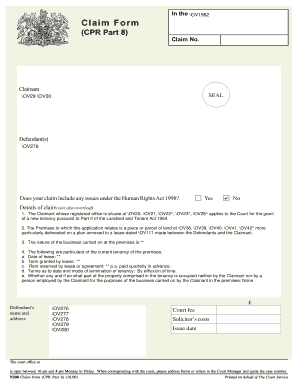
The form defines essential elements like the claim number, claimant information, and defendant details.
-
It is particularly applicable in scenarios where claimants seek resolution for disputes outside typical small claims.
2. The Purpose and Benefits of the N208 Claim Form
The practical advantages of using the N208 Claim Form are numerous, facilitating a streamlined process for those involved in legal claims. One major benefit is that it provides claimants with a structured method to present their claims, helping to ensure that all necessary legal components are included. Additionally, the form offers specific legal reassurance which differs from other claim forms.
-
Claimants can navigate complex legal language more easily with this standardized template.
-
This form tends to be more accepted in legal circles when compared to other claim forms.
3. Key Features of the N208 Claim Form
Understanding the essential components of the N208 Claim Form is crucial for effective completion. The form includes mandatory sections that require specific information, such as the "Claim number," "Claimant information," and details of the "Defendant(s)." Moreover, there are also checkbox sections to clarify specific legal considerations, including those related to the Human Rights Act 1998.
-
The fillable fields enable claimants to enter vital information efficiently.
-
Checkboxes ensure that necessary legal nuances are addressed directly within the form.
4. Who Needs to Use the N208 Claim Form?
The target audience for the N208 Claim Form primarily consists of individuals eligible to file claims, which includes both claimants and their legal representatives. This form is particularly pertinent in cases where disputes arise outside the parameters of small claims, making it integral for those seeking legal recourse in more complex situations.
-
Claimants must be aware of the specific contexts in which this form is applicable, ensuring their eligibility prior to submission.
-
Legal representatives may also use this form to support their clients throughout the claim process.
5. Step-by-Step Guide to Filling Out the N208 Claim Form Online
To effectively fill out the N208 Claim Form online, it is essential to follow a clear, step-by-step guide. Begin by gathering all necessary information related to the claim, ensuring all fields are accurately completed to prevent errors. Pay attention to each section, as they require precise details that are critical for the processing of the claim.
-
Start with the identification sections, ensuring accuracy in the claimant and defendant information.
-
Review each field carefully; a field-by-field breakdown will clarify what is needed and help avoid common mistakes.
6. How to Review, Sign, and Submit Your N208 Claim Form
Completing your N208 Claim Form is only part of the process; reviewing, signing, and submitting it accurately is equally critical. First, it is essential to sign the Statement of Truth, confirming the validity of the information provided. Additionally, claimants must be aware of the various submission methods and strict deadlines to ensure their claims are processed promptly.
-
Options for signing include eSigning and using a traditional wet signature.
-
Timeliness in submission can significantly affect the outcomes of claims.
7. What Happens After You Submit the N208 Claim Form?
Once the N208 Claim Form is submitted, several processes begin, with the initial step being an assessment of the claim by the court. Claimants can expect certain processing times, and knowing how to check the status of their claim is pivotal. Understanding the potential outcomes and knowing what additional information may be requested is essential for effective follow-up.
-
Processing times can vary, so staying informed about your application's status is beneficial.
-
Common reasons for rejection may occur, and understanding these can help in future submissions.
8. Security and Compliance When Using the N208 Claim Form
The handling of the N208 Claim Form must prioritize data security and compliance with legal regulations such as GDPR. With sensitive personal information included in legal documents, employing robust security measures is critical. Utilizing secure platforms ensures that data is protected during the submission and handling processes.
-
Encryption protocols are essential to safeguard sensitive information.
-
Compliance with regulations not only protects individuals but also enhances the legitimacy of the claim process.
9. Utilize pdfFiller for Your N208 Claim Form Needs
PdfFiller stands out as a comprehensive solution for handling the N208 Claim Form. By using pdfFiller, individuals can effectively fill, edit, and eSign their forms, adding both efficiency and ease to the claim process. Furthermore, the platform offers advanced security features that protect sensitive information while providing user-friendly support to streamline the entire legal filing.
-
PdfFiller makes it simple to navigate through filling out all necessary fields with ease.
-
Users can benefit from various functionalities provided for editing and managing documents securely.
How to fill out the N208 Claim Form
-
1.Access pdfFiller and search for the N208 Claim Form to open it on your device.
-
2.Once the form loads, familiarize yourself with the fillable fields and sections indicated.
-
3.Gather all necessary information beforehand, including claim details, defendant's information, and any relevant evidence.
-
4.Begin by entering the claim number in the designated field at the top of the form.
-
5.Fill in the claimant's and defendant's names and addresses accurately to avoid processing delays.
-
6.Detail the nature of your claim clearly in the 'Details of claim' section, providing as much relevant information as possible.
-
7.Use checkboxes for sections requiring binary responses, such as those under the Human Rights Act 1998.
-
8.Review your entries to ensure all information is complete and accurate, especially the 'Statement of Truth' requiring signatures.
-
9.Once satisfied, utilize pdfFiller’s functionality to save your completed form locally or to your cloud storage.
-
10.You can also download the form as a PDF for your records or prepare it for submission.
-
11.If required, submit the completed form directly through pdfFiller, following any instructions for electronic filing with the court.

Who is eligible to use the N208 Claim Form?
The N208 Claim Form is designed for individuals or entities wanting to file a claim under CPR Part 8 in the UK. It is primarily used by claimants and their legal representatives.
What is the deadline for submitting the N208 Claim Form?
There is no universal deadline for filing the N208 Claim Form; however, it's vital to check specific timelines as they can vary based on the nature of your claim and court directions.
How do I submit the completed N208 Claim Form?
The completed N208 Claim Form can be submitted physically to the court or electronically through platforms like pdfFiller, ensuring compliance with local court requirements for submission.
What supporting documents do I need to include with the N208 Claim Form?
Supporting documents typically include evidence related to your claim, existing correspondence, and any relevant court documents that may strengthen your case.
What common mistakes should I avoid when filling out the N208 Claim Form?
Common mistakes include incomplete fields, incorrect defendant details, and failing to sign the 'Statement of Truth.' Always review your form for accuracy before submission.
How long does it take for the N208 Claim Form to be processed?
Processing times for the N208 Claim Form can vary, often taking several weeks. It's advisable to check with the court for specific timelines based on their caseload and requirements.
Do I need to notarize the N208 Claim Form?
No, notarization is not required for the N208 Claim Form. However, a signature is necessary to validate the 'Statement of Truth' included in the document.
Related Content
Related Forms





Related Catalogs
Get the latest insights from our blog


If you believe that this page should be taken down, please follow our DMCA take down process
here
.
This form may include fields for payment information. Data entered in these fields is not covered by PCI DSS compliance.