
Last updated on
Nov 9, 2026
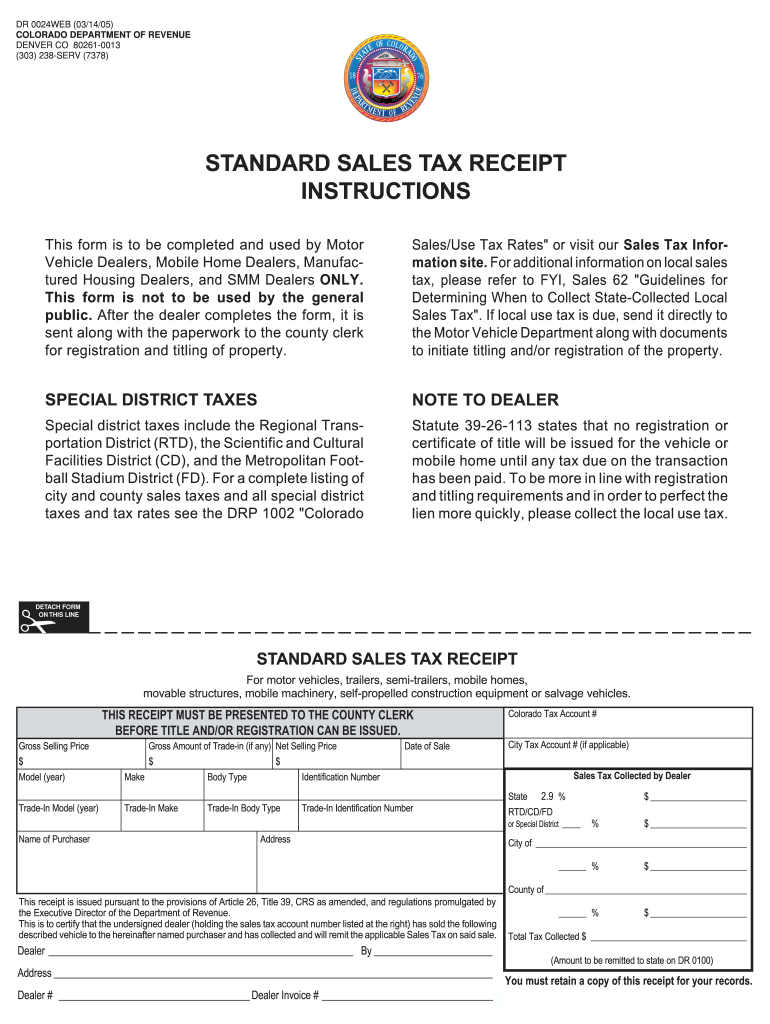
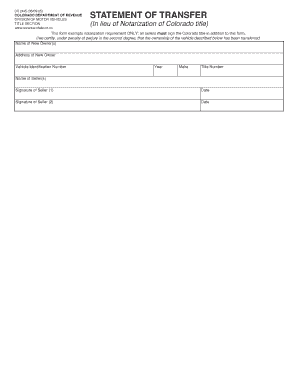
CO DoR DR 0024 2005 free printable template
pdfFiller is not affiliated with any government organization

Fill out
Complete the form online in a simple drag-and-drop editor.

eSign
Add your legally binding signature or send the form for signing.

Share
Share the form via a link, letting anyone fill it out from any device.

Export
Download, print, email, or move the form to your cloud storage.
Why pdfFiller is the best tool for your documents and forms


End-to-end document management
From editing and signing to collaboration and tracking, pdfFiller has everything you need to get your documents done quickly and efficiently.
Accessible from anywhere
pdfFiller is fully cloud-based. This means you can edit, sign, and share documents from anywhere using your computer, smartphone, or tablet.
Secure and compliant
pdfFiller lets you securely manage documents following global laws like ESIGN, CCPA, and GDPR. It's also HIPAA and SOC 2 compliant.
What is CO DoR DR 0024
The Colorado Standard Sales Tax Receipt is a tax document used by vehicle and mobile home dealers in Colorado to report and remit sales tax on transactions.
pdfFiller scores top ratings on review platforms




Who needs CO DoR DR 0024?
Explore how professionals across industries use pdfFiller.

CO DoR DR 0024 is needed by:
-
Vehicle dealers operating in Colorado
-
Mobile home dealers in Colorado
-
Accountants handling dealer transactions
-
County clerks requiring tax documentation
-
Tax professionals assisting clients with vehicle purchases
Comprehensive Guide to CO DoR DR 0024
What is the Colorado Standard Sales Tax Receipt?
The Colorado Standard Sales Tax Receipt serves as a critical tax document in Colorado, specifically designed for vehicle and mobile home dealers. This form is utilized to report and remit sales tax on transactions, thereby ensuring compliance with state regulations. Key components of the receipt include the gross selling price, trade-in value, net selling price, and applicable taxes, each essential for accurate financial reporting.
Purpose and Benefits of the Colorado Standard Sales Tax Receipt
This form holds significant importance for both dealers and customers within the state. It aids in the proper reporting of sales tax, thereby facilitating compliance with Colorado state laws. For sellers, the receipt streamlines the vehicle registration and titling processes, ensuring that all transactions are consolidated and documented appropriately.
Key Features of the Colorado Standard Sales Tax Receipt
Understanding the specific elements of the Colorado Standard Sales Tax Receipt is crucial for users. The form comprises various fields, including the gross selling price and trade-in value, which must be accurately filled out. Explicit instructions are provided on the form to assist users, emphasizing the importance of precise completion for compliance and successful dealer transactions.
Who Needs the Colorado Standard Sales Tax Receipt?
The form is essential for different types of dealers, particularly those involved in vehicle and mobile home sales. Additionally, it may be required for buyers and sellers in a vehicle transaction, as it serves as proof of tax reporting and compliance. Understanding the eligibility criteria is vital for all parties involved in these transactions.
How to Fill Out the Colorado Standard Sales Tax Receipt Online
Filling out the Colorado Standard Sales Tax Receipt online involves several steps. First, gather the necessary information, including sale details and taxes. Next, follow these field-by-field instructions to ensure accuracy:
-
Input the gross selling price.
-
Enter the trade-in value if applicable.
-
Calculate and include the net selling price.
Before submission, utilize a review checklist to verify all information for accuracy.
Submission Methods for the Colorado Standard Sales Tax Receipt
Once completed, there are various submission methods available. Users can file the form either online or in person at the county clerk's office. It’s essential to include any required accompanying documents with the submission. Additionally, be aware of deadlines and processing times that may apply, as well as any potential fees involved.
Common Errors in Completing the Colorado Standard Sales Tax Receipt
Users should be aware of frequent mistakes that can lead to form rejections. Some typical errors include:
-
Incorrectly filled fields.
-
Missing required information.
To enhance accuracy, follow these tips:
-
Double-check entries for clarity.
-
Refer to explicit instructions provided on the form.
Why Choose pdfFiller for Your Colorado Standard Sales Tax Receipt Needs
pdfFiller emerges as a robust solution for managing the Colorado Standard Sales Tax Receipt. Using pdfFiller allows users to create, edit, and sign forms securely, providing a seamless experience tailored to tax document management. With 256-bit encryption and compliance with security standards, users can trust that their sensitive information is handled appropriately.
Next Steps After Completing the Colorado Standard Sales Tax Receipt
After submitting the form, it’s important to track the status of your submission. Users should also be aware of the procedures for correcting or amending any submitted forms if necessary. Maintaining records of the receipt is crucial for future reference and compliance.
Utilize pdfFiller for Effortless Completion of Your Colorado Standard Sales Tax Receipt
pdfFiller’s capabilities greatly streamline the form management process, making filling out tax forms online easy and efficient. Enjoy enhanced security and support throughout the process, ensuring that all forms are completed and submitted without hassle.
How to fill out the CO DoR DR 0024
-
1.To access the Colorado Standard Sales Tax Receipt on pdfFiller, visit the site and use the search bar to locate the form by name.
-
2.Once opened, review the form fields to understand the required information, including gross selling price and trade-in values.
-
3.Before starting, gather essential details such as transaction amounts, vehicle specifications, and buyer information for a smooth filling process.
-
4.Use pdfFiller's interface to click into each field and enter the necessary information accurately, making sure to check for any required fields or options.
-
5.Ensure that you fill out all blank fields and use checkboxes as instructed, specifically for reporting tax amounts and trade-ins.
-
6.After completing the form, review all entries for accuracy and completeness before proceeding to save or submit.
-
7.Once satisfied with your entries, use the options provided by pdfFiller to save your work, download a copy for your records, or submit the form according to your needs.

Who is eligible to use the Colorado Standard Sales Tax Receipt?
The Colorado Standard Sales Tax Receipt is intended for vehicle and mobile home dealers operating in Colorado who need to report and remit sales tax on transactions.
What is the deadline for submitting the Colorado Standard Sales Tax Receipt?
Timelines for submission may depend on specific transactions and local regulations. It's advisable to submit the form promptly after the sale to avoid any potential penalties.
How do I submit the Colorado Standard Sales Tax Receipt?
Once completed, the form should be presented to the county clerk during the vehicle registration and titling process, ensuring it's submitted alongside any other required documentation.
What supporting documents are required with the Colorado Standard Sales Tax Receipt?
Typically, you should prepare to provide transaction details such as the purchase agreement, trade-in documentation, and any other relevant tax documents.
What common mistakes should I avoid when filling out this form?
Common mistakes include not filling in mandatory fields, incorrect tax calculations, and failing to provide supporting documents that can delay processing.
How long does it take to process the Colorado Standard Sales Tax Receipt?
Processing times may vary depending on the specific county office. Generally, processing can take a few days to several weeks based on the volume of submissions.
Can the Colorado Standard Sales Tax Receipt be filled out online?
Yes, you can fill out the Colorado Standard Sales Tax Receipt online using pdfFiller, which provides an easy-to-use interface for entering information and saving your completed form.
CO DoR DR 0024 Form Versions
Related Content
Related Forms





Related Catalogs
Get the latest insights from our blog


If you believe that this page should be taken down, please follow our DMCA take down process
here
.
This form may include fields for payment information. Data entered in these fields is not covered by PCI DSS compliance.