
Last updated on
Oct 31, 2026

Bank Account Verification Form 2009-2026 free printable template
pdfFiller is not affiliated with any government organization

Fill out
Complete the form online in a simple drag-and-drop editor.

eSign
Add your legally binding signature or send the form for signing.

Share
Share the form via a link, letting anyone fill it out from any device.

Export
Download, print, email, or move the form to your cloud storage.
Why pdfFiller is the best tool for your documents and forms


End-to-end document management
From editing and signing to collaboration and tracking, pdfFiller has everything you need to get your documents done quickly and efficiently.
Accessible from anywhere
pdfFiller is fully cloud-based. This means you can edit, sign, and share documents from anywhere using your computer, smartphone, or tablet.
Secure and compliant
pdfFiller lets you securely manage documents following global laws like ESIGN, CCPA, and GDPR. It's also HIPAA and SOC 2 compliant.
What is Bank Account Verification Form
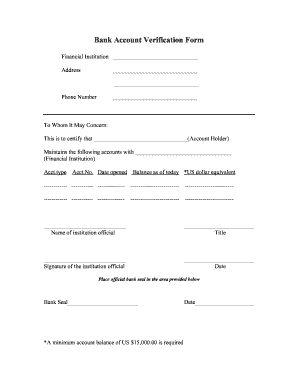
The Bank Account Verification Form is a financial document used by banking institutions to certify that an account holder maintains a specific account for verification purposes.
pdfFiller scores top ratings on review platforms




Who needs Bank Account Verification Form?
Explore how professionals across industries use pdfFiller.

Bank Account Verification Form is needed by:
-
Financial institutions conducting account verifications
-
Businesses requiring account holder certifications
-
Account holders needing to prove account details
-
Third parties requesting confirmation for transactions
-
Auditors reviewing financial statements
-
Compliance officers in regulatory reviews
Comprehensive Guide to Bank Account Verification Form
What is the Bank Account Verification Form?
The Bank Account Verification Form serves as a vital document for certifying that an account holder maintains a specific account with a financial institution. Its primary purpose is to verify account details for third parties, ensuring that the provided information is accurate and authenticated. This form includes essential elements such as the client’s name, account number, and the signature of an institutional official, which adds to its credibility.
Purpose and Benefits of the Bank Account Verification Form
This form is commonly used in scenarios like loan applications, tenant screenings, or when third parties verify account holder information. Having a standardized account verification template streamlines the verification process, benefiting both account holders and financial institutions. It enhances the trustworthiness of transactions and prevents potential fraud, making it a crucial tool for all parties involved.
Key Features of the Bank Account Verification Form
A breakdown of the fields in the Bank Account Verification Form showcases elements such as:
-
Client Name
-
Account Number
-
Financial Institution
-
Signature of Institutional Official
These components serve a specific purpose and fulfill regulatory requirements. Additionally, the form’s adaptability across various financial contexts allows it to be customized as necessary for diverse verification scenarios.
Who Needs the Bank Account Verification Form?
The primary users of the Bank Account Verification Form include businesses, banks, and other financial institutions. Clients seeking to validate their account information for third parties also play a significant role. Furthermore, entities such as landlords or lenders may require this form to ensure the legitimacy of the account holder's claims.
How to Fill Out the Bank Account Verification Form Online (Step-by-Step)
Filling out the form digitally using pdfFiller involves the following steps:
-
Open the form and enter the Client Name.
-
Fill in the Account Number and any other required fields.
-
Provide information for the Financial Institution, including the address and bank details.
-
Ensure that the Institutional Official's information is accurate and complete.
-
Review the form to avoid common errors before submission.
Taking these steps ensures that the form is filled out correctly and efficiently.
Review and Validation Checklist
Before submitting the Bank Account Verification Form, it’s essential to check the following:
-
All required fields are completed.
-
The form is free from errors.
-
The Institutional Official's signature is included.
This review process significantly boosts the accuracy and security of the document, ensuring compliance and validation of the provided information.
How to Sign the Bank Account Verification Form
Signing the Bank Account Verification Form digitally involves using a secure and compliant method. Digital signatures differ from wet signatures in terms of authenticity and verification processes. Signatures must be placed at designated areas within the form, typically requiring the Institutional Official's approval to confirm its legitimacy.
Where to Submit the Bank Account Verification Form?
Typical submission channels for the Bank Account Verification Form include physical bank branches and electronic submissions through secure platforms. Users should be aware of any potential fees associated with processing the form, as well as state or jurisdiction-specific rules that may apply, ensuring a smooth submission experience.
Security and Privacy Considerations
Handling sensitive information requires robust security measures. It is crucial to ensure that data protection complies with current regulations such as HIPAA and GDPR. When using pdfFiller, users can have peace of mind that their data is safeguarded through 256-bit encryption and other security features, maintaining the confidentiality of their information.
How pdfFiller Streamlines the Bank Account Verification Process
pdfFiller enhances the Bank Account Verification Form experience by simplifying the form-filling process. Key features include secure eSigning, efficient document storage, and easy sharing capabilities. Leveraging pdfFiller not only facilitates the effective handling of the Bank Account Verification Form but also empowers users with an efficient and trustworthy tool for their document management needs.
How to fill out the Bank Account Verification Form
-
1.Access the Bank Account Verification Form on pdfFiller by searching its name in the templates section or using a direct link from your banking institution.
-
2.Once the form is open, familiarize yourself with the interface. You can easily click on fields to fill them out.
-
3.Gather the necessary information beforehand, including the client's name, account number, financial institution details, and the signature of an institutional official.
-
4.Start filling in the fields by clicking on them. Input the client’s full name, the account or policy number, and related financial institution information, ensuring accuracy.
-
5.Continue to enter the address, city, province, postal code, and phone number. Confirm that all information matches your records.
-
6.Fill in the bank number, transit number, account number, and currency in the respective fields to provide comprehensive details.
-
7.Have the institutional official complete their section by entering their name, title, and adding their signature. Ensure they also include the date and bank seal, if required.
-
8.After completing the form, review all information for accuracy and completeness. Utilize the review feature on pdfFiller to catch any errors.
-
9.Save your completed form by selecting the save option, and consider downloading a copy for your records.
-
10.Submit the form as directed by your financial institution or third party. You can use pdfFiller’s submission features to send directly to the required recipient.

Who needs to sign the Bank Account Verification Form?
The form must be signed by an institutional official of the financial institution, certifying the account holder's details and maintaining the integrity of the document.
Is notarization required for this form?
No, notarization is not required for the Bank Account Verification Form. Filling it out with the correct information and official signatures suffices.
What information do I need to complete the form?
You will need the client’s name, account number, financial institution details, and the name and signature of the institutional official to complete the Bank Account Verification Form.
Can I submit the form electronically?
Yes, you can use pdfFiller’s submission features to send the completed Bank Account Verification Form electronically to the designated recipient or financial institution.
What are common errors to avoid when filling out this form?
Be sure to double-check all entries for accuracy, especially account numbers and names, as errors can delay verification processes and may require the form to be redone.
How long does it take to process the form once submitted?
Processing times vary by institution, but generally, you can expect verification to be completed within a few business days after submission.
What category does the Bank Account Verification Form fall under?
This form is categorized under Business Forms, specifically under Financial Statements & Reports, providing essential verification details for banking institutions.
Related Forms





Related Catalogs
Get the latest insights from our blog


If you believe that this page should be taken down, please follow our DMCA take down process
here
.
This form may include fields for payment information. Data entered in these fields is not covered by PCI DSS compliance.