
Last updated on
Nov 9, 2026
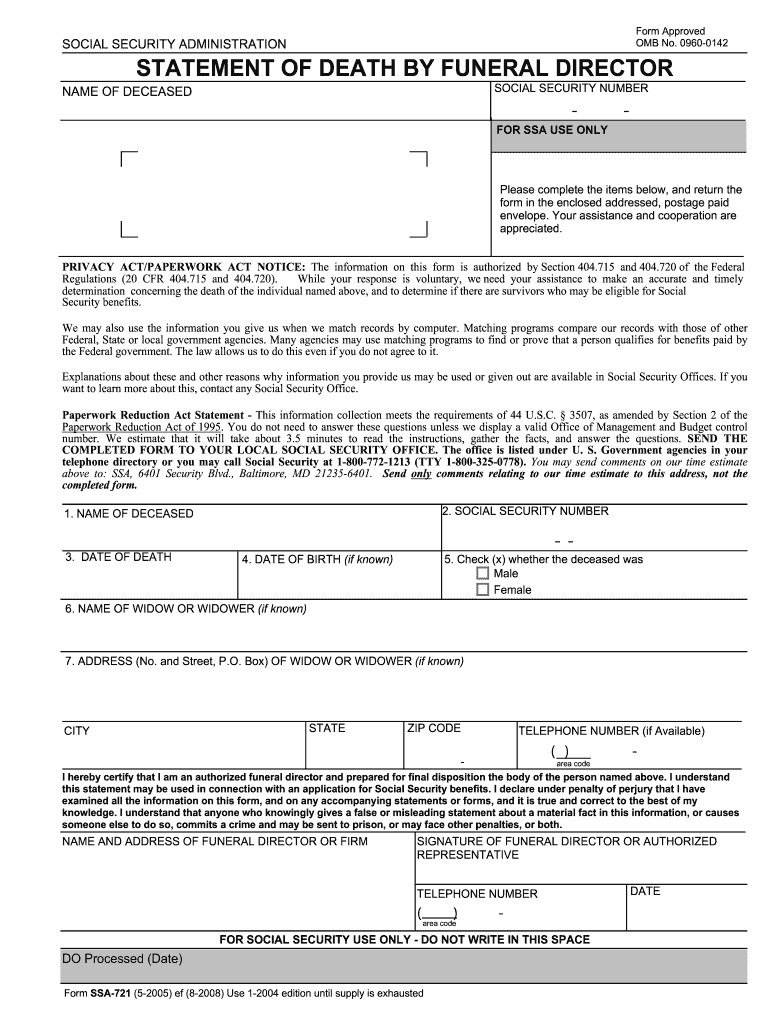
SSA SSA-721 2005 free printable template
pdfFiller is not affiliated with any government organization

Fill out
Complete the form online in a simple drag-and-drop editor.

eSign
Add your legally binding signature or send the form for signing.

Share
Share the form via a link, letting anyone fill it out from any device.

Export
Download, print, email, or move the form to your cloud storage.
Why pdfFiller is the best tool for your documents and forms


End-to-end document management
From editing and signing to collaboration and tracking, pdfFiller has everything you need to get your documents done quickly and efficiently.
Accessible from anywhere
pdfFiller is fully cloud-based. This means you can edit, sign, and share documents from anywhere using your computer, smartphone, or tablet.
Secure and compliant
pdfFiller lets you securely manage documents following global laws like ESIGN, CCPA, and GDPR. It's also HIPAA and SOC 2 compliant.
What is SSA SSA-721
The Statement of Death by Funeral Director (Form SSA-721) is a government document used by funeral directors to report a death to the Social Security Administration.
pdfFiller scores top ratings on review platforms




Very good
Very good. I had been a customer many years, and I back again.
excellent professional customer service
Who needs SSA SSA-721?
Explore how professionals across industries use pdfFiller.

SSA SSA-721 is needed by:
-
Funeral directors responsible for reporting deaths
-
Families of deceased individuals seeking Social Security benefits
-
Legal professionals assisting with death-related documentation
-
Social Security Administration personnel
-
State agencies requiring death verification
-
Widows or widowers applying for survivor benefits
Comprehensive Guide to SSA SSA-721
What is the Statement of Death by Funeral Director?
The Statement of Death by Funeral Director, also known as Form SSA-721, is a critical document used to report a death to the Social Security Administration (SSA). This form is essential for establishing eligibility for Social Security survivor benefits.
This official document collects vital information about the deceased, including their name, Social Security number, and date of death. It serves as a formal notification that is necessary for the processing of any claims related to the deceased's Social Security benefits.
Why Use the Statement of Death by Funeral Director?
Utilizing the Statement of Death by Funeral Director is crucial for both funeral directors and the families involved. This form facilitates the management of post-death processes, ensuring that families can efficiently access survivor benefits and other claims.
Timely and accurate submission of this document carries legal implications, as it confirms the death and initiates the benefits process with the Social Security Administration. Understanding its value can ensure that families are not burdened with delays or complications in their claims.
Who Needs the Statement of Death by Funeral Director?
The form is primarily completed by funeral directors, who play a key role in its preparation. It is applicable in situations of recent deaths, especially when claims for benefits are being filed.
Spouses and dependents of the deceased are the primary beneficiaries who will find significant advantages from the submission of this form. Their ability to secure necessary benefits hinges on the accurate reporting provided through this document.
Eligibility Criteria for the Statement of Death by Funeral Director
Eligibility to complete the Statement of Death by Funeral Director requires that the individual be a licensed funeral director. Accurate knowledge of the deceased is essential to fill out the form correctly.
Required information includes personal details about the deceased and, in some cases, necessary documentation or authorizations may need to accompany the form before submission. Understanding these criteria helps streamline the process for those involved.
How to Fill Out the Statement of Death by Funeral Director Online
Filling out the Statement of Death by Funeral Director online can be done through pdfFiller. To successfully complete the form, follow these steps:
-
Access the Statement of Death by Funeral Director through pdfFiller.
-
Fill in the required fields such as NAME OF DECEASED, SOCIAL SECURITY NUMBER, and DATE OF DEATH.
-
Consider using the eSignature feature when finalizing the document.
-
Securely save the completed form in your pdfFiller account.
These steps ensure that the form is filled out correctly and stored securely for future reference.
Common Errors to Avoid When Filling Out the Statement of Death by Funeral Director
Minimizing mistakes on the Statement of Death by Funeral Director is essential to avoid submission issues. Common errors include providing incorrect information or leaving fields incomplete.
To ensure accuracy, it is crucial to review the form thoroughly before submission. Double-checking all details can prevent unnecessary delays in processing the claims, which can impact the benefits timeframe.
Where to Submit the Statement of Death by Funeral Director
Once the Statement of Death by Funeral Director is completed, there are several methods for submission. These options include:
-
Online submission through the Social Security Administration's designated platform.
-
Mailing the completed form to the appropriate SSA address.
-
In-person delivery at a local Social Security office.
Regardless of the method chosen, understanding the subsequent steps, like tracking the submission status, can help ensure that the process is smooth and timely.
What Happens After You Submit the Statement of Death by Funeral Director?
After submitting the Statement of Death by Funeral Director, users should be aware of the next steps involved. Generally, there will be a processing period during which the Social Security Administration verifies the information provided.
It is crucial to remain aware of any potential follow-up actions that might be required, which may vary depending on the case. Checking the status of the submitted form can provide peace of mind as families await the processing of survivor benefits.
How pdfFiller Can Assist You with the Statement of Death by Funeral Director
pdfFiller provides a range of features designed to simplify the process of completing the Statement of Death by Funeral Director. This platform offers secure document management, ensuring that sensitive details about the deceased are handled safely.
Users can take advantage of functionalities such as creating fillable forms, providing eSigning capabilities, and securely storing completed documents. Leveraging these features can significantly ease the filing process and enhance security.
How to fill out the SSA SSA-721
-
1.To access the Statement of Death by Funeral Director on pdfFiller, go to the website and log in to your account or create a new account if you don’t have one.
-
2.Use the search bar to locate 'Statement of Death by Funeral Director (Form SSA-721)' and select it to open the form.
-
3.Familiarize yourself with the form layout, which includes fields for the deceased's personal information, such as name and Social Security number, as well as dates of death.
-
4.Gather necessary information before starting, including the deceased’s identification details, death date, and widow or widower's information.
-
5.Navigate to the blank fields one by one, clicking on each to enter the required information. You can utilize pdfFiller's features like auto-fill from saved data if applicable.
-
6.Checkboxes are present for gender and other options, so ensure to select appropriate options where needed. Carefully fill in all relevant sections of the form.
-
7.Once all fields are completed, review the form for accuracy. Ensure that all information is correct to avoid delays in processing.
-
8.After finalizing the information, save your work. You can download the completed form as a PDF, or submit it electronically through the provided options on pdfFiller.

Who is eligible to complete Form SSA-721?
Form SSA-721 is typically completed by funeral directors on behalf of deceased individuals' families to report deaths to the Social Security Administration. It's essential for those handling death-related documentation.
When should the Statement of Death by Funeral Director be submitted?
The form should be submitted promptly after a death occurs to ensure timely processing of survivor benefits and other arrangements. Delays may affect eligibility for Social Security benefits.
How can I submit the completed Statement of Death by Funeral Director?
Completed forms can be submitted electronically via pdfFiller or printed for manual submission to the Social Security Administration's local office. Make sure to keep a copy for your records.
What supporting documents are needed with Form SSA-721?
Typically, no additional documents are required when submitting the form itself. However, it’s advisable to have death certificates or personal identification for reference.
What are common mistakes to avoid when filling out the form?
Common mistakes include entering incorrect information, missing required fields, and failing to sign the form as required. Always double-check for accuracy before submission.
How long does it take to process Form SSA-721 with the Social Security Administration?
Processing times can vary, but submissions are generally processed within a few weeks. Delays can occur if additional information is needed, so timely and accurate submissions are crucial.
Can the form be filled out digitally?
Yes, the Statement of Death by Funeral Director can be filled out digitally using pdfFiller. This allows users to complete the form online and streamline submission processes.
SSA SSA-721 Form Versions
Related Content
Related Forms



Related Catalogs
Get the latest insights from our blog


If you believe that this page should be taken down, please follow our DMCA take down process
here
.
This form may include fields for payment information. Data entered in these fields is not covered by PCI DSS compliance.