
Last updated on
Oct 31, 2026

MGIC 71-42080 2012-2026 free printable template
pdfFiller is not affiliated with any government organization

Fill out
Complete the form online in a simple drag-and-drop editor.

eSign
Add your legally binding signature or send the form for signing.

Share
Share the form via a link, letting anyone fill it out from any device.

Export
Download, print, email, or move the form to your cloud storage.
Why pdfFiller is the best tool for your documents and forms


End-to-end document management
From editing and signing to collaboration and tracking, pdfFiller has everything you need to get your documents done quickly and efficiently.
Accessible from anywhere
pdfFiller is fully cloud-based. This means you can edit, sign, and share documents from anywhere using your computer, smartphone, or tablet.
Secure and compliant
pdfFiller lets you securely manage documents following global laws like ESIGN, CCPA, and GDPR. It's also HIPAA and SOC 2 compliant.
What is MGIC 71-42080
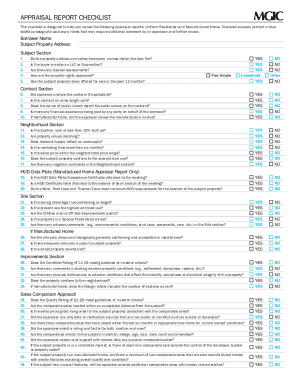
The Appraisal Report Checklist is a fillable form used by appraisers to review and verify the accuracy of appraisal reports for residential properties and manufactured homes.
pdfFiller scores top ratings on review platforms




Who needs MGIC 71-42080?
Explore how professionals across industries use pdfFiller.

MGIC 71-42080 is needed by:
-
Appraisers needing to ensure compliance with valuation standards
-
Real estate agents involved in property transactions
-
Mortgage lenders verifying property values
-
Homeowners seeking accurate appraisals
-
Loan officers facilitating mortgage approvals
-
Investors assessing residential properties
Comprehensive Guide to MGIC 71-42080
What is the Appraisal Report Checklist?
The Appraisal Report Checklist serves as a critical tool for appraisers, ensuring that appraisal reports for residential properties, manufactured homes, and market conditions are thorough and accurate. By adhering to this checklist, appraisers can verify the completeness of their evaluations and align with industry standards.
This checklist is vital as it helps prevent errors in appraisal reports, which can affect the valuation process. It encompasses various property types and is a crucial aspect of maintaining quality within the appraisal framework.
Purpose and Benefits of Using the Appraisal Report Checklist
Utilizing the Appraisal Report Checklist provides significant advantages for appraisers in their work. It assists appraisers in complying with investor or agency guidelines, which is essential for the credibility of their evaluations.
The benefits of using this checklist include reducing the risk of errors and enhancing the efficiency of the appraisal process. Additionally, it plays a pivotal role in supporting mortgage insurance and loan approval procedures, ensuring a smoother transaction process.
Key Features of the Appraisal Report Checklist
The Appraisal Report Checklist is structured with essential sections that facilitate thorough evaluations. Key components included in the checklist are:
-
Subject property details
-
Contract analysis
-
Neighborhood assessment
-
Site evaluation
-
Sales comparison
This checklist employs a clear format featuring yes/no questions and checkboxes, making it straightforward for appraisers. Furthermore, the appraiser’s signature and certification are integral requirements for its validity.
Who Needs the Appraisal Report Checklist?
Appraisers are the primary users of the Appraisal Report Checklist as it directly influences their evaluations during real estate transactions. Additionally, other professionals in the field, such as real estate agents and mortgage lenders, can benefit from using this checklist for accurate assessments.
This checklist is particularly necessary in situations involving residential and manufactured home appraisals, providing all parties with a standardized approach to valuation.
How to Fill Out the Appraisal Report Checklist Online
Completing the Appraisal Report Checklist is straightforward, especially when using online tools like pdfFiller. Follow these steps for effective completion:
-
Access the checklist through the pdfFiller platform.
-
Fill each section, following the provided instructions for accuracy.
-
Double-check your entries for completeness before submission.
Be mindful of the fields that often cause confusion to ensure a seamless filling process.
Common Errors and How to Avoid Them
Appraisers may encounter various pitfalls when filling out the Appraisal Report Checklist. Common mistakes include incomplete sections, misinterpretations of yes/no questions, and incorrect signatures.
To prevent these issues, consider the following tips:
-
Ensure thorough understanding of each section's requirements.
-
Utilize resources available through pdfFiller to clarify procedures.
These strategies will help ensure proper completion and submission of the checklist.
How to Sign the Appraisal Report Checklist
Signing the Appraisal Report Checklist can be done through digital or wet signatures, with each method having specific regulations. Understanding these differences is crucial for proper endorsing of the document.
Using pdfFiller makes the eSigning process efficient and straightforward, ensuring compliance with necessary legal standards. It is essential to determine if notarization is required for your specific appraisal needs.
Submitting the Appraisal Report Checklist
Submitting the completed Appraisal Report Checklist entails several options, including online portals, email, or in-person submissions. Knowing where and how to submit the checklist is crucial to meeting deadlines for loan approvals.
Keep track of the submission status to anticipate processing times and ensure that everything proceeds smoothly after submission.
Security and Compliance with the Appraisal Report Checklist
When using pdfFiller for the Appraisal Report Checklist, users can rest assured regarding the security of their sensitive information. pdfFiller is committed to document security, employing measures such as encryption to protect user data.
Appraisers can trust the platform’s compliance with data protection and privacy standards throughout the appraisal process, making it a reliable choice for managing vital documents.
Leverage pdfFiller for Your Appraisal Report Checklist Needs
pdfFiller offers valuable features for appraisers looking to manage their Appraisal Report Checklist efficiently. Users can edit, fill, and eSign their documents with ease, enhancing both the experience and accuracy of form completion.
By utilizing pdfFiller, appraisers can streamline their processes and ensure their checklist is accurately fulfilled, contributing to a more effective appraisal experience.
How to fill out the MGIC 71-42080
-
1.Access the Appraisal Report Checklist by visiting the pdfFiller website. Use the search bar or go to the templates section to find the form easily.
-
2.Once you’ve located the form, click on it to open it in pdfFiller's editor interface.
-
3.Before filling out the form, gather all necessary information such as property details, neighborhood data, and comparable sales figures to ensure accuracy.
-
4.Navigate through the checklist, filling in the appropriate fields as you go. Use the yes/no questions and checkboxes to complete each section based on your assessment.
-
5.Pay close attention to sections that require specific information like subject property details, contract analysis, and appraiser’s certification. Completing these accurately is crucial.
-
6.Review your entries ensuring all sections are complete and correct. Use pdfFiller’s review features to check for any missed items.
-
7.Once satisfied with your form, save your progress. You can download the form as a PDF or save it directly on pdfFiller.
-
8.To submit the completed checklist, follow the platform's instructions for electronic submission or printing if needed.

Who is eligible to use the Appraisal Report Checklist?
The Appraisal Report Checklist is designed primarily for licensed appraisers who conduct property valuations. Additionally, real estate professionals, mortgage lenders, and homeowners can benefit from understanding the appraisal standards.
Is there a deadline for submitting the Appraisal Report Checklist?
While the checklist itself does not have a strict submission deadline, it is advisable to complete it promptly to meet mortgage application timelines or regulatory requirements associated with property appraisal processes.
What are the submission methods for the checklist?
The completed Appraisal Report Checklist can be submitted electronically through pdfFiller or printed for physical submission to relevant parties, such as mortgage lenders or appraisal management companies.
What supporting documents do I need to provide?
Alongside the Appraisal Report Checklist, it’s important to provide supporting documents such as property deeds, previous appraisal reports, and sales comparables to give context to the appraisal findings.
What common mistakes should I avoid when completing this form?
Common mistakes include overlooking required fields, inaccuracies in property details, and assuming all information is known without proper verification. Always double-check your entries for accuracy.
How long does it take to process the appraisal report?
The processing time for an appraisal report can vary based on several factors, including the appraiser’s workload and market conditions. Typically, expect a turnaround time of several days to a couple of weeks.
Are there fees associated with using this form?
Using the Appraisal Report Checklist via pdfFiller may incur minimal charges depending on your subscription plan. Check with pdfFiller for any potential fees related to form preparation and submission.
Related Forms




Related Catalogs
Get the latest insights from our blog



If you believe that this page should be taken down, please follow our DMCA take down process
here
.
This form may include fields for payment information. Data entered in these fields is not covered by PCI DSS compliance.