
Last updated on
Nov 9, 2026
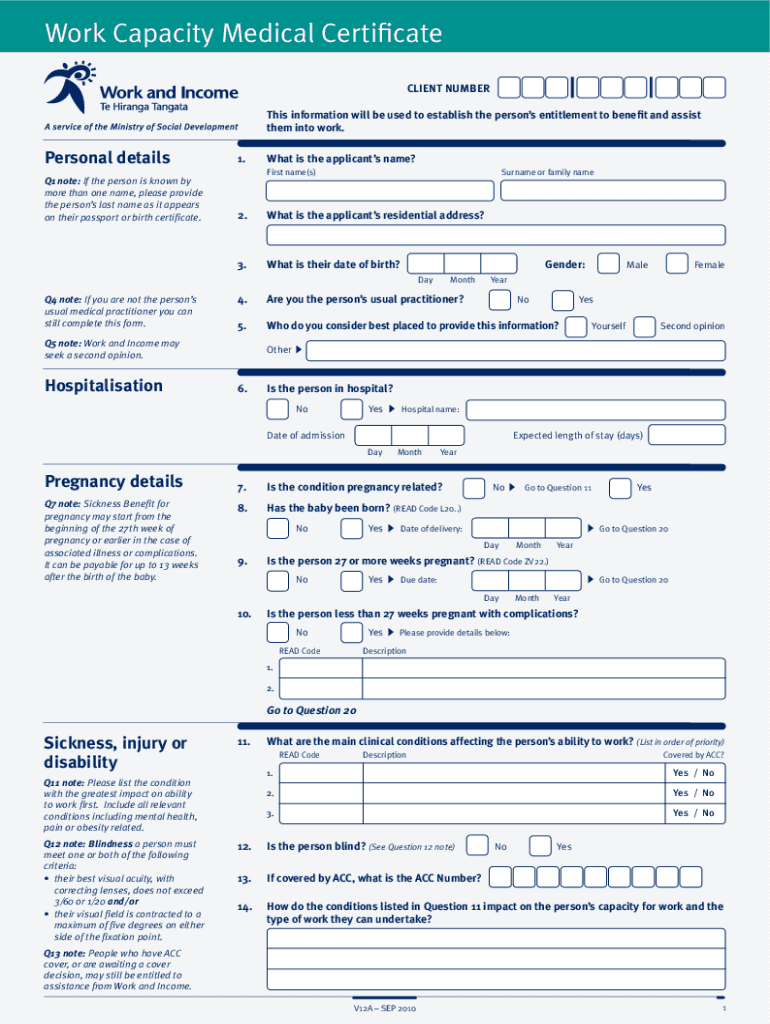
NZ V12A 2010 free printable template
We are not affiliated with any brand or entity on this form

Fill out
Complete the form online in a simple drag-and-drop editor.

eSign
Add your legally binding signature or send the form for signing.

Share
Share the form via a link, letting anyone fill it out from any device.

Export
Download, print, email, or move the form to your cloud storage.
Why pdfFiller is the best tool for your documents and forms


End-to-end document management
From editing and signing to collaboration and tracking, pdfFiller has everything you need to get your documents done quickly and efficiently.
Accessible from anywhere
pdfFiller is fully cloud-based. This means you can edit, sign, and share documents from anywhere using your computer, smartphone, or tablet.
Secure and compliant
pdfFiller lets you securely manage documents following global laws like ESIGN, CCPA, and GDPR. It's also HIPAA and SOC 2 compliant.
What is NZ V12A
The Work Capacity Medical Certificate is a government form used by health practitioners in New Zealand to assess an individual's eligibility for benefits due to work incapacity.
pdfFiller scores top ratings on review platforms




Great product! Wish I had more use for this. But would not not need all the time.
I wasn't sure what all this would do, but I LOVE it! It's nice to be able to scan a document in and change it without having to re-do the whole thing! YAY!
Very easy to find and fill out forms and print them out.
fixed PDF's with ease. upload and printing was easy. Web page was easy to navigate.
it is exactly what I need for Chromebook use. I think it tries to get me to pay for more than one account. but it works great
It satisfied my requirment
It satisfied my requirment
Who needs NZ V12A?
Explore how professionals across industries use pdfFiller.

NZ V12A is needed by:
-
Individuals applying for Sickness Benefit
-
Registered medical practitioners assessing patient capacity
-
Midwives completing patient evaluations
-
Dentists involved in benefit assessments
-
Youth needing Independent Youth Benefit
-
People requesting Invalid’s Benefit documentation
-
Health professionals conducting medical examinations for benefits
Comprehensive Guide to NZ V12A
What is the Work Capacity Medical Certificate?
The Work Capacity Medical Certificate is a key document in New Zealand that assesses an individual’s eligibility for various benefits. It is specifically designed for use by those applying for government assistance, such as the Sickness Benefit or Invalid's Benefit. This certificate plays a critical role in determining a person's capacity to work and is essential for anyone needing support during illness or disability.
This certificate must be completed by registered health practitioners, including medical doctors, dentists, and midwives, who evaluate the individual's ability to undertake work-related activities. Ensuring accurate completion of this form is crucial for a successful application for benefits.
Purpose and Benefits of the Work Capacity Medical Certificate
This form is invaluable for individuals applying for benefits like the Sickness Benefit or Invalid's Benefit. By providing a formal medical assessment, the Work Capacity Medical Certificate ensures that applicants can substantiate their claims effectively.
Having the correct medical documentation significantly enhances one’s application by offering clear evidence of the individual's health circumstances. Documentation of this nature is fundamental in assessing benefit eligibility and aids in the prompt processing of applications.
Who Needs the Work Capacity Medical Certificate?
Individuals who may require the Work Capacity Medical Certificate include those unable to work due to medical conditions or disabilities. This form is particularly crucial for applicants for the Independent Youth Benefit, ensuring they receive necessary support in times of need.
The role of healthcare professionals is vital when issuing this certificate, as only registered medical practitioners, dentists, and midwives can fill it out. Their insight and professional evaluations are fundamental in demonstrating an applicant's work capacity.
How to Fill Out the Work Capacity Medical Certificate Online
Filling out the Work Capacity Medical Certificate through pdfFiller can be simplified by following these steps:
-
Access the pdfFiller platform and locate the Work Capacity Medical Certificate template.
-
Input the necessary personal information, such as the applicant's name and address.
-
Gather and include relevant medical history and current health details as required.
-
Review and confirm the information for accuracy before final submission.
Remember to have any medical history readily available to facilitate the form completion process. Gathering all necessary details beforehand can streamline the experience.
Field-by-Field Instructions for the Work Capacity Medical Certificate
When completing the Work Capacity Medical Certificate, it is important to address each field accurately. Key fields include:
-
Applicant’s full name
-
Residential address
-
Details of the medical issue affecting work capacity
-
Health practitioner’s signature
Pay special attention to areas that might be confusing, such as detailing specific medical conditions. If there is uncertainty about the information required, consulting with a healthcare provider may be beneficial.
How to Sign the Work Capacity Medical Certificate
To validate the Work Capacity Medical Certificate, it must be signed by a qualified health practitioner. This signature can be provided in two ways: through a digital signature or a wet signature.
Understanding the submission requirements will help ensure compliance with regulations. Many forms now accept digital signatures, which enhance convenience while maintaining the integrity of the document.
Submitting the Work Capacity Medical Certificate
Once the Work Capacity Medical Certificate is completed, there are various methods for submission. Individuals can choose to submit their forms:
-
Online through designated benefits portals
-
By mailing the completed form to the relevant government agency
Knowing where to send the completed certificate and any specific guidelines regarding submission will help avoid delays in processing.
What Happens After You Submit the Work Capacity Medical Certificate?
After the submission of the Work Capacity Medical Certificate, applicants can typically expect a processing timeline from the government agency. It is crucial to stay informed about your application status, especially if there are important deadlines.
In addition, being aware of common rejection reasons can help applicants prepare for any issues that may arise during the assessment process, allowing for swift resolution if needed.
Importance of Security and Compliance in Handling the Work Capacity Medical Certificate
Security is paramount when dealing with sensitive medical and personal information. Engaging with organizations that follow strict security standards and regulations ensures compliance with data protection laws.
Maintaining privacy while handling the Work Capacity Medical Certificate protects both the practitioners and the applicants. Users must be aware of how their information is secured through the submission process.
Everything You Need to Know Before Using pdfFiller for Your Work Capacity Medical Certificate
Before using pdfFiller for the Work Capacity Medical Certificate, it’s important to familiarize yourself with its robust features. The platform offers:
-
The ability to easily edit filled forms
-
Creating fillable forms streamlined for user experience
-
Seamless electronic signature capabilities
Leveraging these tools promotes a smooth form-filling experience, ensuring that users can navigate the completion process efficiently and securely.
How to fill out the NZ V12A
-
1.Access the Work Capacity Medical Certificate by visiting the pdfFiller website and searching for the form using the search bar.
-
2.Once accessed, the form will open in the pdfFiller editor where you can view all sections and necessary fields.
-
3.Before starting to fill out the form, gather required personal information from the applicant, including name, address, and any relevant medical history.
-
4.Begin filling in personal details in the specified fields, ensuring accuracy and clarity in the information entered.
-
5.Use checkboxes to indicate the patient’s medical conditions and capacity for work-related activities, which are already included in the form's layout.
-
6.Address each question carefully, providing thorough answers in the relevant sections to fulfill assessment requirements effectively.
-
7.Keep updating the form progressively, utilizing pdfFiller's instant save feature to avoid losing any entered data during the process.
-
8.Review all your entries for any accuracy or completeness errors before finalizing the form.
-
9.Once confirmed, proceed to save the document in your preferred format, whether to download locally or save directly to cloud storage.
-
10.When completed, submit the form according to the specific guidelines provided by the agency handling the benefits, and consider contacting them for any clarifications on submission methods.

Who is eligible to apply for the Work Capacity Medical Certificate?
Eligibility typically includes individuals applying for specific benefits like the Sickness Benefit, Invalid’s Benefit, or Independent Youth Benefit. Publicly funded medical practitioners are required to complete the certificate for their patients.
What documents are required to complete the Work Capacity Medical Certificate?
Before starting the application, gather personal identification details of the applicant, along with any relevant medical records or prior documentation that supports their capacity assessment.
How do I submit the Work Capacity Medical Certificate once filled out?
Submit the completed Work Capacity Medical Certificate according to the guidelines of the relevant New Zealand governmental agency. This may include submitting it online or mailing a physical copy.
What should I do if I made an error on the Work Capacity Medical Certificate?
If you notice an error, you can correct it directly in the pdfFiller before saving or submitting. After submission, contact the relevant administration office for guidance on how to rectify any mistakes.
Are there deadlines for submitting the Work Capacity Medical Certificate?
Deadlines may depend on the type of benefit applied for. It is recommended to check with the relevant New Zealand agency for any time-sensitive requirements associated with your application.
What processing times should I expect after submitting the Work Capacity Medical Certificate?
Processing times can vary based on the agency handling the benefits. It's advisable to inquire directly with the agency for a specific time frame regarding your application.
NZ V12A Form Versions
Related Forms






Related Catalogs
Get the latest insights from our blog


If you believe that this page should be taken down, please follow our DMCA take down process
here
.
This form may include fields for payment information. Data entered in these fields is not covered by PCI DSS compliance.