
Last updated on
Nov 9, 2026

Canada HLTH 2814 2013 free printable template
pdfFiller is not affiliated with any government organization

Fill out
Complete the form online in a simple drag-and-drop editor.

eSign
Add your legally binding signature or send the form for signing.

Share
Share the form via a link, letting anyone fill it out from any device.

Export
Download, print, email, or move the form to your cloud storage.
Why pdfFiller is the best tool for your documents and forms


End-to-end document management
From editing and signing to collaboration and tracking, pdfFiller has everything you need to get your documents done quickly and efficiently.
Accessible from anywhere
pdfFiller is fully cloud-based. This means you can edit, sign, and share documents from anywhere using your computer, smartphone, or tablet.
Secure and compliant
pdfFiller lets you securely manage documents following global laws like ESIGN, CCPA, and GDPR. It's also HIPAA and SOC 2 compliant.
What is Canada HLTH 2814
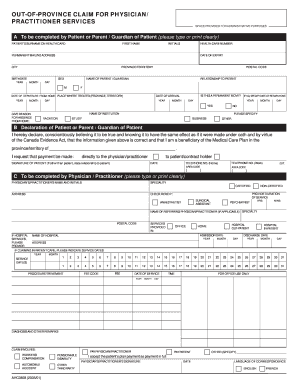
The Out-of-Country Claim Form is a healthcare document used by residents of British Columbia to claim reimbursement for medical services received outside of Canada.
pdfFiller scores top ratings on review platforms




Who needs Canada HLTH 2814?
Explore how professionals across industries use pdfFiller.

Canada HLTH 2814 is needed by:
-
British Columbia residents seeking reimbursement for out-of-country medical expenses
-
Patients who have received healthcare services outside of Canada
-
Legal guardians or representatives of patients requiring reimbursement claims
-
Individuals applying for medical reimbursement through the Medical Services Plan
-
Healthcare professionals assisting patients with completing reimbursement forms
Comprehensive Guide to Canada HLTH 2814
What is the Out-of-Country Claim Form?
The Out-of-Country Claim Form is essential for British Columbia residents seeking reimbursement for medical services received outside Canada. This form facilitates claims for various healthcare services, ensuring residents can access necessary care while abroad. Timely submission of the claim is crucial for maximizing chances of reimbursement.
Eligible medical services include emergency treatments and other healthcare necessities incurred during travel. Understanding the importance of adhering to the 90-day submission deadline enhances the effectiveness of the reimbursement process.
Why Use the Out-of-Country Claim Form?
Utilizing the Out-of-Country Claim Form streamlines the healthcare reimbursement process for residents. It simplifies the submission of medical expenses incurred abroad, promoting a more efficient claims experience. Through the Medical Services Plan (MSP), users gain additional advantages, ensuring they receive the financial support they need for out-of-country treatments.
Leveraging this form can significantly reduce the time and effort involved in processing claims, leading to quicker reimbursements and peace of mind.
Who Needs the Out-of-Country Claim Form?
Individuals eligible to use the Out-of-Country Claim Form include British Columbia residents traveling for various reasons, such as vacations, studies, or work-related assignments. Understanding the specific scenarios in which this form is relevant can help users navigate their eligibility effectively.
-
Traveling for vacation
-
Studying abroad
-
Business trips
-
Seeking medical care outside Canada
Eligibility criteria must be met during the filing process to ensure that claims are processed smoothly.
How to Fill Out the Out-of-Country Claim Form (Step-by-Step Guide)
Completing the Out-of-Country Claim Form requires careful attention to detail. Start by gathering your Personal Health Number (PHN) and address history. Ensuring accurate data in each field is vital for a successful claim submission.
-
Provide personal details including your name and address.
-
Attach necessary documents such as receipts or bills.
-
Review the form for any errors before submission.
Every detail matters to avoid delays in the claims process. Double-checking your entries can prevent common pitfalls that lead to claim rejections.
Information You'll Need to Gather Before Completing the Form
Before filling out the Out-of-Country Claim Form, gather essential personal and medical information. Key items include your PHN, details about your employer, and reasons for your absence from British Columbia.
-
Personal Health Number (PHN)
-
Employer details
-
Reason for absence
-
Travel insurance information
Having complete and accurate information ready is crucial for a successful claim submission.
Common Mistakes to Avoid When Submitting the Out-of-Country Claim Form
Being aware of common mistakes can help avoid claim rejections or delays. Frequent errors include missing signatures, incomplete addresses, and omitting necessary documents.
-
Check for missing signatures
-
Ensure all contact details are complete
-
Validate the attached receipts or bills
Implementing a final review using a checklist can minimize errors and enhance the claim's success rate.
How to Submit and Track Your Out-of-Country Claim
There are several ways to submit your Out-of-Country Claim Form: online or by mail. Each method has specific steps to follow to ensure proper submission.
-
Online submission via the MSP portal
-
Mail to the appropriate claim processing address
Tracking the status of your submitted claims is also vital. Knowing what to do if your claim is denied, including exploring appeal options, can save you stress and time.
Security and Compliance When Using the Out-of-Country Claim Form
Since the Out-of-Country Claim Form involves sensitive medical information, addressing privacy concerns is crucial. Ensure you understand the security measures in place, such as encryption and compliance with regulations like HIPAA and GDPR.
Utilizing secure platforms for form submission enhances the protection of your personal data, promoting confidence in the claims process.
Simplifying Your Claims Process with pdfFiller
pdfFiller offers an efficient solution for filling out and securely submitting the Out-of-Country Claim Form. Featuring tools for editing, document tracking, and eSignature capabilities, it enhances the user experience significantly.
Exploring pdfFiller’s capabilities can streamline your form management process, making it more straightforward and less time-consuming.
Final Steps and Encouragement to Use pdfFiller
Completing the Out-of-Country Claim Form accurately and promptly is essential for success. Engage with pdfFiller’s platform to experience an efficient and reliable solution for managing your forms.
Trust in pdfFiller throughout your claims process empowers users to take control of their healthcare reimbursement needs effectively.
How to fill out the Canada HLTH 2814
-
1.Access the Out-of-Country Claim Form on pdfFiller by searching for the document name in the search bar.
-
2.Open the form in pdfFiller by clicking on the file. Ensure you have a reliable internet connection to avoid disruptions.
-
3.Gather all necessary information before starting to fill out the form. This includes your personal health number, addresses, and details about the medical treatment received.
-
4.Use the fillable fields in pdfFiller to enter the required information accurately. You can click on each field to type or select options.
-
5.Complete all fields marked as mandatory to ensure your application is valid. Double-check entries like your name, personal health number, and reason for absence.
-
6.After filling out the form, review all the information entered for accuracy. Ensure that no required information is left blank and all details match your documentation.
-
7.Finalize the form by using pdfFiller's tools to save or print the document. Make sure to attach all original receipts or bills to the completed form.
-
8.Save your completed form to your device or download it directly from pdfFiller. To submit, follow the instructions for submission as outlined by the Medical Services Plan or relevant authority.

Am I eligible to use the Out-of-Country Claim Form?
Yes, residents of British Columbia who have received medical services outside of Canada can use this form to request a reimbursement for their expenses. Ensure you have your personal health number and details of your treatment.
What documents do I need to submit with the claim form?
Along with the Out-of-Country Claim Form, you must attach original receipts or bills for the medical services you received. Ensure they are clear and itemized for the best processing results.
How long do I have to submit my claim?
Claims must be submitted within 90 days from the date of service to be considered for reimbursement. Late submissions may not be processed.
How should I submit the completed form?
The completed Out-of-Country Claim Form can typically be submitted by mail or online, depending on the guidelines provided by the Medical Services Plan. Check their official website for specific submission instructions.
What common mistakes should I avoid when filling out the form?
To avoid delays, ensure that all fields are filled accurately, particularly the personal health number and contact information. Double-check that all required documents are included with your submission.
What is the processing time for the reimbursement claim?
Processing times can vary but typically take several weeks. For the most accurate information, check directly with the Medical Services Plan or your health insurance provider.
Do I need to notarize the Out-of-Country Claim Form?
No, notarization is not required for the Out-of-Country Claim Form. However, the form must be signed by the patient or their legal guardian.
Canada HLTH 2814 Form Versions
Related Content
Related Forms


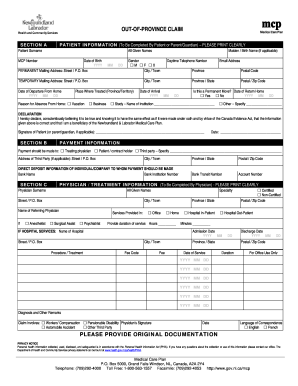


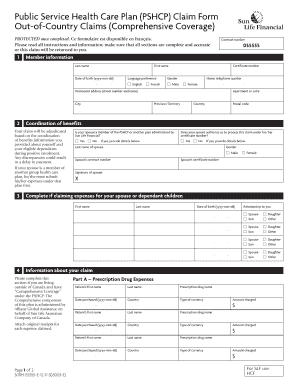
Get the latest insights from our blog


If you believe that this page should be taken down, please follow our DMCA take down process
here
.
This form may include fields for payment information. Data entered in these fields is not covered by PCI DSS compliance.