
Last updated on
Nov 9, 2026
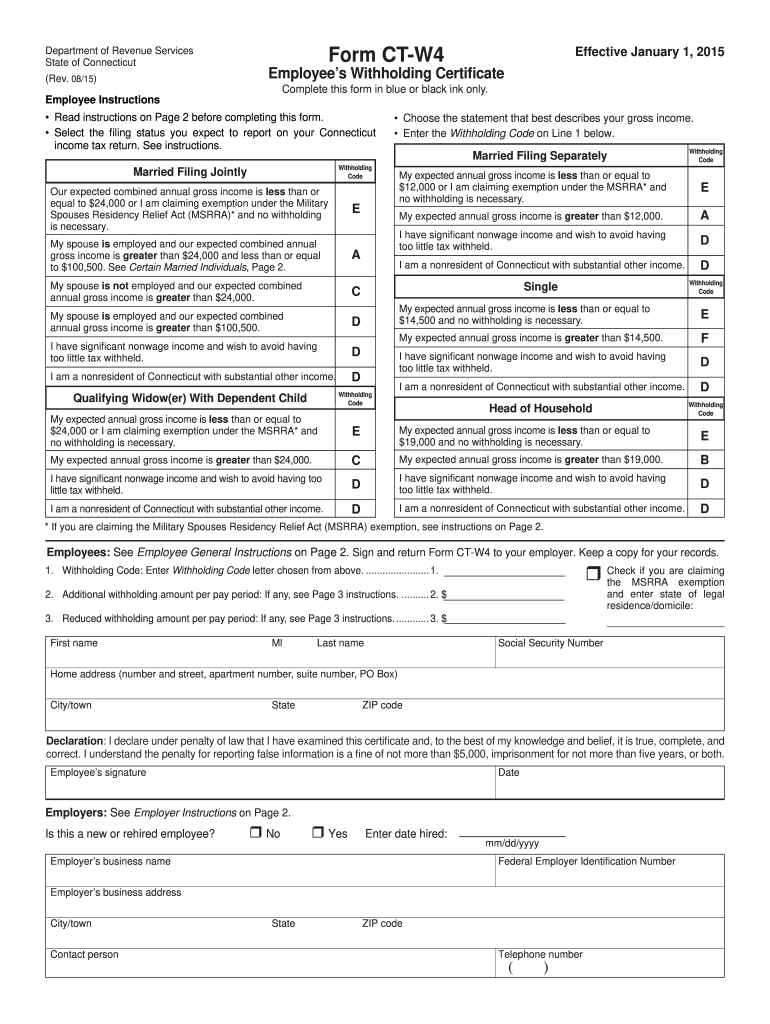
CT DRS CT-W4 2015 free printable template
pdfFiller is not affiliated with any government organization

Fill out
Complete the form online in a simple drag-and-drop editor.

eSign
Add your legally binding signature or send the form for signing.

Share
Share the form via a link, letting anyone fill it out from any device.

Export
Download, print, email, or move the form to your cloud storage.
Why pdfFiller is the best tool for your documents and forms


End-to-end document management
From editing and signing to collaboration and tracking, pdfFiller has everything you need to get your documents done quickly and efficiently.
Accessible from anywhere
pdfFiller is fully cloud-based. This means you can edit, sign, and share documents from anywhere using your computer, smartphone, or tablet.
Secure and compliant
pdfFiller lets you securely manage documents following global laws like ESIGN, CCPA, and GDPR. It's also HIPAA and SOC 2 compliant.
What is CT DRS CT-W4
The Connecticut Form CT-W4 is a state tax form used by employees in Connecticut to certify their withholding allowances for state income tax purposes.
pdfFiller scores top ratings on review platforms




So simple and effective!
Liz Carrillo
Austin,Tx
Just did the trial and bought the product. It seems to be just what I was looking for.
awesome, so helpful. super easy to use love it
It worked very well for me, though I really only needed it to complete one government document.
Quickly created my document and now I have the appropriate paperwork for my business. Well worth the time and investment.
Works pretty good. Could use some better documentation
Who needs CT DRS CT-W4?
Explore how professionals across industries use pdfFiller.

CT DRS CT-W4 is needed by:
-
Connecticut employees needing to adjust their state income tax withholding
-
Employers in Connecticut requiring withholding information from their employees
-
Tax professionals assisting clients with tax planning in Connecticut
-
Individuals preparing their state tax returns in Connecticut
-
HR departments managing payroll and employee tax documentation
Comprehensive Guide to CT DRS CT-W4
What is the Connecticut Form CT-W4 Employee’s Withholding Certificate?
The Connecticut Form CT-W4 Employee’s Withholding Certificate is crucial for employees to certify their state tax withholding allowances. This form directly affects the amount of Connecticut income tax withheld from paychecks, ensuring compliance with state tax regulations. To complete the CT-W4, employees must provide personal information, including their name, Social Security number, and address.
Purpose and Benefits of the Connecticut Form CT-W4
Completing the Connecticut Form CT-W4 accurately allows employees to declare their withholding allowances and significantly influences their state income tax obligations. By certifying their exemptions accurately, employees can potentially increase their take-home pay by reducing over-withholding. The form serves as a vital tool for financial planning for Connecticut residents.
Who Needs the Connecticut Form CT-W4 Employee’s Withholding Certificate?
The CT-W4 form is necessary for a range of employees in Connecticut. This includes individuals who are newly hired, those who have recently changed jobs, or anyone needing to revise their withholding allowances. Eligibility to use this form is essential for anyone subject to Connecticut state income tax.
How to Fill Out the Connecticut Form CT-W4 Online (Step-by-Step)
Following these steps will help you fill out the Connecticut Form CT-W4 efficiently:
-
Access the CT-W4 template online through pdfFiller.
-
Provide necessary details in the designated fields, including your withholding code.
-
Indicate any additional or reduced withholding amounts that apply to your situation.
-
Thoroughly review the information entered to prevent common mistakes.
Common errors include inaccuracies in personal information or incorrect withholding amounts, so it’s wise to double-check your entries before submission.
Common Errors and How to Avoid Them
Prevent potential rejections by being aware of frequent mistakes when filling out the CT-W4 form. Common issues include:
-
Missing personal information like Social Security numbers.
-
Incorrectly calculated withholding allowances.
-
Neglecting to provide a signature or completing the signature field improperly.
Verification is critical; review the form carefully to ensure all required fields are correctly filled out before submission.
How to Sign the Connecticut Form CT-W4 Employee’s Withholding Certificate
Signing the CT-W4 form can be done in various ways. Employees can choose between using a digital signature or a traditional wet signature. Ensure that the proper signature fields are completed to validate the form, as missing signatures can lead to processing delays.
Where and How to Submit the Connecticut Form CT-W4
Once completed, the Connecticut Form CT-W4 must be returned to your employer using the preferred method of delivery. Typically, employees submit the form directly to human resources or payroll departments. After submitting, confirm with your employer regarding the status of your form to ensure it is processed accurately.
Security and Compliance with the Connecticut Form CT-W4
pdfFiller prioritizes security while handling sensitive information on the Connecticut Form CT-W4. Features include 256-bit encryption and compliance with regulations like HIPAA and GDPR, assuring users that their personal data remains protected throughout the form-filling process. It’s essential to safeguard this information to prevent unauthorized access.
Ready to Fill Out Your Connecticut Form CT-W4?
Utilizing pdfFiller streamlines the form completion process. With user-friendly features, you can easily fill out the CT-W4 form accurately and efficiently. It is vital to file the CT-W4 correctly and on time to meet your state income tax obligations smoothly.
How to fill out the CT DRS CT-W4
-
1.Access pdfFiller and search for 'Connecticut Form CT-W4' to locate the form.
-
2.Open the form in the pdfFiller interface, ensuring you have a stable internet connection.
-
3.Gather necessary information before starting, such as your name, social security number, and address.
-
4.Begin by filling out the 'Withholding Code' section, selecting the appropriate code based on your situation.
-
5.Next, indicate any additional or reduced withholding amounts per pay period as applicable.
-
6.Ensure all fillable fields are completed accurately, referencing any require data carefully.
-
7.Double-check all entries to ensure that all required personal information and withholding adjustments are correct.
-
8.Review the entire form for completeness and correctness, making any necessary edits.
-
9.Once satisfied, proceed to finalize the form by signing electronically within pdfFiller.
-
10.Save your completed form to your device or directly submit it to your employer using the provided options on pdfFiller.

Who is required to fill out the Connecticut Form CT-W4?
Any employee working in Connecticut who wishes to certify their withholding allowances for state income tax must fill out this form.
What information do I need to complete the CT-W4 form?
You will need your name, social security number, address, and details regarding your withholding allowances.
Where do I submit the completed CT-W4 form?
After completing the form, submit it directly to your employer, as they use it to calculate your state income tax withholding.
Are there any deadlines for submitting the CT-W4 form?
While there are no set deadlines for submitting the CT-W4 form, it is advised to do so promptly upon starting a new job or making changes to your withholding.
Can I make changes to my withholding after submitting the CT-W4?
Yes, you can submit a new CT-W4 form at any time to adjust your withholding allowances based on changing circumstances.
What are common mistakes to avoid when filling out the CT-W4 form?
Common mistakes include not providing complete personal information and overlooking the correct withholding code. Always review the form before submission.
Is there a fee for filing the Connecticut Form CT-W4?
No, there is typically no fee associated with filing the Connecticut Form CT-W4; it is a standard tax form provided by the state.
CT DRS CT-W4 Form Versions
Related Content
Related Forms




Related Catalogs
Get the latest insights from our blog


If you believe that this page should be taken down, please follow our DMCA take down process
here
.
This form may include fields for payment information. Data entered in these fields is not covered by PCI DSS compliance.