
Last updated on
Oct 2, 2026

ICS 225 NFES 1576 free printable template
pdfFiller is not affiliated with any government organization

Fill out
Complete the form online in a simple drag-and-drop editor.

eSign
Add your legally binding signature or send the form for signing.

Share
Share the form via a link, letting anyone fill it out from any device.

Export
Download, print, email, or move the form to your cloud storage.
Why pdfFiller is the best tool for your documents and forms


End-to-end document management
From editing and signing to collaboration and tracking, pdfFiller has everything you need to get your documents done quickly and efficiently.
Accessible from anywhere
pdfFiller is fully cloud-based. This means you can edit, sign, and share documents from anywhere using your computer, smartphone, or tablet.
Secure and compliant
pdfFiller lets you securely manage documents following global laws like ESIGN, CCPA, and GDPR. It's also HIPAA and SOC 2 compliant.
What is ICS 225 NFES 1576
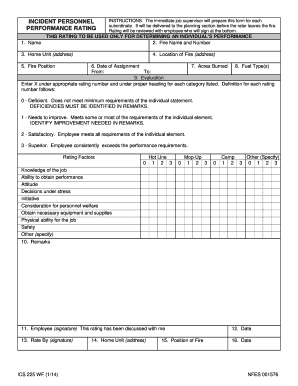
The Incident Personnel Performance Rating Form is a performance review document used by fire department supervisors to evaluate subordinates' effectiveness during fire incidents.
pdfFiller scores top ratings on review platforms




Who needs ICS 225 NFES 1576?
Explore how professionals across industries use pdfFiller.

ICS 225 NFES 1576 is needed by:
-
Fire department supervisors conducting performance reviews
-
Employees subject to performance evaluation in fire incidents
-
Human resources personnel managing fire department evaluations
-
Compliance officers ensuring evaluation processes are followed
-
Training coordinators assessing incident response effectiveness
Comprehensive Guide to ICS 225 NFES 1576
What is the Incident Personnel Performance Rating Form
The Incident Personnel Performance Rating Form serves as a crucial tool in evaluating the effectiveness of fire department personnel. It includes essential information such as fire name, location, and performance ratings, ensuring a comprehensive assessment of each incident. The requirement for both employee and rater signatures underscores its importance in maintaining accountability and documentation integrity.
Purpose and Benefits of the Incident Personnel Performance Rating Form
This form is integral to fire department operations as it facilitates objective evaluation of staff performance. By utilizing this form, departments can foster a culture of accountability and professional development among team members. Additionally, it streamlines the documentation process for performance reviews, making evaluations more efficient and organized.
Key Features of the Incident Personnel Performance Rating Form
The Incident Personnel Performance Rating Form includes various distinct features designed to enhance usability and accuracy. Key elements of the form are:
-
Fillable fields that allow for easy data entry.
-
Checkboxes to simplify the evaluation process.
-
Clear instructions for completing and signing the document.
-
Compliance with security standards during submission, ensuring data protection.
Who Needs the Incident Personnel Performance Rating Form
This form is essential for multiple roles within a fire department, particularly:
-
Supervisors responsible for evaluating their teams.
-
Subordinates undergoing performance assessments.
It is typically used in conjunction with fire incidents to accurately evaluate personnel, emphasizing its relevance in operational readiness and performance appraisal.
How to Fill Out the Incident Personnel Performance Rating Form Online (Step-by-Step)
Filling out the Incident Personnel Performance Rating Form online is a straightforward process using pdfFiller. Follow these steps:
-
Access the form through pdfFiller's cloud-based platform.
-
Fill out all required fields with accurate information.
-
Utilize editing features for any necessary enhancements.
-
Carefully review the completed form before submission.
-
Ensure both employee and rater sign the document.
Submission Methods and Delivery for the Incident Personnel Performance Rating Form
Once the Incident Personnel Performance Rating Form is completed, various submission methods are available:
-
Online submission through pdfFiller for quick processing.
-
Printing the form for traditional, physical submission.
Remember to confirm that both signatures are included prior to submission to avoid any potential delays, and utilize submission tracking features when possible.
Common Errors and How to Avoid Them When Using the Incident Personnel Performance Rating Form
While filling out the form, there are common errors users should strive to avoid:
-
Incomplete sections that can lead to inaccurate evaluations.
-
Misplaced signatures that may invalidate the form.
To prevent mistakes, double-check all information before submission and ensure proper digitization to maintain accuracy.
Security and Compliance When Using the Incident Personnel Performance Rating Form
Users can feel confident about the security of handling the Incident Personnel Performance Rating Form. pdfFiller adheres to robust privacy standards, including:
-
Compliance with HIPAA and GDPR guidelines.
-
256-bit encryption to safeguard sensitive data.
This ensures that all submitted forms are managed and stored securely, providing peace of mind for both employees and raters.
Utilizing pdfFiller to Enhance Your Form Experience
pdfFiller offers an array of features that can significantly improve the experience of filling out the Incident Personnel Performance Rating Form. Users benefit from:
-
Ease of use through a user-friendly, cloud-based platform.
-
Capabilities to edit, eSign, and share documents directly from the tool.
By leveraging these features, users can streamline their experience and ensure secure handling of the form throughout the evaluation process.
How to fill out the ICS 225 NFES 1576
-
1.Access the Incident Personnel Performance Rating Form by visiting pdfFiller's website and logging into your account.
-
2.Use the search bar to locate the form by entering its name. Click on the form to open it in the editing interface.
-
3.Before filling out the form, collect essential information such as the incident name, location, and performance metrics relevant to the employee's role.
-
4.Navigate through the form using the provided fields. Click on each fillable area to input data like fire details and performance ratings.
-
5.Utilize the checklist features where applicable to ensure all aspects of the rating are thoroughly evaluated.
-
6.Review each section carefully, ensuring all necessary details are complete and accurately represented. Pay close attention to the signature areas for both the employee and the rater.
-
7.Once all fields are completed and the form is reviewed, save your progress periodically using the save option.
-
8.Finalize the document by clicking the 'Submit' button if required, or choose to download it as a PDF for your records.

Who is eligible to use the Incident Personnel Performance Rating Form?
The form is designed for use by fire department employees being evaluated by their supervisors, as well as the supervisors themselves who are completing the ratings.
Is there a deadline for submitting the completed performance rating form?
Deadlines for the form's submission may vary by department policy. It's advisable to consult with your supervisor regarding specific deadlines for evaluation processes.
How should I submit the completed Incident Personnel Performance Rating Form?
The completed form can be submitted directly through pdfFiller if the department uses an electronic submission system, or it may need to be printed and submitted physically to HR.
What supporting documents are required when submitting the form?
Typically, no additional documents are required; however, performance-related records or previous reviews can provide context and support during evaluations.
What common mistakes should I avoid when filling out the form?
Common mistakes include leaving fields blank, providing unclear ratings, and forgetting to obtain signatures from both the employee and the rater before submission.
How long does it take to process the performance rating form?
The processing time can vary depending on departmental procedures. Generally, evaluations should be reviewed and finalized within a few days to a week after submission.
Are there any fees associated with completing the form?
There are usually no fees for completing the performance rating form unless specific processing or administrative fees are established by the fire department.
Related Forms



Related Catalogs
Get the latest insights from our blog


If you believe that this page should be taken down, please follow our DMCA take down process
here
.
This form may include fields for payment information. Data entered in these fields is not covered by PCI DSS compliance.