
Last updated on
Nov 6, 2026

Daily Accountability Sheet free printable template
We are not affiliated with any brand or entity on this form

Fill out
Complete the form online in a simple drag-and-drop editor.

eSign
Add your legally binding signature or send the form for signing.

Share
Share the form via a link, letting anyone fill it out from any device.

Export
Download, print, email, or move the form to your cloud storage.
Why pdfFiller is the best tool for your documents and forms


End-to-end document management
From editing and signing to collaboration and tracking, pdfFiller has everything you need to get your documents done quickly and efficiently.
Accessible from anywhere
pdfFiller is fully cloud-based. This means you can edit, sign, and share documents from anywhere using your computer, smartphone, or tablet.
Secure and compliant
pdfFiller lets you securely manage documents following global laws like ESIGN, CCPA, and GDPR. It's also HIPAA and SOC 2 compliant.
What is Daily Accountability Sheet
The Daily Accountability Sheet is a productivity tracking document used by individuals to monitor daily activities, time spent on tasks, and personal notes.
pdfFiller scores top ratings on review platforms




Very helpful and easy to navigate awesome program
Great Expirience, love the site, helpfull
Who needs Daily Accountability Sheet?
Explore how professionals across industries use pdfFiller.

Daily Accountability Sheet is needed by:
-
Professionals looking to enhance productivity
-
Freelancers managing project time
-
Students tracking study hours
-
Business owners overseeing employee activities
-
Individuals seeking personal accountability in time management
Comprehensive Guide to Daily Accountability Sheet
What is the Daily Accountability Sheet?
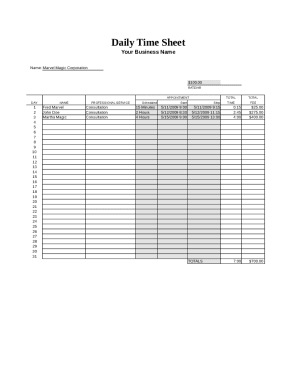
The Daily Accountability Sheet is a structured form designed to enhance personal and professional accountability by tracking daily activities. This form serves to document various types of information including tasks completed, time spent on each task, and any additional notes. By utilizing this time tracking form, users can gain clarity on their productivity, enabling better management of their responsibilities.
Purpose and Benefits of the Daily Accountability Sheet
Tracking daily activities is crucial for maintaining productivity. The Daily Accountability Sheet operates as an effective productivity tracker, helping individuals and teams manage their time more efficiently. This tool not only supports task-related accountability but also aids in financial oversight by providing insight into hours worked and tasks completed.
Key Features of the Daily Accountability Sheet
The Daily Accountability Sheet includes several vital fields that users must fill out: 'Week Day', 'Date', 'Time', 'Required Subject', 'What did you do?', 'Spent', and 'Notes'. These fields facilitate comprehensive tracking of daily tasks, making it easier for users to monitor their progress. To enhance accessibility, fillable forms are utilized, allowing for seamless data entry. Additionally, integration with pdfFiller's tools offers robust editing capabilities, making it a convenient choice for users.
Who Needs the Daily Accountability Sheet?
The Daily Accountability Sheet is beneficial for a diverse group of users, including freelancers, teams, and employees. It proves particularly useful in scenarios such as tracking billable hours for service providers. Various industries, from healthcare to consulting, can leverage this time tracking form to foster improved productivity and clearer accountability.
How to Fill Out the Daily Accountability Sheet Online (Step-by-Step)
-
Access the Daily Accountability Sheet via pdfFiller.
-
Begin inputting data in the specified fields, ensuring all relevant information is included.
-
Complete each section thoroughly to ensure accuracy in tracking.
Common Errors and How to Avoid Them
While using the Daily Accountability Sheet, users may encounter common pitfalls. Frequent mistakes include incomplete entries and inaccurate reporting of time spent. To mitigate these errors, it is advised to double-check all entries before submission. Utilizing pdfFiller's editing tools can also help ensure data accuracy and integrity.
How to Download and Save the Daily Accountability Sheet PDF
After completing the Daily Accountability Sheet on pdfFiller, users can save their form as a PDF file. This format provides numerous advantages, including easy sharing and secure storage. Prioritizing document security is essential when managing sensitive information, ensuring that data is safely transported and stored.
Security and Compliance for the Daily Accountability Sheet
pdfFiller implements stringent security measures to protect sensitive information, including 256-bit encryption and compliance with regulations like HIPAA and GDPR. This is crucial for individuals tracking their productivity and expenses through the Daily Accountability Sheet, as it helps preserve data integrity and confidentiality when shared with stakeholders.
Using pdfFiller to Enhance Your Daily Accountability Experience
Using pdfFiller can significantly improve the accountability tracking process. With features that allow for easy editing, signing, and sharing of documents, users can streamline their form management practices. Testimonials from users highlight substantial improvements in accountability practices attributed to the efficiencies gained through pdfFiller.
Get Started with Your Daily Accountability Sheet Today!
Embrace the flexibility and ease of using pdfFiller to meet your daily accountability tracking needs. The platform is accessible and user-friendly, empowering individuals to create, edit, and monitor their daily tasks effectively. Start optimizing your productivity today with the Daily Accountability Sheet.
How to fill out the Daily Accountability Sheet
-
1.Access the Daily Accountability Sheet on pdfFiller by searching for the form in the platform's search bar.
-
2.Once located, click on the form to open it. pdfFiller’s user-friendly interface will display the document.
-
3.Before starting, gather necessary information such as the day of the week, date, tasks performed, time spent, and any notes you wish to include.
-
4.Begin filling in the fields starting from the 'Week Day' and 'Date,' using the calendar tool if needed for accuracy.
-
5.Proceed to the 'Required Subject' section where you can specify the main focus of your tasks for the day.
-
6.In the 'What did you do?' area, describe the activities or tasks you've completed while clearly indicating each task.
-
7.For the 'Spent' section, enter the duration of time allocated for each task, ensuring you keep accurate records.
-
8.Use the 'Notes' field for any additional comments, insights, or reflections about your day or specific tasks.
-
9.Once all fields are completed, review the form carefully to ensure all information is accurate and there are no errors.
-
10.Finally, save your work by clicking 'Save' in the top right corner, or download the form for offline use or submission by selecting 'Download.'
-
11.If you are finished with your session, submit the document if required by your organization or save it to your pdfFiller account for future reference.

Who can use the Daily Accountability Sheet?
Anyone seeking to track their daily activities, including professionals, students, and freelancers, can use the Daily Accountability Sheet to monitor their productivity and time management.
Is there a deadline for completing this form?
While there are no specific deadlines associated with the Daily Accountability Sheet, it is best to fill it out daily to maintain accurate tracking of your activities.
How do I submit the Daily Accountability Sheet once completed?
You can submit the Daily Accountability Sheet by downloading it from pdfFiller and emailing it to your supervisor or printing it out for physical submission, depending on your needs.
What supporting documentation do I need when using this form?
Typically, no additional documentation is required for this form. However, it’s helpful to have a list of tasks and time details at hand before you begin filling it out.
What common mistakes should I avoid when filling out this form?
Ensure you avoid incomplete entries, such as leaving key fields blank (e.g., time spent). Double-check for typos or errors before finalizing the form.
How long does it take to process the information from this form?
The Daily Accountability Sheet does not require formal processing. However, reviewing your entries should be done daily to track your progress effectively.
Can I edit the Daily Accountability Sheet after saving?
Yes, once saved, you can reopen and edit the Daily Accountability Sheet anytime on pdfFiller to update or refine your entries as needed.
Related Forms

Get the latest insights from our blog


If you believe that this page should be taken down, please follow our DMCA take down process
here
.
This form may include fields for payment information. Data entered in these fields is not covered by PCI DSS compliance.