
Last updated on
Sep 18, 2026
eForms General Bill of Sale 2016-2026 free printable template
pdfFiller is not affiliated with any government organization

Fill out
Complete the form online in a simple drag-and-drop editor.

eSign
Add your legally binding signature or send the form for signing.

Share
Share the form via a link, letting anyone fill it out from any device.

Export
Download, print, email, or move the form to your cloud storage.
Why pdfFiller is the best tool for your documents and forms


End-to-end document management
From editing and signing to collaboration and tracking, pdfFiller has everything you need to get your documents done quickly and efficiently.
Accessible from anywhere
pdfFiller is fully cloud-based. This means you can edit, sign, and share documents from anywhere using your computer, smartphone, or tablet.
Secure and compliant
pdfFiller lets you securely manage documents following global laws like ESIGN, CCPA, and GDPR. It's also HIPAA and SOC 2 compliant.
What is eForms General Bill of Sale
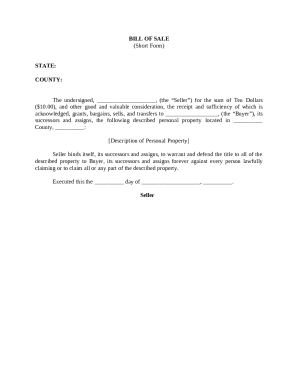
The General Bill of Sale is a legal document used by individuals in the United States to transfer ownership of personal property from a seller to a buyer.
pdfFiller scores top ratings on review platforms




Who needs eForms General Bill of Sale?
Explore how professionals across industries use pdfFiller.

EForms General Bill of Sale is needed by:
-
Individuals selling personal property
-
Buyers of personal items
-
Real estate agents facilitating property sales
-
Witnesses to property transactions
-
Notaries public for document verification
-
Customs agents for compliance verification
Comprehensive Guide to eForms General Bill of Sale
What is the General Bill of Sale?
The General Bill of Sale is a legal document utilized primarily for transferring ownership of personal property. This document outlines the details necessary for a transaction, including the identities of the seller and buyer, and the specifics of the property being sold. To ensure validity, it is crucial that both parties sign the document.
This document serves as a "personal property sale form," providing a clear record of the transaction while also fulfilling the requirements of a "general bill of sale template" that can be easily customized for individual needs.
Purpose and Benefits of Using a General Bill of Sale
Individuals utilize a General Bill of Sale for several reasons, primarily for the legal protection it affords both sellers and buyers during property transactions. This document clearly documents the purchase, encompassing vital information such as the description of the item and the purchase price.
-
Secures legal protection for both parties involved in the transaction.
-
Ensures clarity and transparency with detailed purchase documentation.
-
Acts as a reliable "seller buyer agreement form" recognized in the US.
Key Features of the General Bill of Sale Document
The General Bill of Sale includes essential elements that help streamline the transaction process. One of its key features is the fillable form template, designed with specific fields for necessary information relevant to the sale.
The document also requires notarization to validate the agreement, making it a legally binding contract. Notarization adds an extra layer of security, ensuring all details are properly recorded and acknowledged.
Furthermore, it emphasizes the importance of "bill of sale notarization" to uphold the integrity of the document.
Who Should Use the General Bill of Sale?
The General Bill of Sale is beneficial for various parties involved in property transactions. Sellers looking to transfer ownership of personal property find this document integral to the process. Likewise, buyers utilize the bill to secure proof of purchase, which is vital for confirming ownership rights.
-
Sellers needing to document the transfer of their property.
-
Buyers seeking proof of purchase for confirmation of ownership.
-
Witnesses who may need to validate the agreement through their signatures.
How to Fill Out the General Bill of Sale Online (Step-by-Step)
Filling out a General Bill of Sale online through pdfFiller can be accomplished with several straightforward steps:
-
Access the bill of sale template on pdfFiller.
-
Enter the required information into the form fields, including the seller’s and buyer’s names and addresses.
-
Complete sections detailing purchase specifics, such as date and item description.
-
Ensure acknowledgement of 'as is' conditions by the buyer.
Following these steps ensures a proper completion of the "general bill of sale template," allowing for easy processing of the transaction.
Digital Signature vs. Wet Signature Requirements for Notarization
Understanding signing requirements is critical when creating a General Bill of Sale. A digital signature may be acceptable in certain jurisdictions, but traditional wet signatures are often required for notarization depending on local regulations.
This guidance is essential for securing notarization for the General Bill of Sale. Emphasizing security during the signing process protects both parties and ensures the validity of the document.
Security and Compliance for the General Bill of Sale
Security plays a vital role in handling personal documents like the General Bill of Sale. pdfFiller implements robust security measures, including 256-bit encryption, to safeguard sensitive information throughout the process.
Moreover, compliance with regulations such as HIPAA and GDPR further underscores the importance of maintaining confidentiality and protection for personal data during transactions.
How to Download, Save, and Print the General Bill of Sale
After completing the General Bill of Sale, users should follow these tips for managing the document:
-
Download the bill as a PDF for personal records.
-
Save the completed document in a secure location to prevent data loss.
-
Print the document ensuring all relevant information is clear and legible.
Maintaining a copy of the General Bill of Sale is fundamental for future reference and record-keeping.
What Happens After You Submit the General Bill of Sale?
After submitting the General Bill of Sale, various outcomes may occur. Typically, parties can expect an acknowledgment confirming receipt of the document. Additionally, it is essential to understand the record-keeping practices that may follow.
If the platform used for submission offers tracking, users can monitor the status of their document, ensuring all parties are informed regarding the progression of the transaction.
Explore pdfFiller for Your Document Needs!
pdfFiller streamlines the process of creating, editing, and signing all types of documents, including the General Bill of Sale. Users can take full advantage of the fillable forms and robust security features inherent to the platform.
Discover how easily pdfFiller allows you to manage documents from any browser without needing downloads, catering to all your document management needs.
How to fill out the eForms General Bill of Sale
-
1.To access the General Bill of Sale on pdfFiller, visit the website and enter 'General Bill of Sale' in the search bar to find the template.
-
2.Once you locate the form, click on it to open the fillable document in the pdfFiller interface.
-
3.Before starting, gather necessary details such as your name, the buyer's name, addresses, item descriptions, and the purchase price for accurate completion.
-
4.Begin filling out the form by clicking on each blank field or checkbox. pdfFiller allows you to type directly into the form with user-friendly text fields.
-
5.For the items being sold, provide clear and accurate descriptions to ensure all parties understand what is included in the sale.
-
6.As you proceed, remember to fill in the date of the transaction and both parties' signatures in the designated areas.
-
7.After completing all required fields, take a moment to review the finished document for any errors or omissions.
-
8.Once satisfied, you can save the form directly on pdfFiller by clicking 'Save' or export it by selecting the download option for your preferred file format.
-
9.If needed, print the completed document by using the 'Print' option, ensuring all signatures and notarizations are included.
-
10.Lastly, you can submit the General Bill of Sale to the appropriate parties via email by using pdfFiller’s sharing options to ensure it reaches the buyer and seller.

Who needs to sign the General Bill of Sale?
The General Bill of Sale requires signatures from the Seller, Buyer, and two witnesses. All parties involved in the transaction must sign to validate the document legally.
Is notarization required for this form?
Yes, the General Bill of Sale must be notarized to be considered valid. This step ensures legal authenticity and protects both parties involved in the transaction.
What if I made a mistake while filling out the form?
If you make a mistake on the General Bill of Sale, you can correct it directly in pdfFiller before saving. Always double-check the information before finalizing the document.
Why is it important to include detailed item descriptions?
Detailed item descriptions in the General Bill of Sale clarify what is being transferred and prevent future disputes over the terms of the sale. Be specific to protect all parties involved.
How do I ensure the form is legally binding?
To ensure the General Bill of Sale is legally binding, all required parties must sign the document, and it must be notarized. Follow all instructions carefully to maintain its validity.
Can I complete this form online?
Yes, you can complete the General Bill of Sale online using the pdfFiller platform. It allows you to fill, sign, and save the document digitally for convenience.
What should I do after signing the form?
After signing the General Bill of Sale, make sure to have it notarized. Then, provide copies to all parties involved and keep one for your own records to ensure future reference.
Related Forms


Related Catalogs
Get the latest insights from our blog


If you believe that this page should be taken down, please follow our DMCA take down process
here
.
This form may include fields for payment information. Data entered in these fields is not covered by PCI DSS compliance.