
Last updated on
Oct 19, 2026

Treasury EFTPS 9787 2007-2026 free printable template
pdfFiller is not affiliated with any government organization

Fill out
Complete the form online in a simple drag-and-drop editor.

eSign
Add your legally binding signature or send the form for signing.

Share
Share the form via a link, letting anyone fill it out from any device.

Export
Download, print, email, or move the form to your cloud storage.
Why pdfFiller is the best tool for your documents and forms


End-to-end document management
From editing and signing to collaboration and tracking, pdfFiller has everything you need to get your documents done quickly and efficiently.
Accessible from anywhere
pdfFiller is fully cloud-based. This means you can edit, sign, and share documents from anywhere using your computer, smartphone, or tablet.
Secure and compliant
pdfFiller lets you securely manage documents following global laws like ESIGN, CCPA, and GDPR. It's also HIPAA and SOC 2 compliant.
What is Treasury EFTPS 9787
The Tax Form 9787 Update Form is a federal tax document used by taxpayers to correct or modify their Electronic Federal Tax Payment System (EFTPS) enrollment information.
pdfFiller scores top ratings on review platforms




Who needs Treasury EFTPS 9787?
Explore how professionals across industries use pdfFiller.

Treasury EFTPS 9787 is needed by:
-
Taxpayers needing to update their EFTPS information
-
Individual taxpayers filing for federal taxes
-
Accountants managing client tax details
-
Tax preparers assisting with EFTPS enrollments
-
Businesses using EFTPS for federal tax payments
-
Estate administrators handling tax matters
Comprehensive Guide to Treasury EFTPS 9787
What is the Tax Form 9787 Update Form?
The Tax Form 9787 Update Form is designed to modify enrollment information for the Electronic Federal Tax Payment System (EFTPS). This essential form enables taxpayers to correct discrepancies in their enrollment data, ensuring accuracy and compliance with IRS requirements. A key feature of the form is that it necessitates the taxpayer's signature, reflecting their participation and authorization for making such changes.
Purpose and Benefits of the Tax Form 9787 Update Form
The primary purpose of the Tax Form 9787 Update Form is to keep the enrollment information accurate and up-to-date. By using this form, taxpayers can easily correct any errors in their data, which is crucial for avoiding complications with tax payments. Timely updates are essential; they help in ensuring that taxpayers comply with regulatory requirements and retain eligibility for EFTPS benefits.
Eligibility Criteria for the Tax Form 9787 Update Form
To be eligible to submit the Tax Form 9787 Update Form, taxpayers must meet certain criteria. These criteria include being an enrolled participant in EFTPS and needing to make adjustments to their previously submitted information. For residents of Colorado, there may be specific local requirements that must be addressed when using this form, underscoring the necessity for taxpayers to evaluate their circumstances carefully.
How to Fill Out the Tax Form 9787 Update Form Online (Step-by-Step)
To complete the Tax Form 9787 Update Form electronically, taxpayers can follow these steps:
-
Access the pdfFiller platform where the form is hosted.
-
Locate the Tax Form 9787 within the platform.
-
Fill out the necessary fields, including checkboxes and areas requiring input.
-
Review the completed form to ensure accuracy.
-
Submit the form as per the provided instructions.
While filling out the form, it is critical to avoid common errors, which can lead to processing delays. Double-check entries before finalizing the submission to enhance accuracy.
Submission and Delivery of the Tax Form 9787 Update Form
After completing the Tax Form 9787 Update Form, taxpayers have several methods available for submitting the form. These methods include electronic submission through the EFTPS portal or mailing the completed form to the designated IRS address. It is important to be aware that certain submission methods may involve fees, and processing times can vary based on the chosen method of delivery.
Confirmation and Tracking of Your Submission
Following the submission of the Tax Form 9787 Update Form, taxpayers can confirm receipt by EFTPS. One way to verify status is through the EFTPS tracking system, which provides updates on submitted forms. Understanding potential common rejection reasons can also help taxpayers address issues in a timely manner.
Security and Compliance for the Tax Form 9787 Update Form
When handling the Tax Form 9787 Update Form, maintaining security and compliance is paramount. pdfFiller employs robust security measures, including encryption, to protect sensitive information contained within forms. Compliance with regulations such as HIPAA and GDPR also plays a crucial role in ensuring privacy and data protection while using the platform.
How pdfFiller Helps with the Tax Form 9787 Update Form
pdfFiller enhances the user experience throughout the process of filling out the Tax Form 9787 Update Form. The platform offers features such as easy editing, electronic signature capabilities, and seamless document management. With these tools, taxpayers can efficiently complete the form, significantly reducing the time and effort required to manage their tax documentation.
Sample Tax Form 9787 Update Form
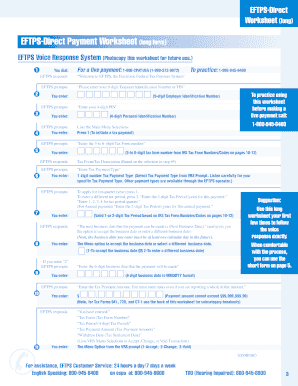
Providing a visual reference, a sample of a completed Tax Form 9787 is available to guide users. Key sections of the form are highlighted, showcasing common entries that can aid in navigating the form effectively. This sample serves as a practical tool for taxpayers looking to understand the structure and requirements of the IRS Form 9787.
Start Using pdfFiller Today for Your Tax Form Needs
Utilizing pdfFiller for tax document creation and modification brings significant advantages. The user-friendly interface allows for easy navigation, coupled with strong security features to protect sensitive information. Taxpayers are encouraged to take immediate action and explore the efficiencies of filling out the Tax Form 9787 Update Form online.
How to fill out the Treasury EFTPS 9787
-
1.To complete the Tax Form 9787 Update Form, begin by accessing the form on pdfFiller. Use the search function to find 'Tax Form 9787 Update Form' or navigate directly to your saved documents if previously filled.
-
2.Once you have opened the form, you'll see various fillable fields. Start by carefully entering your updated personal information and review the instructions provided at the top of the form to identify all necessary sections.
-
3.Gather all necessary information before completing the form. This includes your previous EFTPS details and any changes you wish to make. Ensure you have all supporting documentation handy, if required.
-
4.Use pdfFiller’s features to highlight or mark any necessary checkboxes or fields accurately. Double-check your entry for accuracy to avoid any mistakes, as this could cause processing delays.
-
5.After filling out the necessary fields, review the form for completeness. Make sure all information is correctly entered and consistent with your tax records. Halting at this step can save you from common errors.
-
6.Once satisfied with all details, save your work routinely. Utilize pdfFiller’s download option to download a copy of the completed form, ensuring it is accessible for your records.
-
7.Finally, submit the form through pdfFiller following their submission procedures. Ensure you confirm successful submission by checking for any email confirmation or acknowledgement from EFTPS.

Who is eligible to use the Tax Form 9787 Update Form?
The Tax Form 9787 Update Form is intended for taxpayers enrolled in the Electronic Federal Tax Payment System (EFTPS) who need to modify their enrollment details. This includes individual taxpayers and businesses using EFTPS for federal tax payments.
What is the deadline for submitting the Tax Form 9787 Update Form?
There is no specific deadline for submitting the Tax Form 9787 Update Form. However, it is advisable to update your information as soon as any changes occur to ensure accurate tax payment processing.
How do I submit the Tax Form 9787 Update Form?
The completed Tax Form 9787 Update Form should be printed, signed, and returned to the EFTPS. You can submit it by regular mail or ensure submission through authorized channels as outlined by EFTPS.
Do I need to include supporting documents with the form?
Typically, you do not need to include supporting documents with the Tax Form 9787 Update Form unless specifically requested by the EFTPS requirements or your situation warrants it. Always verify current submission requirements.
What are common mistakes to avoid when filling out the form?
Common mistakes include incorrect personal information, failing to sign the form, and leaving required fields blank. Always double-check your entries for accuracy before submission to avoid processing delays.
How long does it take to process the Tax Form 9787 Update Form?
Processing times for the Tax Form 9787 Update can vary. Generally, you should expect to receive confirmation or updates regarding your submitted form within a few weeks, but this may depend on current processing workloads.
What should I do if I need further assistance with the form?
If you require assistance while filling out the Tax Form 9787 Update Form, you can refer to the IRS guidelines or contact their support for help with specific issues. Alternatively, consulting a tax professional might be beneficial.
Related Forms






Related Catalogs
Get the latest insights from our blog


If you believe that this page should be taken down, please follow our DMCA take down process
here
.
This form may include fields for payment information. Data entered in these fields is not covered by PCI DSS compliance.