
Last updated on
Nov 9, 2026

RushCard Prepaid Visa Parental Consent Form free printable template
pdfFiller is not affiliated with any government organization

Fill out
Complete the form online in a simple drag-and-drop editor.

eSign
Add your legally binding signature or send the form for signing.

Share
Share the form via a link, letting anyone fill it out from any device.

Export
Download, print, email, or move the form to your cloud storage.
Why pdfFiller is the best tool for your documents and forms


End-to-end document management
From editing and signing to collaboration and tracking, pdfFiller has everything you need to get your documents done quickly and efficiently.
Accessible from anywhere
pdfFiller is fully cloud-based. This means you can edit, sign, and share documents from anywhere using your computer, smartphone, or tablet.
Secure and compliant
pdfFiller lets you securely manage documents following global laws like ESIGN, CCPA, and GDPR. It's also HIPAA and SOC 2 compliant.
What is RushCard Prepaid Visa Parental Consent Form
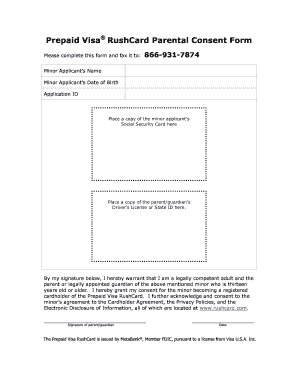
The Parental Consent Form is a personal document used by parents or guardians to grant consent for a minor to become a registered cardholder of a Prepaid Visa RushCard.
pdfFiller scores top ratings on review platforms




Who needs RushCard Prepaid Visa Parental Consent Form?
Explore how professionals across industries use pdfFiller.

RushCard Prepaid Visa Parental Consent Form is needed by:
-
Parents or guardians of minors applying for a prepaid card
-
Financial institutions offering prepaid Visa RushCards
-
Schools or educational organizations requiring consent forms
-
Legal entities needing evidence of parental consent
-
Social services agencies working with minors
Comprehensive Guide to RushCard Prepaid Visa Parental Consent Form
What is the Parental Consent Form?
The Parental Consent Form serves as a legal document required to grant consent for a minor to engage in certain financial activities, such as becoming a cardholder of the Prepaid Visa RushCard. This form is essential as it delineates the responsibilities of both the parent or guardian and the minor, ensuring that all necessary components are completed accurately. The form includes features like the minor's name, date of birth, and requires submission of identification documents.
Providing consent for a minor's financial activities is crucial to ensure that the minor can responsibly manage funds while adhering to legal regulations. The form helps to protect both the guardian and the minor by offering a framework of accountability.
Benefits of Using the Parental Consent Form
Utilizing the Parental Consent Form ensures that all parties are compliant with relevant legal requirements. This acknowledgment is vital for anyone who wishes to be a cardholder on behalf of a minor. By granting consent, parents and guardians facilitate responsible money management for minors, helping them learn essential financial skills.
Filling out this form gives peace of mind to parents and guardians, knowing their child is taking part in financial activities within a secure and legislatively supported framework. This preparation opens doors for minors to engage with financial tools responsibly.
Who Needs the Parental Consent Form?
The key stakeholders involved in the Parental Consent Form process are parents or guardians and minor applicants. This form becomes necessary in situations such as when a minor is signing up for a Prepaid Visa RushCard. It ensures that proper consent is secured before any financial activities can commence.
-
Parents or guardians must provide consent for their minor children.
-
The form is required for various financial applications categorized under minor financial engagement.
-
To be eligible, minors must meet specific criteria defined by the financial institution.
Required Documents for the Parental Consent Form
Submitting the Parental Consent Form necessitates that certain documents be included. Key materials include copies of the minor's Social Security Card and the parent or guardian's Driver’s License or State ID. Ensuring accurate identification verification is paramount.
-
Minor's Social Security Card
-
Parent or guardian's Driver’s License or State ID
-
Any additional supporting credentials as specified by the institution
Before submission, it’s fundamental to prepare the required documents correctly to avoid delays in processing the application.
How to Fill Out the Parental Consent Form Online
Completing the Parental Consent Form online using pdfFiller is a straightforward process. Follow these steps to ensure all information is entered correctly:
-
Access the form on pdfFiller’s platform.
-
Enter the minor's name and date of birth in the required fields.
-
Attach copies of required identification documents.
-
Provide a valid email address for future communications.
-
Review the information for accuracy before submission.
Accurate data entry is crucial to avoid potential delays in the processing of the form.
Submitting the Parental Consent Form
Upon completion, the Parental Consent Form can be submitted through various methods, such as online via pdfFiller, by mail, or in person at the designated financial institution. Each submission route has distinct timelines for processing and feedback.
-
Online submission is the quickest method, typically with immediate confirmation.
-
Mail submission may take longer, depending on postal services.
-
In-person submissions allow for immediate clarification of any questions.
After submission, tracking the status is essential to follow up on the application's progress.
Common Mistakes to Avoid When Filling Out the Form
Many users make frequent errors while completing the Parental Consent Form, which can lead to unnecessary delays. Common mistakes include insufficient documentation and inaccuracies in signatures or personal information.
-
Double-check all entries for spelling and accuracy.
-
Ensure all required documents are included.
-
Verify that the form is signed where required.
Adhering to submission guidelines is crucial for a successful application.
Privacy and Security Considerations
When dealing with sensitive information in the Parental Consent Form, privacy and security measures are paramount. pdfFiller ensures the security of submitted forms through robust data protection protocols, including 256-bit encryption and compliance with standards such as HIPAA and GDPR.
Users must always consider these security practices to safeguard their data when submitting the form.
Using pdfFiller for Your Parental Consent Form Needs
pdfFiller offers a user-friendly platform that simplifies the process of filling out, signing, and submitting the Parental Consent Form. Its features enhance the user experience, ensuring that managing sensitive documents is both easy and secure.
Utilizing this trusted digital platform alleviates the concerns surrounding document management, making it an excellent choice for parents and guardians.
Explore the Possibilities with the Parental Consent Form Today
Starting your journey with the Parental Consent Form through pdfFiller is the first step towards engaging your minor in responsible financial activities. Leverage the seamless integration of form management capabilities provided by pdfFiller to ensure smooth processing and handling of necessary documents.
How to fill out the RushCard Prepaid Visa Parental Consent Form
-
1.Access pdfFiller and search for 'Parental Consent Form' in the search bar.
-
2.Open the form by clicking on it, which will launch the editable version in your browser.
-
3.Before filling in the form, gather necessary information including the minor's full name, date of birth, and a copy of their Social Security Card.
-
4.Prepare a copy of your Driver’s License or State ID as the form requires it for verification.
-
5.Navigate through the fillable fields and enter the required information, ensuring accuracy in every detail.
-
6.Check for blank fields that need to be completed to avoid errors.
-
7.Once filled, review the form thoroughly for any mistakes or omissions.
-
8.After confirming the accuracy of the details, navigate to the 'Signature' field and sign it digitally.
-
9.Finalize the form by clicking on the 'Save' button to preserve your entries.
-
10.Download the completed form or select the option to submit directly through pdfFiller based on your preference.

Who is eligible to use the Parental Consent Form?
The Parental Consent Form is intended for parents or guardians of minors who wish to grant consent for their child to become a registered cardholder. Ensure you are legally recognized as a guardian.
What information is required to complete the form?
You'll need the minor's name, date of birth, a copy of their Social Security Card, and a copy of your Driver’s License or State ID to complete the Parental Consent Form.
How do I submit the completed Parental Consent Form?
After filling out the Parental Consent Form, you can save it to your device or submit it directly through pdfFiller's submission options as per your needs.
Is there a deadline for submitting the form?
While the Parental Consent Form itself does not have a specific deadline, it's advisable to submit it promptly when applying for the Prepaid Visa RushCard to avoid delays.
What common mistakes should I avoid when filling out the form?
Ensure that all required fields are filled out accurately. Double-check that you have included the necessary supporting documents, like the Social Security Card and ID, to avoid processing delays.
How long does it take to process the Parental Consent Form?
Processing times may vary depending on the financial institution's policies. It is best to follow up directly with them after submission for specific timeframes.
Do I need to notarize the Parental Consent Form?
No, the Parental Consent Form does not require notarization, but it must be signed by the parent or guardian for it to be valid.
Related Forms




Related Catalogs
Get the latest insights from our blog


If you believe that this page should be taken down, please follow our DMCA take down process
here
.
This form may include fields for payment information. Data entered in these fields is not covered by PCI DSS compliance.