
Last updated on
Nov 7, 2026

IN SPA user account request 2017 free printable template
pdfFiller is not affiliated with any government organization

Fill out
Complete the form online in a simple drag-and-drop editor.

eSign
Add your legally binding signature or send the form for signing.

Share
Share the form via a link, letting anyone fill it out from any device.

Export
Download, print, email, or move the form to your cloud storage.
Why pdfFiller is the best tool for your documents and forms


End-to-end document management
From editing and signing to collaboration and tracking, pdfFiller has everything you need to get your documents done quickly and efficiently.
Accessible from anywhere
pdfFiller is fully cloud-based. This means you can edit, sign, and share documents from anywhere using your computer, smartphone, or tablet.
Secure and compliant
pdfFiller lets you securely manage documents following global laws like ESIGN, CCPA, and GDPR. It's also HIPAA and SOC 2 compliant.
What is IN SPA user account request
The Odyssey Secure Public Access User Account Request is a government form used by individuals in Indiana to request access to the Odyssey Case Management System for judicial purposes.
pdfFiller scores top ratings on review platforms




Who needs IN SPA user account request?
Explore how professionals across industries use pdfFiller.

IN SPA user account request is needed by:
-
Judicial Officers needing system access
-
Supervisors overseeing judicial processes
-
Legal professionals in Indiana
-
Court technology administrators
-
Individuals involved in the judicial system
-
Researchers requiring court data
Comprehensive Guide to IN SPA user account request
What is the Odyssey Secure Public Access User Account Request?
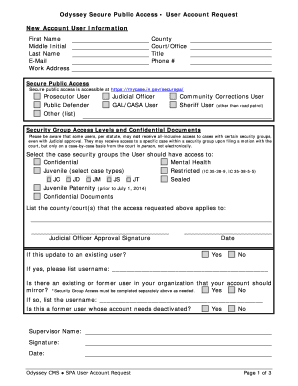
The Odyssey Secure Public Access User Account Request is a crucial form within the Indiana judicial process. It defines the protocols for individuals seeking access to the Odyssey Case Management System. This form aims to streamline user access by collecting essential user information and establishing security group access levels, ensuring that all access requests are handled effectively.
Key features of this form include fields for user information and measures to safeguard sensitive data. Users can specify their roles and access requirements in a secure environment, which highlights the form's objective to enhance the integrity of the Indiana judicial system.
Purpose and Benefits of the Odyssey Secure Public Access User Account Request
This form serves multiple purposes, primarily aimed at clarifying the need for secure access to the Odyssey Case Management System. By utilizing the Odyssey Secure Public Access User Account Request, judicial officers and supervisors can easily secure the necessary access to pertinent legal cases.
Obtaining this secure public access is particularly significant for those involved in legal proceedings, facilitating efficient and effective case management while enhancing the workflow within the judicial system.
Who Needs the Odyssey Secure Public Access User Account Request?
Several roles necessitate the submission of the Odyssey Secure Public Access User Account Request. Judicial officers and supervisors are the primary individuals required to complete this form to gain access to vital judicial data.
In addition to these core roles, other individuals who actively participate in the judicial process may benefit from filling out this account request. Eligibility criteria are specifically outlined to ensure that only qualified personnel obtain access.
How to Fill Out the Odyssey Secure Public Access User Account Request Online
Filling out the Odyssey Secure Public Access User Account Request online involves several straightforward steps:
-
Access the online form.
-
Complete the required fields, including 'First Name', 'Last Name', and contact information.
-
Obtain necessary approvals from a judicial officer and supervisor, ensuring signatures are provided.
Each field is designed to gather essential information required for proper processing, allowing users to complete the form efficiently while adhering to submission guidelines.
Common Errors and How to Avoid Them
When filling out the Odyssey Secure Public Access User Account Request, users frequently encounter common errors that can delay processing. These mistakes often occur in signature requirements and incomplete fields.
To ensure accurate completion, consider the following tips:
-
Double-check all entries for accuracy.
-
Ensure required signatures are obtained before submission.
-
Review the entire form to confirm all fields are filled out appropriately.
Submission Methods for the Odyssey Secure Public Access User Account Request
There are multiple methods available for submitting the Odyssey Secure Public Access User Account Request form. Users may choose to submit electronically or via paper methods, each with distinct timelines for processing.
For electronic submissions, track the status of your application online. If choosing paper submission, allow for potential longer processing times due to postal delays.
What Happens After You Submit the Odyssey Secure Public Access User Account Request?
After submitting the form, users should be aware of the post-submission process. A confirmation of receipt will typically be sent, allowing users to track the status of their application effectively.
Should any amendments be needed to the request, proper procedures will be outlined for correcting or modifying the submission to ensure compliance with the guidelines.
Security and Compliance of the Odyssey Secure Public Access User Account Request
The submission of sensitive documents through the Odyssey Secure Public Access User Account Request is safeguarded by various security measures. Compliance with recognized standards, including those enforced by pdfFiller, ensures that users can feel confident about the integrity of their data.
To maintain the highest level of privacy and data security, users are advised to follow outlined protocols during the submission process.
How pdfFiller Simplifies Your Odyssey Secure Public Access User Account Request
pdfFiller plays a significant role in assisting users with the Odyssey Secure Public Access User Account Request. The platform’s capabilities include eSigning, PDF editing, and automated form filling, designed to streamline the completion process.
Many users have shared positive experiences, highlighting the platform's efficiency. By utilizing pdfFiller, users can manage their forms in a more efficient and user-friendly manner.
Get Started with Your Odyssey Secure Public Access User Account Request Today!
Utilizing pdfFiller to fill out the Odyssey Secure Public Access User Account Request form ensures a seamless and straightforward experience. Thecloud-based document management platform offers numerous advantages, enabling easy access to necessary tools for document handling.
Start the form-filling process now to gain efficient access to the Odyssey Case Management System.
How to fill out the IN SPA user account request
-
1.To start, visit pdfFiller and log in or create an account if you don't have one. Use the search feature to locate the Odyssey Secure Public Access User Account Request form.
-
2.Once you’ve opened the form, review the introductory sections to familiarize yourself with the required fields and information requested.
-
3.Make sure you have the necessary information ready, including your full name, email, phone number, and details about your required access levels.
-
4.Use the fillable fields to enter your personal information accurately. Click on each field to type directly or select checkboxes where prompted.
-
5.If applicable, ensure that you obtain any necessary approvals or signatures from Judicial Officers and Supervisors. Use the designated signature lines provided in the form.
-
6.After completing all sections, carefully review the form for any missing information or errors. Verify that all fields are filled out as intended.
-
7.To save your work, click on the save button. You can also download the completed form directly to your device in PDF format for your records.
-
8.When ready to submit, follow the instructions for sending the form to the appropriate judicial body, either electronically or by mail as specified.

Who is eligible to submit the Odyssey Secure Public Access User Account Request?
Eligibility to submit this form typically includes judicial officers, legal professionals, and others authorized by Indiana's judicial system requiring access to relevant case management systems.
Is there a submission deadline for the form?
While the form itself does not specify an exact deadline, it’s crucial to submit it promptly if you need system access for an upcoming case or judicial task.
What methods are available to submit the completed form?
You can submit the completed form either electronically through the designated judicial system platforms or physically by mailing it to the appropriate court office.
What supporting documents do I need to include with the form?
Generally, you may need to include identification verification and any necessary approval signatures. Check with your local court for specific requirements.
What common mistakes should I avoid when filling out the form?
Avoid leaving any required fields blank and double-check for any incorrect information, especially in email addresses and contact numbers to ensure prompt communication.
How long does it take to process my application after submission?
Processing times vary by court, but typically you can expect a response within a few days to a couple of weeks depending on the current workload.
Can I make changes to the form after submitting it?
Once submitted, you may need to contact the court directly to make changes. It’s advisable to ensure all information is correct before submission.
IN SPA user account request Form Versions
Related Forms





Get the latest insights from our blog


If you believe that this page should be taken down, please follow our DMCA take down process
here
.
This form may include fields for payment information. Data entered in these fields is not covered by PCI DSS compliance.