
Last updated on
Nov 9, 2026

MO Girl Scouts F-57 2017 free printable template
pdfFiller is not affiliated with any government organization

Fill out
Complete the form online in a simple drag-and-drop editor.

eSign
Add your legally binding signature or send the form for signing.

Share
Share the form via a link, letting anyone fill it out from any device.

Export
Download, print, email, or move the form to your cloud storage.
Why pdfFiller is the best tool for your documents and forms


End-to-end document management
From editing and signing to collaboration and tracking, pdfFiller has everything you need to get your documents done quickly and efficiently.
Accessible from anywhere
pdfFiller is fully cloud-based. This means you can edit, sign, and share documents from anywhere using your computer, smartphone, or tablet.
Secure and compliant
pdfFiller lets you securely manage documents following global laws like ESIGN, CCPA, and GDPR. It's also HIPAA and SOC 2 compliant.
What is MO Girl Scouts F-57
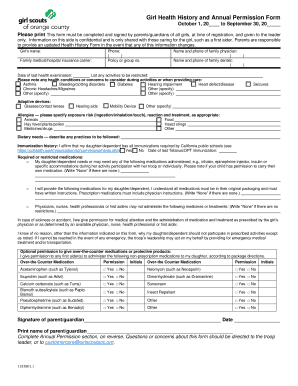
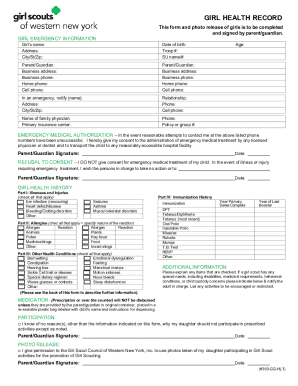
The Girl Health History and Annual Permission Form is a health document used by parents or guardians to provide health details and permissions for their daughter's participation in Girl Scout activities.
pdfFiller scores top ratings on review platforms




Who needs MO Girl Scouts F-57?
Explore how professionals across industries use pdfFiller.

MO Girl Scouts F-57 is needed by:
-
Parents or guardians of girls involved in Girl Scouts
-
Girl Scout leaders and coordinators
-
Health professionals assessing participant health
-
Event organizers for Girl Scout activities
-
Administrators at Girl Scouts of Eastern Missouri
Comprehensive Guide to MO Girl Scouts F-57
What is the Girl Health History and Annual Permission Form?
The Girl Health History and Annual Permission Form is crucial for parents or guardians of Girl Scouts, allowing them to provide essential health information for their daughters' participation in various activities. This form serves as both a girl health history form and an annual permission form, enabling a safe and organized experience during Girl Scout programs.
By facilitating clear communication of health conditions and permissions, it ensures that children are well taken care of during events and outings, aligning with the mission of fostering a supportive environment.
Purpose and Benefits of the Girl Health History and Annual Permission Form
This form offers numerous benefits for both parents/guardians and their daughters. It simplifies the communication of vital health information, enabling healthcare providers and program leaders to be informed about any allergies, medical conditions, or special needs. Additionally, it serves as a parental consent form that contributes to a secure environment for all participants.
-
Promotes safety through accurate health disclosures.
-
Streamlines permissions for various Girl Scout activities.
-
Helps in emergency situations by providing crucial health data.
Key Features of the Girl Health History and Annual Permission Form
The form includes several essential sections designed to capture comprehensive health information. This includes:
-
Health history details, outlining any relevant past medical occurrences.
-
Specific allergies that may affect participation.
-
Emergency contacts for quick access during events.
Moreover, it contains permissions for media usage and consent for emergency medical treatment, ensuring parents are informed about how their child’s information will be used during Girl Scout activities.
Who Needs the Girl Health History and Annual Permission Form?
The primary audience for this form includes parents and guardians of Girl Scouts in Missouri. It is essential for maintaining updated health and permissions annually. All guardians of registered Girl Scouts Missouri must submit this form each year to ensure up-to-date information is available for activities and events.
How to Fill Out the Girl Health History and Annual Permission Form Online (Step-by-Step)
Filling out the form online is a straightforward process that can be done using pdfFiller. Here are the steps to follow:
-
Access the Girl Health History and Annual Permission Form on pdfFiller.
-
Click on each field to enter the required information.
-
Complete the health history section thoroughly.
-
Check the box for permissions you are granting.
-
Review all entries for accuracy before submission.
Common Errors and How to Avoid Them
When completing this form, there are several common errors to be aware of, such as:
-
Omitting vital health information.
-
Providing outdated contact details.
-
Failure to sign the form where required.
To ensure accuracy, always double-check entries and utilize a form validation checklist if available. This can prevent unnecessary complications during the registration process.
What Happens After You Submit the Girl Health History and Annual Permission Form?
Following submission, the form undergoes a review process. Parents/guardians may receive confirmation of their submission, ensuring all information is acknowledged by the Girl Scouts. Tracking the form is crucial for maintaining compliance and scheduling participation in upcoming events.
Security and Compliance for the Girl Health History and Annual Permission Form
Data protection is a priority when handling this form. pdfFiller employs robust security measures, including 256-bit encryption, to safeguard sensitive health information. Compliance with regulations such as HIPAA and GDPR ensures your information is treated with the utmost care and privacy, reassuring parents that their data is secure.
How pdfFiller Can Help with the Girl Health History and Annual Permission Form
pdfFiller enhances the form-filling experience by providing user-friendly features that make the process simple and efficient. Users can create fillable forms, eSign documents, and access their forms from any device, streamlining the entire process for parents and guardians.
Start Filling Out Your Girl Health History and Annual Permission Form Today
Now is the perfect time to begin filling out your girl health history form using pdfFiller. Enjoy the convenience of online form management, making it easier than ever to ensure your daughter can participate in girl scout activities confidently and securely.
How to fill out the MO Girl Scouts F-57
-
1.Access the Girl Health History and Annual Permission Form on pdfFiller by entering the URL link or searching it in the platform's search bar.
-
2.Once open, familiarize yourself with the form layout and the different sections designated for health history, permissions, and emergency contacts.
-
3.Gather all necessary information including your daughter's health history, any allergies, immunizations, and relevant medical contacts prior to filling out the form.
-
4.Click on each blank field to input text for your daughter's name, health details, and emergency contact information found on the form.
-
5.Utilize the checkboxes provided in the form to indicate health conditions or permissions relevant to your daughter’s participation.
-
6.Ensure all necessary fields are filled out completely and accurately, paying close attention to any instructions provided within the form.
-
7.Review the form carefully to confirm that all information is accurate and all necessary sections are completed before finalizing.
-
8.Once satisfied with the form, save your progress on pdfFiller to prevent loss of data.
-
9.You have the option to download the completed form as a PDF, submit it online through the platform, or print it for physical submission.

Who is required to sign the Girl Health History and Annual Permission Form?
The form requires a signing from a parent or guardian to ensure that all health information and permissions are officially validated.
When must I submit the Girl Health History and Annual Permission Form?
The form must be completed and submitted annually to ensure it reflects the most current health information for your daughter’s participation in Girl Scout activities.
Are there any specific health details that need to be included?
Yes, the form requests details regarding your daughter’s health history, allergies, immunizations, and emergency contacts to ensure her safety during activities.
What should I do if I make a mistake on the form?
If you make a mistake, review the affected section, make the necessary corrections directly in pdfFiller, and ensure the updated information is saved before final submission.
How can I submit the Girl Health History and Annual Permission Form?
You can submit the completed form either by downloading it as a PDF and sending it via email, or you can submit it directly through the pdfFiller platform if that option is available.
Is notarization required for this form?
No, this form does not require notarization, making the filling and submission process more straightforward for parents and guardians.
What happens if I don’t submit this form on time?
Failing to submit the form on time may prevent your daughter from participating in certain Girl Scout activities, so it’s essential to adhere to deadlines.
MO Girl Scouts F-57 Form Versions
Related Forms



Get the latest insights from our blog


If you believe that this page should be taken down, please follow our DMCA take down process
here
.
This form may include fields for payment information. Data entered in these fields is not covered by PCI DSS compliance.