
Last updated on
Oct 28, 2026
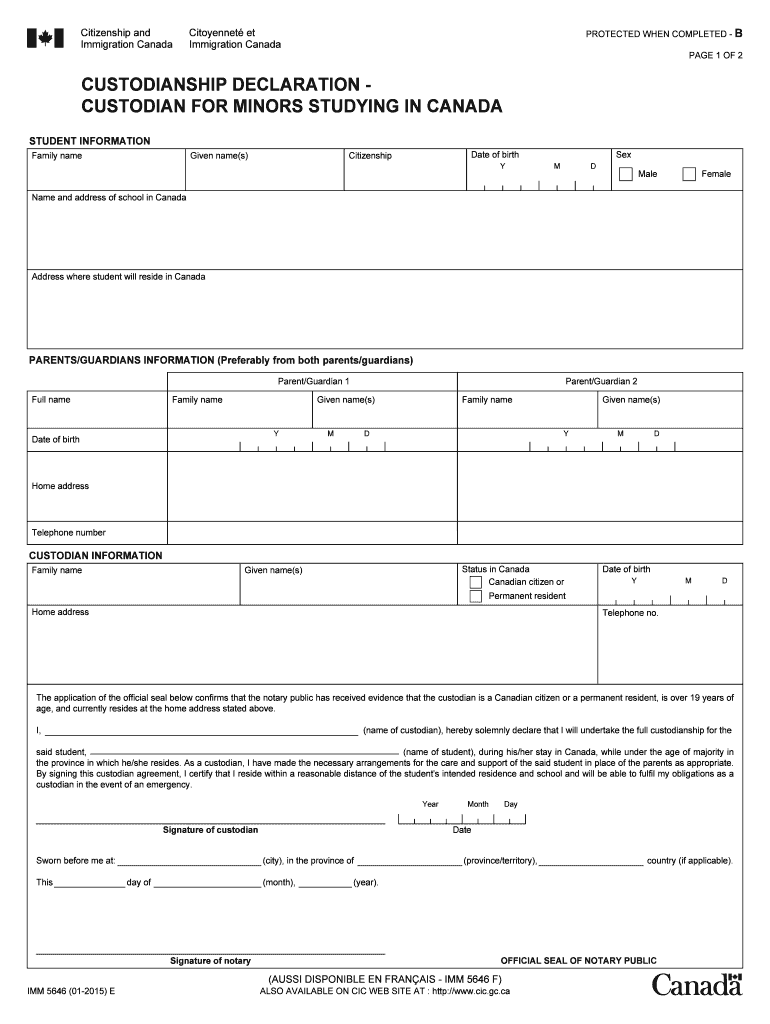
Canada IMM 5646 2015 free printable template
pdfFiller is not affiliated with any government organization

Fill out
Complete the form online in a simple drag-and-drop editor.

eSign
Add your legally binding signature or send the form for signing.

Share
Share the form via a link, letting anyone fill it out from any device.

Export
Download, print, email, or move the form to your cloud storage.
Why pdfFiller is the best tool for your documents and forms


End-to-end document management
From editing and signing to collaboration and tracking, pdfFiller has everything you need to get your documents done quickly and efficiently.
Accessible from anywhere
pdfFiller is fully cloud-based. This means you can edit, sign, and share documents from anywhere using your computer, smartphone, or tablet.
Secure and compliant
pdfFiller lets you securely manage documents following global laws like ESIGN, CCPA, and GDPR. It's also HIPAA and SOC 2 compliant.
What is Canada IMM 5646
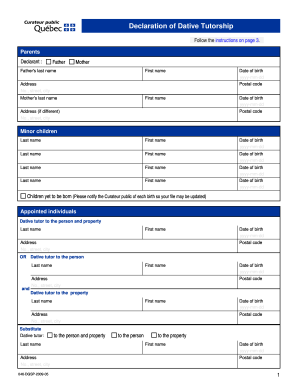
The Custodianship Declaration for Minors Studying in Canada is a government form used by guardians to appoint a custodian for minors studying in Canada.
pdfFiller scores top ratings on review platforms




Brilliant does excatly what it says can do, I am very delighted with this PDF Filler, I travel a log with my job and this is so helpful for Signatures and other tasks, 5* job well done guys
Super convenient with so many options for sharing documents. Good pricing options.
Who needs Canada IMM 5646?
Explore how professionals across industries use pdfFiller.

Canada IMM 5646 is needed by:
-
Parents or guardians of minor students planning to study in Canada.
-
Custodians who are Canadian citizens or permanent residents responsible for a minor.
-
Notaries public who will certify the signatures on the form.
-
Educational institutions requiring proof of custodianship for international students.
-
Immigration agents processing student visas for minors.
-
Legal advisors assisting families with immigration forms.
Comprehensive Guide to Canada IMM 5646
Understanding the Custodianship Declaration for Minors Studying in Canada
The Custodianship Declaration form (IMM 5646) is a crucial document for international students under the age of 18 studying in Canada. This form appoints a custodian, a Canadian citizen or permanent resident, to ensure the safety and welfare of the minor while they pursue their education abroad. The declaration is necessary for all minors who need a guardian-like figure during their stay, highlighting the importance of this process for smooth educational experiences.
Typically, parents or legal guardians of the minor must fill out this form alongside the appointed custodian. Understanding the responsibilities of the custodian and the implications of this form significantly impacts the minor's immigration status and study permit process.
Purpose and Benefits of the Custodianship Declaration Form
The Custodianship Declaration form serves to ensure that minors studying abroad have a reliable adult overseeing their care. The primary purpose is to establish legal guardianship, providing a layer of security that contributes to the well-being of the student. This declaration confirms the custodian's legal responsibility, making them accountable for the minor's actions and welfare.
Moreover, having this form in place can positively affect the minor's immigration status, as it demonstrates compliance with Canada’s regulations concerning foreign students. Parents can also rest assured knowing that there are legal structures in place to support their children.
Who Needs the Custodianship Declaration for Minors?
Several key stakeholders must be involved in completing the Custodianship Declaration. First, the appointed custodian is responsible for directly overseeing the minor's care. Additionally, the parents or legal guardians must sign the document, affirming their consent to the custodian's role. Lastly, notarization from a recognized official is essential to validate the agreement legally.
-
The custodian must be a Canadian citizen or a permanent resident.
-
Parents or guardians need to provide their consent.
-
Notaries ensure the document is legally enforceable.
Eligibility Criteria for Completing the Custodianship Declaration
Eligibility to act as a custodian is limited to Canadian citizens or permanent residents who meet specific criteria. The custodian must be of legal age, typically at least 18 years old, and capable of fulfilling the responsibilities outlined in the declaration. Furthermore, the minor student must be under the age of 18 at the time of study.
To support eligibility claims, certain documentation will be required. This includes proof of the custodian's residency status and identification, as well as any relevant documentation regarding the minor.
How to Fill Out the Custodianship Declaration Form Online
Completing the Custodianship Declaration form online through pdfFiller is a straightforward process. Start by accessing the form and gathering necessary details such as family name, given names, date of birth, and contact information. Each field must be filled accurately to avoid common errors.
-
Enter the minor's personal information, including date of birth.
-
Have all parties—custodian, parents/guardians—sign the form using the eSignature feature.
-
Submit the completed document electronically for processing.
Notarization Requirements for the Custodianship Declaration
Notarization adds a layer of authenticity to the Custodianship Declaration form, ensuring it meets legal standards. Only authorized notaries are permitted to notarize this document. The notarization process typically consists of verifying identities and signatures of all parties involved.
It's essential to follow these steps for notarization:
-
Locate a licensed notary near you.
-
Bring all necessary identification documents.
-
Have the notary witness the signing of the form.
Submission Guidelines for the Custodianship Declaration
Once the Custodianship Declaration is completed and notarized, there are several submission methods available. Individuals can choose to submit the form online or send it through the mail, allowing for convenience in processing. In-person submissions may also be available at designated governmental offices.
-
Understand the deadlines associated with submission.
-
Track the processing times to stay updated.
What Happens After Submission of the Custodianship Declaration
After the Custodianship Declaration is submitted, the following steps generally occur:
-
Applicants can expect to receive confirmation of receipt shortly thereafter.
-
Monitoring the application status can be done through the designated tracking system.
Being aware of common rejection reasons can also aid in corrective steps, ensuring that the form is processed successfully.
Security and Data Protection When Submitting the Custodianship Declaration Form
When handling sensitive documents such as the Custodianship Declaration, ensuring confidentiality and data security is paramount. pdfFiller employs advanced security measures, including 256-bit encryption, to protect user information. Furthermore, compliance with regulations such as SOC 2, HIPAA, and GDPR provides additional assurance to users.
Best practices for secure document management include:
-
Utilizing secure connections when submitting forms.
-
Being cautious with personal information shared online.
Using pdfFiller to Streamline the Custodianship Declaration Process
Utilizing pdfFiller simplifies the process of filling out the Custodianship Declaration form. The platform offers features such as editing, eSigning, and seamless submission, enhancing user experience. Users have reported positive outcomes, with many noting the efficiency and ease of using the service.
By leveraging pdfFiller's capabilities, users can navigate through the Custodianship Declaration process with minimal hassle.
How to fill out the Canada IMM 5646
-
1.Access the Custodianship Declaration for Minors form (IMM 5646) on pdfFiller by searching for its name or uploading the PDF file directly if you have it saved.
-
2.Once the form is open, use the fillable fields to enter student information, including family name, given name(s), and date of birth. Ensure accuracy at each step.
-
3.Gather necessary information before starting. This includes the custodian's details, contact information, and the parent or guardian's information as well.
-
4.As you navigate pdfFiller’s interface, click on each field to input data, making use of the toolbar for formatting options if needed.
-
5.After completing the form, review all entries carefully to ensure all required fields are filled and check for typographical errors.
-
6.Finalize the form by following the instructions to sign electronically or print it out for physical signing by all parties involved: the custodian, parent/guardian, and notary.
-
7.Once signed, save your work by clicking on the save option. You can either download a copy of the form for your records or submit it as required through pdfFiller.

Who is eligible to fill out the Custodianship Declaration for Minors form?
The form is intended for parents or guardians of minors who intend to study in Canada, along with their appointed custodians who must be Canadian citizens or permanent residents.
What documents are required to complete the form?
To complete the Custodianship Declaration, you will need the minor’s identification, the custodian’s proof of citizenship or residency, and any relevant contact information.
Do all parties need to sign the form?
Yes, the form must be signed by the custodian, parents or guardians, and a notary public to validate the custodianship agreement.
How can I submit the Custodianship Declaration once filled out?
The completed form can typically be submitted online as part of a visa application or printed and mailed to the appropriate immigration office, depending on specific procedures.
Is there a specific deadline for submitting this form?
While there is no universal deadline, it should be submitted as part of the student’s visa application process well before the intended date of travel to Canada.
What common mistakes should I avoid when filling out the form?
Ensure all information is accurate and complete, avoid leaving any fields blank unless specified, and check that all signatures are present before submission.
How long does it take for the form to be processed?
Processing times can vary; check with the relevant immigration authority for current processing times for custodianship declarations in relation to student visas.
Canada IMM 5646 Form Versions
Related Forms





Related Catalogs
Get the latest insights from our blog


If you believe that this page should be taken down, please follow our DMCA take down process
here
.
This form may include fields for payment information. Data entered in these fields is not covered by PCI DSS compliance.