
Last updated on
Oct 31, 2026

Get the free NAAC Student Satisfaction Survey
We are not affiliated with any brand or entity on this form

Fill out
Complete the form online in a simple drag-and-drop editor.

eSign
Add your legally binding signature or send the form for signing.

Share
Share the form via a link, letting anyone fill it out from any device.

Export
Download, print, email, or move the form to your cloud storage.
Why pdfFiller is the best tool for your documents and forms


End-to-end document management
From editing and signing to collaboration and tracking, pdfFiller has everything you need to get your documents done quickly and efficiently.
Accessible from anywhere
pdfFiller is fully cloud-based. This means you can edit, sign, and share documents from anywhere using your computer, smartphone, or tablet.
Secure and compliant
pdfFiller lets you securely manage documents following global laws like ESIGN, CCPA, and GDPR. It's also HIPAA and SOC 2 compliant.
What is NAAC Survey
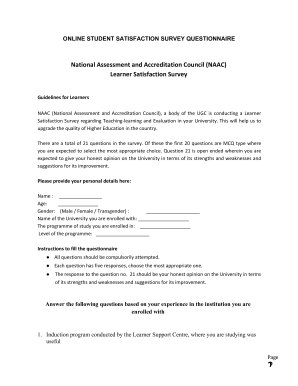
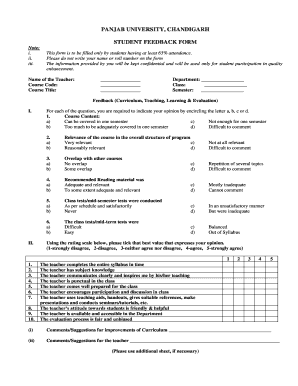
The NAAC Student Satisfaction Survey is a survey form used by the National Assessment and Accreditation Council to gather student feedback on the teaching-learning and evaluation processes in higher education.
pdfFiller scores top ratings on review platforms




Off to a good start--fast & user friendly!
Great so Far. I would like to find out if you can format to do adding, subtracting, dividing, and multiplying
in any cells?
Who needs NAAC Survey?
Explore how professionals across industries use pdfFiller.

NAAC Survey is needed by:
-
Higher education institutions seeking student feedback.
-
Accreditation bodies assessing educational quality.
-
Students enrolled in degree programs.
-
Educational researchers analyzing teaching effectiveness.
-
Administrative staff involved in quality assurance.
Comprehensive Guide to NAAC Survey
What is the NAAC Student Satisfaction Survey?
The NAAC Student Satisfaction Survey is a vital form utilized by the National Assessment and Accreditation Council. Its primary purpose is to collect feedback from students regarding the teaching and learning processes within higher education institutions. This feedback plays a crucial role in refining educational standards and practices.
Students are encouraged to express their experiences by completing the survey, known as the NAAC Student Satisfaction Survey. This allows them to provide insights that can directly influence educational improvements. Moreover, the survey is designed as a student survey form pdf, contributing to a structured approach to higher education feedback.
Purpose and Benefits of the NAAC Student Satisfaction Survey
The NAAC Student Satisfaction Survey aims to gather student insights that are essential for enhancing educational quality. By participating in this process, students can voice their opinions about the effectiveness of teaching methods and the overall learning environment.
One significant advantage of the survey is its impact on improving education quality. Feedback collected through the education quality assessment form allows institutions to refine their teaching strategies and better meet student needs. Voicing opinions through this teaching learning evaluation survey provides students an opportunity for their needs to be acknowledged and addressed.
Key Features of the NAAC Student Satisfaction Survey
The structure of the NAAC Student Satisfaction Survey includes several key features designed to facilitate feedback collection. The format consists of 21 questions that students respond to, primarily using multiple-choice options.
Participants fill out essential fields, including their age, college name, and degree program. This structured approach ensures that the student feedback questionnaire effectively captures diverse student experiences while making it manageable for respondents.
Who Needs to Complete the NAAC Student Satisfaction Survey?
Participation in the NAAC Student Satisfaction Survey is limited to students enrolled in accredited institutions. Identifying this target audience is crucial, as representative feedback ensures that the insights gathered are reflective of the broader student body.
Such representation is vital for educational institutions to gauge the effectiveness of their teaching methods and to implement changes that enhance the student experience. The college student survey form serves as a key tool in achieving these educational improvements.
How to Fill Out the NAAC Student Satisfaction Survey Online
Filling out the NAAC Student Satisfaction Survey online is a straightforward process that can be accomplished using pdfFiller. Here’s a step-by-step guide:
-
Access the online survey through the provided link.
-
Begin by verifying your participation in the survey, confirming that this is the first time you are completing it.
-
Fill out the required fields, including your age, college name, and degree program.
-
Complete the multiple-choice questions, ensuring each response accurately reflects your thoughts.
-
Submit the survey once all sections are completed.
This user-friendly approach emphasizes the accessibility of completing the NAAC Student Satisfaction Survey online.
Common Errors and How to Avoid Them
While completing the NAAC Student Satisfaction Survey, students may encounter several common errors. Some typical mistakes include:
-
Failing to verify the survey completion confirmation.
-
Providing incomplete or inaccurate information in the personal details section.
-
Rushing through the multiple-choice questions without careful consideration.
To enhance accuracy when filling out the survey, students should double-check their entries and ensure they understand each question clearly. Taking the time to review responses before submission can significantly reduce mistakes and improve the quality of feedback provided.
Submission Methods and Deadlines for the NAAC Student Satisfaction Survey
The completed NAAC Student Satisfaction Survey can be submitted in various ways, depending on the institution's guidelines. Common methods include online submission through pdfFiller or direct submission to designated administrative offices.
It’s crucial to be aware of submission deadlines to ensure participation in the survey. Students should regularly check for any announcements regarding the timeline for effectively submitting their feedback.
What Happens After You Submit the NAAC Student Satisfaction Survey?
After submitting the NAAC Student Satisfaction Survey, students may wonder about the utilization of their feedback. The insights gathered play a pivotal role in informing educational institutions about areas needing improvement.
Institutions analyze the results to initiate changes and adaptations based on student input. Understanding how feedback influences educational practices encourages students to participate actively in the survey process.
Security and Privacy in Completing the NAAC Student Satisfaction Survey
Security is a paramount concern when completing the NAAC Student Satisfaction Survey. pdfFiller employs robust security features, including 256-bit encryption, to safeguard student data during the survey process.
Students can rest assured that their responses and personal information are handled with the utmost care, adhering to regulations such as HIPAA and GDPR. This commitment to data protection in surveys reinforces trust in the submission process.
Effortlessly Complete Your NAAC Student Satisfaction Survey with pdfFiller
Using pdfFiller streamlines the process of filling out the NAAC Student Satisfaction Survey. The platform offers various capabilities, including editing, submitting, and ensuring the secure completion of forms.
With an intuitive interface designed for ease of use, pdfFiller enhances the survey experience, allowing students to navigate the form-filling process effortlessly. Consider utilizing pdfFiller for a seamless and secure experience in completing the NAAC survey.
How to fill out the NAAC Survey
-
1.Access the NAAC Student Satisfaction Survey on pdfFiller by searching for the document using the search bar or browsing through the Education Forms category.
-
2.Once the form is open, familiarize yourself with the instructions and layout. Each section will have labeled input fields and checkbox options.
-
3.Before starting, gather necessary information such as your age, college name, gender, degree program, and subject area to ensure accurate completion.
-
4.Navigate to the first question and click the checkbox to select your response. Continue filling in your personal information as prompted in the subsequent fields.
-
5.Be sure to read each question carefully and choose the option that best represents your experience with the teaching-learning process.
-
6.After completing all sections of the form, review your responses to ensure accuracy and completeness. Double-check for any missed questions or errors.
-
7.Once satisfied, you can save your form by selecting the 'Save' option in pdfFiller, or you can download it in your preferred format if you wish to submit it manually.
-
8.For digital submission, follow the on-screen instructions to directly send your completed survey to the designated email or submission portal.

Who is eligible to participate in the NAAC Student Satisfaction Survey?
Any student currently enrolled in a higher education institution in India is eligible to complete the NAAC Student Satisfaction Survey.
When is the NAAC Student Satisfaction Survey deadline?
Deadlines for submitting the NAAC Student Satisfaction Survey may vary by institution. Always check with your college administration for specific dates.
How can I submit the completed NAAC Student Satisfaction Survey?
You can submit the completed survey digitally through pdfFiller by following the submission instructions, or you can print and submit it to your college's administration office.
What supporting documents are needed for this survey?
No supporting documents are typically required to complete this survey, but ensure you have your personal information ready for accuracy.
What are common mistakes to avoid while filling out the survey?
Common mistakes include skipping questions, selecting multiple answers for questions requiring a single choice, and inputting incorrect personal information.
How long does it take to process the survey results?
Processing times for survey results can vary depending on the institution, but findings are usually compiled and analyzed within a few weeks after submission.
Is the NAAC Student Satisfaction Survey anonymous?
Yes, the NAAC Student Satisfaction Survey is generally designed to be anonymous to encourage honest feedback from students.
Related Forms





Related Catalogs
Get the latest insights from our blog


If you believe that this page should be taken down, please follow our DMCA take down process
here
.
This form may include fields for payment information. Data entered in these fields is not covered by PCI DSS compliance.