
Last updated on
Nov 6, 2026

Canada IMM 5373B E 2018 free printable template
pdfFiller is not affiliated with any government organization

Fill out
Complete the form online in a simple drag-and-drop editor.

eSign
Add your legally binding signature or send the form for signing.

Share
Share the form via a link, letting anyone fill it out from any device.

Export
Download, print, email, or move the form to your cloud storage.
Why pdfFiller is the best tool for your documents and forms


End-to-end document management
From editing and signing to collaboration and tracking, pdfFiller has everything you need to get your documents done quickly and efficiently.
Accessible from anywhere
pdfFiller is fully cloud-based. This means you can edit, sign, and share documents from anywhere using your computer, smartphone, or tablet.
Secure and compliant
pdfFiller lets you securely manage documents following global laws like ESIGN, CCPA, and GDPR. It's also HIPAA and SOC 2 compliant.
What is Canada IMM 5373B E
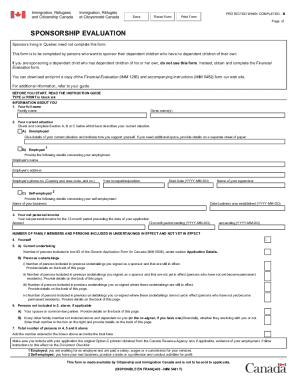
The IMM 5373B Financial Profile Form is a financial affidavit used by private sponsors in Canada to provide necessary personal and financial details for immigration applications.
pdfFiller scores top ratings on review platforms




Have not had time to discover ALL the options offered by pdfFiller, but from the little I have used so far it appears as a 'one-stop shop' for everything I need or might need in the future to handle my documents. Great app!
well it is free and works pretty good. I would expect the paid version to be even better
Who needs Canada IMM 5373B E?
Explore how professionals across industries use pdfFiller.

Canada IMM 5373B E is needed by:
-
Private sponsors applying for immigration to Canada
-
Individuals seeking to support a sponsorship application
-
Applicants requiring financial assessment for immigration
-
Non-profit organizations involved in sponsorship programs
-
Legal representatives assisting with immigration documentation
-
Families sponsoring relatives for immigration purposes
Comprehensive Guide to Canada IMM 5373B E
What is the IMM 5373B Financial Profile Form?
The IMM 5373B Financial Profile Form serves an essential function in the Canadian immigration process, acting as a financial affidavit required by private sponsors. This form aids in collecting personal and financial details critical for immigration applications. Primarily, it is utilized by individuals or entities seeking to support potential immigrants through financial sponsorship, under the legal framework established by the Immigration and Refugee Protection Act.
Purpose and Benefits of the IMM 5373B Financial Profile Form
The IMM 5373B form is crucial for providing accurate personal and financial information, which directly impacts the success of immigration applications. By utilizing this immigration financial form, private sponsors can effectively outline their ability to support immigrants financially. Accurate submissions not only facilitate smoother processes but also mitigate potential delays regarding sponsorship approvals.
Who Needs the IMM 5373B Financial Profile Form?
This form is required for various stakeholders in the Canadian immigration process. Individuals applying for sponsorship, as well as their sponsors, must provide sufficient information detailing their financial status. Scenarios that necessitate using the Canada sponsorship form typically include applicants seeking permanent residency or temporary visas supported by Canadian citizens or permanent residents.
How to Fill Out the IMM 5373B Financial Profile Form Online (Step-by-Step)
To complete the IMM 5373B form online using pdfFiller, follow these structured steps:
-
Access the IMM 5373B PDF template on pdfFiller's platform.
-
Fill in the required personal details, such as identification information and contact details.
-
Provide financial information, including income sources and employment status.
-
Review the form for accuracy and ensure that all sections are completed.
-
Use pdfFiller’s tools to eSign the document if required, ensuring compliance.
Accurate and truthful information is imperative to avoid complications during the immigration process.
Common Errors and How to Avoid Them
When completing the IMM 5373B form, users often encounter several common errors that could result in form rejection. Some pitfalls include:
-
Incomplete fields, which can lead to delays in processing.
-
Providing inaccurate financial details, risking sponsorship approval.
-
Neglecting to check for signature requirements.
To enhance the accuracy of submissions, utilize pdfFiller's review features to double-check all entries before submission.
Submission Methods and Delivery Options for the IMM 5373B Financial Profile Form
There are multiple methods for submitting the completed IMM 5373B form. You may choose to submit it online or by mail, depending on your preferences and circumstances. After submission, you can expect a review process by immigration officials, which typically takes several weeks. It is essential to keep track of your submission status through the appropriate channels to ensure timely follow-up.
What Happens After You Submit the IMM 5373B Financial Profile Form?
Upon submission of the IMM 5373B form, immigration authorities begin the review process. Depending on the evaluation, potential outcomes may include approval of the application or requests for additional documentation. Maintaining open communication with the immigration office is vital to staying updated on any developments regarding your application.
Security and Compliance When Handling the IMM 5373B Financial Profile Form
Given the sensitive nature of the information requested on the IMM 5373B form, ensuring data security is paramount. pdfFiller incorporates robust security features, including 256-bit encryption, to protect your documents. It is crucial to adhere to privacy and data protection best practices when handling immigration forms, ensuring confidentiality at all times.
How pdfFiller Can Help with the IMM 5373B Financial Profile Form
pdfFiller provides numerous benefits for users completing the IMM 5373B form. Features such as editing, eSigning, and compliance assistance streamline the process. Many users have successfully completed their forms with pdfFiller, highlighting its effectiveness and ease of use for imm 5373b pdf forms. Leveraging these tools can make your submission experience hassle-free and efficient.
Get Started with the IMM 5373B Financial Profile Form Today!
Utilizing pdfFiller to fill out the IMM 5373B form is straightforward and efficient. This platform not only simplifies the completion process but also provides access to various resources and support services to assist users. Begin your experience with pdfFiller today and tackle your immigration requirements with confidence.
How to fill out the Canada IMM 5373B E
-
1.Access the IMM 5373B Financial Profile Form directly on pdfFiller by searching for it in the platform's form library.
-
2.Once opened, familiarize yourself with the fillable fields and checkboxes provided throughout the document.
-
3.Prior to starting, gather necessary information including personal details, employment status, and income sources to streamline the filling process.
-
4.Begin completing the form by clicking on the first field. Enter your information carefully, ensuring all entries are accurate and legible.
-
5.Utilize pdfFiller's tools to check boxes where applicable and use the signature line to add your signature electronically.
-
6.As you complete each section, review the information for accuracy. Use the 'Preview' option to see how your answers will appear on the final form.
-
7.After reviewing, save the completed form to your pdfFiller account. Ensure you choose the correct format before downloading if needed.
-
8.For submission, follow any guidance provided by the immigration authority regarding digital submissions or print options before terminating the session.

Who is eligible to use the IMM 5373B Financial Profile Form?
The IMM 5373B Financial Profile Form is intended for private sponsors involved in immigration applications in Canada. Eligibility typically includes individuals or organizations able to provide necessary financial support for applicants.
What is the deadline for submitting the IMM 5373B form?
Deadlines for submitting the IMM 5373B Financial Profile Form depend on the specific immigration application process. Always check the latest requirements from Immigration, Refugees and Citizenship Canada (IRCC) to ensure timely submission.
How can I submit the completed IMM 5373B Financial Profile Form?
You can submit the completed form either online through the relevant immigration authority's platform or by printing and sending it via postal mail, following the instructions provided with your application kit.
What supporting documents are required with the IMM 5373B form?
You may need to provide additional documents with the IMM 5373B form, such as proof of income, employment verification, or identity documents. Review the application guidelines carefully to ensure all required documents are included.
What common mistakes should I avoid when filling out the IMM 5373B form?
Common mistakes include leaving fields blank, providing incorrect information, or failing to sign the form where necessary. Double-check each entry and ensure you follow the instructions closely to avoid delays in processing.
How long does processing take for the IMM 5373B Financial Profile Form?
Processing times for the IMM 5373B Financial Profile Form can vary based on the volume of applications and specific immigration cases. Typically, you can expect several weeks for processing, but it's advised to check IRCC for current timelines.
Is notarization required for the IMM 5373B form?
No, notarization is not required for the IMM 5373B Financial Profile Form. However, it is important to ensure that the information provided is truthful and complete as per the declaration within the form.
Canada IMM 5373B E Form Versions
Related Content
Related Forms



Related Catalogs
Get the latest insights from our blog


If you believe that this page should be taken down, please follow our DMCA take down process
here
.
This form may include fields for payment information. Data entered in these fields is not covered by PCI DSS compliance.