
Last updated on
Nov 10, 2026

FWS Form 3-2292 2008-2026 free printable template
We are not affiliated with any brand or entity on this form

Fill out
Complete the form online in a simple drag-and-drop editor.

eSign
Add your legally binding signature or send the form for signing.

Share
Share the form via a link, letting anyone fill it out from any device.

Export
Download, print, email, or move the form to your cloud storage.
Why pdfFiller is the best tool for your documents and forms


End-to-end document management
From editing and signing to collaboration and tracking, pdfFiller has everything you need to get your documents done quickly and efficiently.
Accessible from anywhere
pdfFiller is fully cloud-based. This means you can edit, sign, and share documents from anywhere using your computer, smartphone, or tablet.
Secure and compliant
pdfFiller lets you securely manage documents following global laws like ESIGN, CCPA, and GDPR. It's also HIPAA and SOC 2 compliant.
What is FWS Form 3-2292
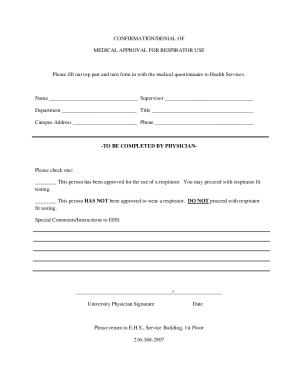
The Respirator Training Certification is a healthcare form used by employers to certify that an employee has been trained in the proper use of a respirator.
pdfFiller scores top ratings on review platforms




Who needs FWS Form 3-2292?
Explore how professionals across industries use pdfFiller.

FWS Form 3-2292 is needed by:
-
Employers ensuring employee safety compliance.
-
Training providers offering respirator training.
-
Employees required to use respirators in their job.
-
Occupational health professionals managing training records.
-
Regulatory agencies monitoring workplace safety.
Comprehensive Guide to FWS Form 3-2292
What is the Respirator Training Certification?
The Respirator Training Certification is a form designed to ensure that employees in healthcare settings are properly trained in the use, care, and inspection of respirators. This certification encompasses essential training elements that emphasize safe practices in environments where protective equipment is vital. Its significance lies in promoting workplace safety and ensuring compliance with health regulations, ultimately contributing to a safer healthcare environment.
Purpose and Benefits of the Respirator Training Certification
Obtaining a respirator training certification is crucial for both employees and training providers. This certification helps organizations meet safety regulation standards, ensuring competency in respirator use and care. The benefits extend beyond compliance; they also increase employee confidence and enhance overall workplace safety practices.
Key Features of the Respirator Training Certification
The Respirator Training Certification includes several essential components that are critical for proper documentation. Key features of the form are:
-
Specific fields for the type, model, and manufacturer of the respirator.
-
Signature fields required from both the employee and the training provider.
-
Clear identification of training dates and training provider details.
Who Needs the Respirator Training Certification?
The target audience for the Respirator Training Certification includes employees who require respirator training and training providers responsible for delivering that education. Certification is particularly necessary for employees working in roles that involve exposure to airborne contaminants. Employers have a responsibility to ensure that their employees are adequately trained, highlighting the importance of this certification in various job functions.
How to Fill Out the Respirator Training Certification Online (Step-by-Step)
Filling out the Respirator Training Certification form is straightforward when utilizing pdfFiller. Follow these steps for a seamless experience:
-
Access the Respirator Training Certification form on pdfFiller.
-
Complete the fields for respirator type, model, and manufacturer.
-
Add your name and the training provider's name.
-
Fill in the date of training.
-
Sign the form digitally or print it for traditional signing.
Ensure that all information is accurate before finalizing the submission.
Common Errors and How to Avoid Them
When completing the Respirator Training Certification form, individuals often encounter some common errors. To avoid these mistakes, consider the following tips:
-
Check that all fields are filled out completely.
-
Review the information entered for any discrepancies.
-
Double-check the signing and dating of the form.
Validation of the completed form is crucial to prevent delays or issues with certification.
How to Sign the Respirator Training Certification
Signing the Respirator Training Certification is an essential step in the process. There are two main options for signing:
-
Digital signatures can be applied directly within the pdfFiller platform.
-
Wet signatures can be obtained by printing the form and signing manually.
When saving the signed document, ensure that it is stored securely to maintain confidentiality and compliance.
Submission and Tracking Your Respirator Training Certification
Once the Respirator Training Certification form is completed and signed, it must be submitted appropriately. There are various methods to submit the form:
-
Online submission through the pdfFiller platform.
-
Mailing the printed form to the relevant authority.
After submission, track the document's status directly through the pdfFiller interface or via email notifications for updates.
Security and Compliance When Handling the Respirator Training Certification
Handling the Respirator Training Certification requires a focus on data security and compliance. Important considerations include:
-
Ensuring the confidentiality of sensitive employee information.
-
Adhering to compliance standards such as HIPAA and GDPR.
-
Maintaining proper records and implementing privacy best practices.
These measures help protect both the employees and the organization.
Utilizing pdfFiller for Your Respirator Training Certification Needs
pdfFiller streamlines the entire process of managing the Respirator Training Certification form. With capabilities for editing, eSigning, and securely sharing documents, users can efficiently handle their documentation. Utilizing pdfFiller ensures that the creation, completion, and management of documents is effortless and secure.
How to fill out the FWS Form 3-2292
-
1.Access the Respirator Training Certification form on pdfFiller by entering the site and searching for the form title in the search bar.
-
2.Once you find the form, click on it to open it in the pdfFiller interface.
-
3.Review the form layout and gather necessary information such as respirator type, model, manufacturer, training provider details, and training date beforehand.
-
4.Begin filling in the fields provided. Click on each field to input data. Use the toolbar to adjust formatting or add additional notes.
-
5.Ensure the training provider's information is accurately entered and verify that the form reflects the employee's training completion.
-
6.After filling in all fields, review the completed form for any errors or missing information to ensure it’s accurate and complete.
-
7.Once you are satisfied with the form, use the save function to store your data. You can also download it for your records or print it out directly.
-
8.If necessary, submit the completed form to relevant departments or keep it for future reference based on your organization’s requirements.

Who needs to sign the Respirator Training Certification form?
Both the employee and the training provider are required to sign the Respirator Training Certification form. This ensures that both parties agree on the training completed and the responsibilities involved.
What information is required to complete this form?
To complete the Respirator Training Certification form, you will need to provide the type, model, and manufacturer of the respirator, along with the name of the training provider and the training date. Accurate details will ensure compliance.
Is notarization required for this form?
No, notarization is not required for the Respirator Training Certification form. The signatures of the involved parties are sufficient for this document’s validation.
What is the purpose of this certification?
The Respirator Training Certification serves to confirm that an employee has been adequately trained in using, caring for, and inspecting a respirator, promoting workplace safety and compliance with health standards.
How can I submit the completed form?
You can submit the completed Respirator Training Certification form through your organization's designated process, which may include electronic submission via email or a hard copy submitted to a supervisor or HR department.
What are common mistakes to avoid while filling out this form?
Common mistakes include omitting required fields, entering incorrect respirator details, failing to obtain signatures, or submitting the form without a thorough review. Always double-check for accuracy.
What happens if I need to make changes after submitting?
If changes are needed after submission, contact the appropriate department immediately to explain the situation. Depending on your organization's policy, you may need to fill out a correction form or submit an updated Respirator Training Certification.
Related Content
Related Forms



Related Catalogs
Get the latest insights from our blog


If you believe that this page should be taken down, please follow our DMCA take down process
here
.
This form may include fields for payment information. Data entered in these fields is not covered by PCI DSS compliance.