
Last updated on
Oct 19, 2026

Get the free Rhode Island Motion to Vacate Traffic Summons
We are not affiliated with any brand or entity on this form

Fill out
Complete the form online in a simple drag-and-drop editor.

eSign
Add your legally binding signature or send the form for signing.

Share
Share the form via a link, letting anyone fill it out from any device.

Export
Download, print, email, or move the form to your cloud storage.
Why pdfFiller is the best tool for your documents and forms


End-to-end document management
From editing and signing to collaboration and tracking, pdfFiller has everything you need to get your documents done quickly and efficiently.
Accessible from anywhere
pdfFiller is fully cloud-based. This means you can edit, sign, and share documents from anywhere using your computer, smartphone, or tablet.
Secure and compliant
pdfFiller lets you securely manage documents following global laws like ESIGN, CCPA, and GDPR. It's also HIPAA and SOC 2 compliant.
What is Motion to Vacate
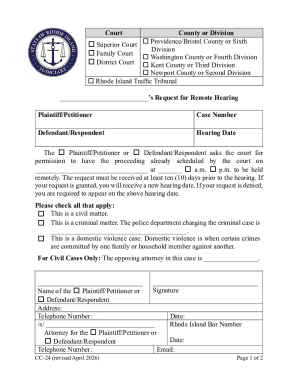
The Rhode Island Motion to Vacate Traffic Summons is a legal document used by motorists to request a hearing to change a default judgment entered against them for a traffic summons.
pdfFiller scores top ratings on review platforms




Who needs Motion to Vacate?
Explore how professionals across industries use pdfFiller.

Motion to Vacate is needed by:
-
Drivers who received a traffic summons in Rhode Island
-
Individuals wishing to contest a default judgment related to traffic violations
-
Motorists seeking to request a hearing in Rhode Island Traffic Tribunal
-
Lawyers representing clients with traffic summons issues
-
Residents of Rhode Island dealing with court processes
-
Anyone needing to file a legal document related to traffic citations
Comprehensive Guide to Motion to Vacate
What is the Rhode Island Motion to Vacate Traffic Summons?
The Rhode Island Motion to Vacate Traffic Summons is a legal document enabling motorists to contest a default judgment issued for a traffic summons. This motion serves the primary purpose of allowing individuals to seek a hearing where they can present their case, potentially leading to the annulment of the judgment. Vacating a default judgment is significant as it helps individuals maintain their driving privileges and avoid adverse impacts on their driving record.
Purpose and Benefits of the Rhode Island Motion to Vacate Traffic Summons
This motion can be invaluable for motorists who have received default judgments, as it opens pathways to rectify these decisions. The benefits include the opportunity for a formal hearing where motorists can present evidence and defend their violation claims. Furthermore, successfully vacating a default judgment may positively influence the individual's driving record and insurance premiums.
-
Opportunity for a hearing to contest judgments.
-
Potential for improved driving records.
-
Helps avoid penalties associated with default judgments.
Who Needs the Rhode Island Motion to Vacate Traffic Summons?
This motion is particularly relevant for motorists who have received a traffic summons but did not attend their scheduled hearings. Common scenarios necessitating the filing of this motion include missing court dates due to extenuating circumstances or not receiving the summons in the first place. Individuals in these situations can use the motion to challenge the default judgment issued against them.
Eligibility Criteria for the Rhode Island Motion to Vacate Traffic Summons
Eligibility to file this motion includes specific criteria that must be met by the motorists involved. There are often time limits for filing the motion, typically within a certain period after the default judgment is rendered. Additionally, circumstances such as a lack of proper notification about the summons can affect eligibility.
-
Must file within the stipulated time frame post-judgment.
-
Requires proof of not receiving proper notification.
-
Eligibility contingent upon the nature of the traffic violation.
How to Fill Out the Rhode Island Motion to Vacate Traffic Summons Online (Step-by-Step)
Filling out the Rhode Island Motion to Vacate Traffic Summons online involves several key steps to ensure accurate submission. First, access the appropriate motion to vacate traffic summons template and gather necessary information including your summons number, hearing date, and certification details.
-
Access the motion form online.
-
Input your summons number accurately.
-
Fill in the designated hearing date.
-
Certify notification to the police department.
-
Review all fields and ensure accuracy before submission.
Common Errors and How to Avoid Them
While filling out the motion, common mistakes can lead to processing delays or rejections. Frequent errors include incorrect or incomplete information and failing to sign where required. To mitigate such issues, motorists should validate all details and seek assistance if uncertain about any part of the form.
-
Double-check all entries for accuracy.
-
Ensure the form is fully completed before submission.
-
Seek guidance if facing challenges while filling out the motion.
Submission Methods and Delivery for the Rhode Island Motion to Vacate Traffic Summons
The completed Rhode Island Motion to Vacate Traffic Summons must be submitted to the Clerk’s Office, which serves as the designated venue for these filings. It's essential to adhere to submission timelines, typically filing at least five days before the hearing date. Following submission, motorists should keep track of their motion status to ensure a hearing is scheduled.
What Happens After You Submit the Motion?
After submitting the motion, several key steps will take place. Motorists may receive a notification regarding their hearing date or additional requirements to meet before the hearing. It's crucial to stay informed by checking the status of the motion, as outcomes can vary from the annulment of the judgment to the scheduling of a formal hearing where evidence can be presented.
-
Receive notification about the hearing date.
-
Prepare for potential outcomes based on the submitted evidence.
Security and Compliance when Using pdfFiller for the Motion
When utilizing pdfFiller for handling the Rhode Island Motion to Vacate Traffic Summons, security is a top priority. The platform features robust security measures, including 256-bit encryption and compliance with regulations such as HIPAA and GDPR. This cloud-based solution not only ensures the safe handling of sensitive legal documents but also offers a convenient platform for users.
Leverage pdfFiller to Simplify Your Rhode Island Motion to Vacate Traffic Summons
Utilizing pdfFiller can significantly ease the process of creating, editing, and filing your motion. The platform's features, including eSigning and easy document sharing options, enhance the overall user experience, making it straightforward to navigate the filing process. Start using pdfFiller to ensure a seamless and efficient form-filling experience.
How to fill out the Motion to Vacate
-
1.To begin, access the Rhode Island Motion to Vacate Traffic Summons form on pdfFiller by searching for it in the platform's search bar.
-
2.Once located, open the form to view its structure and required fields, which include blanks for summons number, hearing date, and certification information.
-
3.Before filling out the form, gather all necessary information, including your summons number and the date of the original hearing.
-
4.Start by entering your summons number in the designated field and ensure it matches the document you received.
-
5.Next, input the hearing date requested for the motion in its respective field, making sure to consider filing deadlines.
-
6.Use the certification section to confirm you have notified the arraigning police department regarding your intent to contest the summons.
-
7.As you complete each section, utilize pdfFiller's tools to adjust font size and format for clarity, ensuring all information is legible.
-
8.After filling out the entirety of the form, review all provided details for accuracy and completeness, checking for missed signatures or incorrectly filled fields.
-
9.Finalize your form by saving it within pdfFiller's storage or download it for printing.
-
10.If you choose to submit electronically, follow the prompts for submitting the completed form to the Clerk’s Office, keeping in mind the five-day prior filing requirement.

Who is eligible to use the Rhode Island Motion to Vacate Traffic Summons?
Any motorist who has received a traffic summons in Rhode Island and wishes to contest a default judgment can utilize this form.
What is the deadline to file the motion?
The completed Rhode Island Motion to Vacate Traffic Summons must be filed at the Clerk’s Office at least five days prior to the assigned hearing date.
How do I submit my completed form?
You can submit your completed Rhode Island Motion to Vacate Traffic Summons electronically through pdfFiller or print it out for submission at the Clerk’s Office.
What documents do I need to attach with my form?
Typically, no additional documents are required beyond the completed motion, but you should ensure your notification to the police department is confirmed.
What common mistakes should I avoid when filling out the form?
Ensure you accurately enter your summons number and hearing date. Double-check for any blank fields or mismatched information before submission.
How long does it take for the court to process my motion?
Processing times can vary, but you should allow for several days to a couple of weeks depending on the court's workload and filing methods used.
Can I make changes to my form after submitting it?
Once submitted, any changes typically require a new filing unless specified by court procedures. It's best to confirm with the Clerk’s Office.
Related Content
Related Forms





Related Catalogs
Get the latest insights from our blog


If you believe that this page should be taken down, please follow our DMCA take down process
here
.
This form may include fields for payment information. Data entered in these fields is not covered by PCI DSS compliance.