
Last updated on
Oct 15, 2026

Get the free Illinois Workers' Compensation Motion Notice
We are not affiliated with any brand or entity on this form

Fill out
Complete the form online in a simple drag-and-drop editor.

eSign
Add your legally binding signature or send the form for signing.

Share
Share the form via a link, letting anyone fill it out from any device.

Export
Download, print, email, or move the form to your cloud storage.
Why pdfFiller is the best tool for your documents and forms


End-to-end document management
From editing and signing to collaboration and tracking, pdfFiller has everything you need to get your documents done quickly and efficiently.
Accessible from anywhere
pdfFiller is fully cloud-based. This means you can edit, sign, and share documents from anywhere using your computer, smartphone, or tablet.
Secure and compliant
pdfFiller lets you securely manage documents following global laws like ESIGN, CCPA, and GDPR. It's also HIPAA and SOC 2 compliant.
What is IL WC Motion
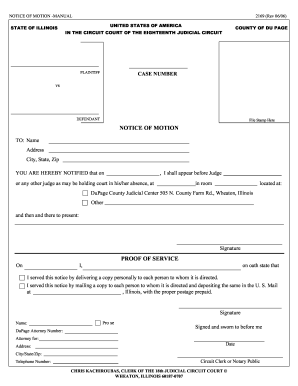
The Illinois Workers' Compensation Motion Notice is a legal document used by petitioners, respondents, and attorneys to schedule and present motions before the Illinois Workers' Compensation Commission.
pdfFiller scores top ratings on review platforms




Who needs IL WC Motion?
Explore how professionals across industries use pdfFiller.

IL WC Motion is needed by:
-
Petitioners filing a motion for a hearing.
-
Respondents needing to respond to a motion.
-
Attorneys representing parties in workers' compensation cases.
-
Arbitrators or commissioners overseeing workers' compensation matters.
-
Legal professionals handling cases in Illinois.
Comprehensive Guide to IL WC Motion
What is the Illinois Workers' Compensation Motion Notice?
The Illinois Workers' Compensation Motion Notice is a vital legal form used within the Illinois Workers' Compensation system. Its primary function is to schedule and present motions before the Illinois Workers' Compensation Commission. This notice ensures that motions are formally recognized by the commission and includes essential components such as the requirement for signatures from involved parties and possible notarization of the document. Key participants must thoroughly understand this form to navigate the workers' compensation process effectively.
Purposes and Benefits of the Illinois Workers' Compensation Motion Notice
This notice is utilized in various situations, including requests for a change of venue, reinstatement of benefits, or dismissal of claims. The benefits of using this motion notice extend beyond simply submitting a request; it ensures adherence to legal protocols in the workers' compensation system, fostering a more organized and recognized process. By following established procedures, parties can avoid unnecessary complications and delays.
Key Features of the Illinois Workers' Compensation Motion Notice
The Illinois Workers' Compensation Motion Notice contains essential components critical for its proper completion. These include:
-
Fillable fields to enter case details and other relevant information.
-
Checkboxes for selecting applicable motions.
-
Instructions to attach the motion to the notice.
-
Signature lines for the Petitioner, Respondent, Attorney, and Arbitrator or Commissioner.
These features are designed to guide users in filling out the form accurately and ensuring all necessary information is included.
Who Needs the Illinois Workers' Compensation Motion Notice?
This form is crucial for various roles in the workers' compensation process. The parties who may need to use this motion notice include:
-
Petitioner: The individual filing the motion.
-
Respondent: The party responding to the motion.
-
Attorney: Legal representatives involved in the case.
-
Arbitrator or Commissioner: The official overseeing the process.
Each role has specific responsibilities, and the required signatures affirm the validity of the submitted motion, emphasizing each party's involvement in the proceedings.
How to Fill Out the Illinois Workers' Compensation Motion Notice Online (Step-by-Step)
To ensure successful completion of the Illinois Workers' Compensation Motion Notice using pdfFiller's tools, follow these steps:
-
Access the form on pdfFiller's platform.
-
Enter information into the designated fillable fields.
-
Attach the necessary motion as specified in the instructions.
-
Review all entered information for accuracy.
-
Ensure all signature fields are properly filled out.
Pay special attention to the signature sections, as missing signatures can lead to processing delays.
Common Errors and How to Avoid Them
To minimize mistakes that could delay the processing of motions, be aware of common errors such as:
-
Missing signatures from required parties.
-
Failing to attach the necessary motion documents.
-
Incorrect or incomplete case details in the fillable fields.
To avoid such issues, double-check the completed form and validate that all components are accurately filled in prior to submission.
Submission Methods and Delivery of the Illinois Workers' Compensation Motion Notice
Users can submit the completed Illinois Workers' Compensation Motion Notice through traditional and digital methods. The options available include:
-
Mailing the completed form to the appropriate commission office.
-
Submitting the form electronically via pdfFiller for quicker processing.
Be aware of any related fees, submission deadlines, and best practices for tracking the status of your submission to ensure compliance and efficiency.
Security and Compliance for Sensitive Legal Forms
When handling sensitive legal information, it is crucial to ensure robust security measures are in place. pdfFiller implements advanced security protocols, including:
-
256-bit encryption for data protection.
-
Compliance with industry standards such as HIPAA and GDPR.
These measures reinforce the importance of privacy and data security when managing legal documents, assuring users their information is safe.
Experience the Efficiency of pdfFiller for Your Illinois Workers' Compensation Motion Notice
Utilizing pdfFiller's platform can significantly enhance the form completion and management experience for users. Key features available include:
-
Easy editing and signing capabilities.
-
Streamlined electronic submission processes.
-
Access to additional resources that facilitate smooth form filling.
These tools make navigating the Illinois Workers' Compensation Motion Notice quick and hassle-free, empowering users to focus on their cases.
How to fill out the IL WC Motion
-
1.Access pdfFiller and search for 'Illinois Workers' Compensation Motion Notice' in the template search bar.
-
2.Open the selected form to view it in the editing interface.
-
3.Gather necessary information such as case details, hearing date, type of motion, and any required documents before you begin.
-
4.Start by filling in the petitioner and respondent information in the designated fields.
-
5.Use the navigation tools to move through the form easily, clicking on each fillable field to enter your information.
-
6.Be sure to attach the actual motion document as instructed and check the box for any specific actions you are requesting.
-
7.Review all entered information for accuracy and completeness, ensuring signatures are placed correctly for all required parties.
-
8.Once finalized, use the options provided by pdfFiller to save your completed form, download it as a PDF, or submit it electronically if applicable.

Who is eligible to use the Illinois Workers' Compensation Motion Notice?
The form is intended for use by petitioners, respondents, attorneys, and commissioners involved in workers' compensation cases in Illinois.
What are the deadlines for submitting this notice?
Submission deadlines can vary based on the motion being filed. It's crucial to check with the Illinois Workers' Compensation Commission for specific timelines related to your case.
How do I submit the completed form?
Completed forms can be submitted electronically via the Illinois Workers' Compensation Commission's website or printed and submitted by mail as needed.
What documents are required along with the Motion Notice?
Typically, you must attach the motion itself, detailing the request being made, along with any other pertinent supporting documents required for your case.
What common mistakes should I avoid when filling out the form?
Common mistakes include forgetting to attach the actual motion, missing signatures, and incorrect information in fields. Double-check each section before submission.
How long does it take to process the motion after submission?
Processing times can vary. Generally, you can expect a response within a few weeks, but it's best to confirm with the Illinois Workers' Compensation Commission.
Is notarization required for the signatures?
Yes, notarization may be required, especially if signed by a non-attorney. Ensure to follow the notarization instructions provided with the form.
Related Content
Related Forms




Get the latest insights from our blog


If you believe that this page should be taken down, please follow our DMCA take down process
here
.
This form may include fields for payment information. Data entered in these fields is not covered by PCI DSS compliance.