
Last updated on
Oct 2, 2026

Blue Cross Blue Shield 4F1-18058 F 2014 free printable template
pdfFiller is not affiliated with any government organization

Fill out
Complete the form online in a simple drag-and-drop editor.

eSign
Add your legally binding signature or send the form for signing.

Share
Share the form via a link, letting anyone fill it out from any device.

Export
Download, print, email, or move the form to your cloud storage.
Why pdfFiller is the best tool for your documents and forms


End-to-end document management
From editing and signing to collaboration and tracking, pdfFiller has everything you need to get your documents done quickly and efficiently.
Accessible from anywhere
pdfFiller is fully cloud-based. This means you can edit, sign, and share documents from anywhere using your computer, smartphone, or tablet.
Secure and compliant
pdfFiller lets you securely manage documents following global laws like ESIGN, CCPA, and GDPR. It's also HIPAA and SOC 2 compliant.
What is Blue Cross Blue Shield 4F1-18058 F
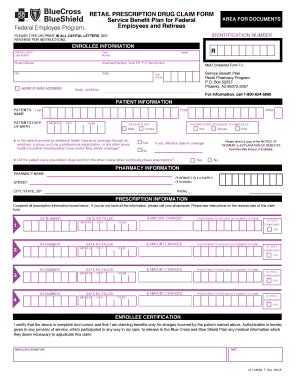
The Retail Prescription Drug Claim Form is a healthcare document used by employees and retirees covered under the Service Benefit Plan to submit claims for prescription drugs purchased at retail pharmacies.
pdfFiller scores top ratings on review platforms




Who needs Blue Cross Blue Shield 4F1-18058 F?
Explore how professionals across industries use pdfFiller.

Blue Cross Blue Shield 4F1-18058 F is needed by:
-
Employees enrolled in the Service Benefit Plan
-
Retirees covered under federal employee health plans
-
Pharmacies issuing prescriptions for federal employees
-
Insurance agents assisting with claims
-
Healthcare providers prescribing medication
-
Individuals seeking reimbursement for out-of-pocket medication costs
Comprehensive Guide to Blue Cross Blue Shield 4F1-18058 F
What is the Retail Prescription Drug Claim Form?
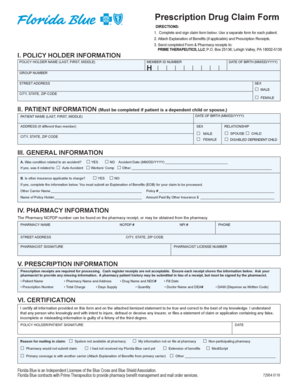
The Retail Prescription Drug Claim Form is an essential document for employees and retirees enrolled in the Service Benefit Plan. Its primary purpose is to facilitate the reimbursement of prescription drugs purchased at retail pharmacies. By using this pharmacy claim form, enrollees can ensure that their expenses are documented correctly, making it easier for health insurance claim processing.
This form is crucial for both new enrollments and existing members who need to submit claims efficiently. It streamlines the reimbursement process, reducing the time and stress involved in claiming expenses for medications.
Purpose and Benefits of Using the Retail Prescription Drug Claim Form
Using the Retail Prescription Drug Claim Form offers multiple advantages for enrollees seeking reimbursement for medical expenses related to prescription medications. This form provides a quick and easy process to obtain financial reimbursement, ensuring proper documentation and claims submission.
-
The form supports a seamless reimbursement experience for prescription drug expenses.
-
It helps maintain accurate records for both enrollees and insurance providers.
-
Proper use of this form minimizes delays in processing claims.
Key Features of the Retail Prescription Drug Claim Form
The Retail Prescription Drug Claim Form includes several critical features that streamline the claim submission process. The form comprises various sections to gather essential information, such as enrollee details and prescription specifics.
-
Sections include enrollee information, patient data, and detailed prescription information.
-
Itemized receipts and necessary supporting documents must accompany the form for validation.
-
The form is designed to meet Arizona healthcare requirements, ensuring compliance.
Who Needs the Retail Prescription Drug Claim Form?
This form is specifically designed for employees and retirees enrolled in the Service Benefit Plan. Understanding who qualifies for using the Retail Prescription Drug Claim Form is essential for successful submissions.
-
Eligible individuals include all employees and retirees under the Service Benefit Plan.
-
Each enrollee must ensure they meet the requirements for the prescription reimbursement process.
-
The form caters to federal employees securing their prescription claims efficiently.
How to Fill Out the Retail Prescription Drug Claim Form Online (Step-by-Step)
Completing the Retail Prescription Drug Claim Form online is straightforward. Here is a step-by-step guide to ensure accurate completion.
-
Begin by filling out the enrollee information section, including name and identification details.
-
Provide specifics about the pharmacy where the prescription was filled.
-
Enter prescription details, such as the prescription number and date filled.
-
Attach itemized receipts and any relevant supporting documents to the submission.
-
Certify the information's accuracy and sign the form electronically.
Common Errors When Completing the Retail Prescription Drug Claim Form
Users often face challenges with the Retail Prescription Drug Claim Form. Here are frequent mistakes and how to avoid them.
-
Missing required signatures can delay the processing of claims.
-
Incorrect prescription details may lead to rejection of the application.
-
Overlooking necessary supporting documents can result in an incomplete submission.
A thorough review of the form before submitting can help prevent these common issues.
Submission Methods and What Happens After You Submit the Form
Once the Retail Prescription Drug Claim Form is completed, enrollees can submit it through various channels. Understanding these methods is essential for a smooth submission process.
-
Forms can be submitted online or through traditional mail, depending on preference.
-
After submission, enrollees should expect confirmation of their claim submission.
-
The average processing time can vary, so checking the claim status regularly is recommended.
Security and Privacy in Handling the Retail Prescription Drug Claim Form
Handling personal information with utmost care is crucial when using the Retail Prescription Drug Claim Form. Security measures are in place to protect sensitive data.
-
The form complies with HIPAA and GDPR standards to ensure confidentiality.
-
Secure document management practices are vital when submitting personal claims.
This commitment to security is essential for safeguarding sensitive information during the claim process.
Utilizing pdfFiller to Simplify Your Prescription Drug Claim Process
pdfFiller provides an efficient platform for managing the Retail Prescription Drug Claim Form. Users can appreciate the advantages of pdfFiller’s cloud-based services for filling out and submitting forms.
-
Edit and eSign documents securely without needing any downloads.
-
Store documents safely online and access them anytime.
Exploring the capabilities of pdfFiller can significantly enhance the user experience while managing healthcare-related documents.
How to fill out the Blue Cross Blue Shield 4F1-18058 F
-
1.Access pdfFiller and search for the Retail Prescription Drug Claim Form by entering its name in the search bar.
-
2.Open the form, ensuring you have a stable internet connection for an optimal experience.
-
3.Familiarize yourself with the blank fields and checkboxes available on the form to understand what information is required.
-
4.Gather all necessary documentation before starting, including your prescription number, date filled, amount charged, and prescribing physician's DEA number or name.
-
5.Begin filling out the form by entering your details in the enrollee section, ensuring accuracy for successful processing.
-
6.Complete the patient section by providing the required patient information related to the prescription claimed.
-
7.Navigate to the pharmacy details area and fill in the pharmacy's name and contact information alongside the prescription specifics.
-
8.Make sure to input the correct prescription number, date it was filled, and the charged amount, as this will be essential for your claim.
-
9.Review all entered information carefully to ensure that all details are accurate and complete, minimizing potential delays.
-
10.Once completed, utilize the review feature on pdfFiller to finalize the form before signing it.
-
11.After signing, save the document in your preferred format, such as PDF or Word, and download it for your records.
-
12.Submit the completed form through your designated claims process as instructed, usually by mailing or via electronic submission methods advised by your plan provider.

Who is eligible to use the Retail Prescription Drug Claim Form?
The form is primarily for employees and retirees covered under the Service Benefit Plan, as well as individuals who have incurred prescription drug expenses related to their coverage.
Are there deadlines for submitting the form?
Yes, it is important to submit the form promptly after obtaining your prescription to ensure timely reimbursement. Check with your Service Benefit Plan for specific deadlines.
How should I submit the Retail Prescription Drug Claim Form?
You can typically submit the completed form either by mailing it directly to your claims processor or via any online submission portal provided by your health plan. Verify preferred methods with your plan.
What supporting documents are required with the claim form?
You may need to attach itemized receipts from the pharmacy along with any additional documentation requested by your plan, such as prescriptions or prior authorization forms.
What common mistakes should I avoid while filling out the form?
Ensure to accurately fill in all required fields, double-check the prescription details, and remember to sign the form. Missing signature or incorrect information may lead to processing delays.
How long will it take to process my claim once submitted?
Processing times may vary, but generally, you can expect a response within 30 days. Check your plan documents for specific timelines related to drug claims.
What should I do if my claim is denied?
If your claim is denied, review the denial notice for reasons, contact your health plan's customer service for clarification, and consider submitting an appeal if necessary.
Blue Cross Blue Shield 4F1-18058 F Form Versions
Related Content
Related Forms



Related Catalogs
Get the latest insights from our blog


If you believe that this page should be taken down, please follow our DMCA take down process
here
.
This form may include fields for payment information. Data entered in these fields is not covered by PCI DSS compliance.