
Last updated on
Oct 19, 2026

WI DPI PI-1613 2010 free printable template
pdfFiller is not affiliated with any government organization

Fill out
Complete the form online in a simple drag-and-drop editor.

eSign
Add your legally binding signature or send the form for signing.

Share
Share the form via a link, letting anyone fill it out from any device.

Export
Download, print, email, or move the form to your cloud storage.
Why pdfFiller is the best tool for your documents and forms


End-to-end document management
From editing and signing to collaboration and tracking, pdfFiller has everything you need to get your documents done quickly and efficiently.
Accessible from anywhere
pdfFiller is fully cloud-based. This means you can edit, sign, and share documents from anywhere using your computer, smartphone, or tablet.
Secure and compliant
pdfFiller lets you securely manage documents following global laws like ESIGN, CCPA, and GDPR. It's also HIPAA and SOC 2 compliant.
What is WI DPI PI-1613
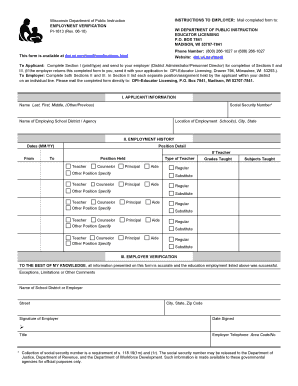
The Wisconsin Educator Employment Verification Form is a document used by educators in Wisconsin to verify their employment history with school districts for licensing purposes.
pdfFiller scores top ratings on review platforms




Who needs WI DPI PI-1613?
Explore how professionals across industries use pdfFiller.

WI DPI PI-1613 is needed by:
-
Wisconsin educators seeking licensure
-
School district employers verifying educator employment
-
Human resources professionals in educational institutions
-
Applicants for teaching positions in Wisconsin
-
Licensing agencies in Wisconsin
Comprehensive Guide to WI DPI PI-1613
What is the Wisconsin Educator Employment Verification Form?
The Wisconsin Educator Employment Verification Form, officially titled PI-1613, plays a pivotal role in the educator licensing process in Wisconsin. This form is essential for verifying the employment history of educators, ensuring compliance with state regulations. Both applicants and employers must complete specific sections to confirm the accuracy of the information provided.
Purpose and Benefits of the Wisconsin Educator Employment Verification Form
This form is crucial as it streamlines the licensing process with the Wisconsin Department of Public Instruction. By accurately representing employment history, the form alleviates discrepancies that could delay license approvals. Additionally, both applicants and employers benefit from compliance, ensuring that employment records meet state requirements.
Who Needs the Wisconsin Educator Employment Verification Form?
The individuals required to complete this verification form include educators seeking to apply for or renew their teaching licenses in Wisconsin. Employers also utilize this form to verify the employment history of applicants, laying a foundational understanding of eligibility and the actions needed to complete the licensing process.
How to Fill Out the Wisconsin Educator Employment Verification Form Online
Completing the form online involves a few simple steps:
-
Applicants should fill out Section I, providing their personal and employment details.
-
Employers are responsible for Sections II and III, where they confirm the applicant's employment details.
-
Before submission, it’s beneficial to review all completed sections for accuracy.
Field-by-Field Instructions for the Wisconsin Educator Employment Verification Form
A detailed breakdown of the form includes:
-
Section I requires applicants to accurately complete all personal and employment information fields.
-
Sections II and III outline the employer’s responsibilities, which include verifying and signing the employment history provided.
-
Avoid common mistakes by double-checking all entries and ensuring required signatures are complete.
How to Submit the Wisconsin Educator Employment Verification Form
To ensure timely processing, follow these steps for submission:
-
Mail the completed form to the designated Wisconsin Department of Public Instruction office.
-
If applicable, use electronic submission methods, as pdfFiller offers an easy way to send documents digitally.
-
Retain proof of submission for your records to ensure accountability.
Consequences of Not Filing or Late Filing the Wisconsin Educator Employment Verification Form
Failure to file or late filing can lead to significant consequences, including:
-
Delays in the licensing process, affecting career opportunities for educators.
-
Implications for employment verification, which may hinder an educator's ability to work legally in Wisconsin.
-
Timely action is essential to avoid complications in the licensing process.
Security and Compliance for the Wisconsin Educator Employment Verification Form
Users can feel secure about their sensitive information while using pdfFiller:
-
pdfFiller employs 256-bit encryption to safeguard data.
-
The platform adheres to HIPAA, GDPR, and SOC 2 Type II compliance standards.
-
Keeping user data protected is vital when handling forms like the PI-1613.
Get Started with the Wisconsin Educator Employment Verification Form Today
Utilizing pdfFiller for completing the Wisconsin Educator Employment Verification Form offers numerous advantages:
-
The platform simplifies editing, filling, and eSigning of documents.
-
A cloud-based approach saves time and effort in form management.
-
Start your verification process today with ease and efficiency.
How to fill out the WI DPI PI-1613
-
1.To begin, visit pdfFiller and locate the Wisconsin Educator Employment Verification Form (PI-1613) by using the search bar or browsing through available education forms.
-
2.Once you access the form, review the instructions provided at the top for guidance on filling it out correctly.
-
3.Before starting, gather all necessary personal information, employment history, and details about the positions held.
-
4.In Section I, fill out all required fields with your personal information and employment details, ensuring accuracy to avoid delays.
-
5.Use pdfFiller’s tools to add information, such as text boxes and selection options for checkboxes, to make the completion seamless.
-
6.Proceed to Sections II and III where your employer will need to complete their information, detailing your positions and verifying the provided information.
-
7.After both sections are filled out, thoroughly review the form for any missing information or errors to ensure it is complete.
-
8.Once finalized, save the completed form in pdfFiller and choose the option to download it, if needed for your records.
-
9.You can also directly submit the form by following the service's instructions to send it to the Wisconsin Department of Public Instruction.

Who is eligible to use the Wisconsin Educator Employment Verification Form?
This form is intended for educators seeking verification of their employment history for licensure in Wisconsin and requires input from both the applicant and their employer.
What is the deadline for submitting the employment verification form?
While there is no specific deadline listed for submitting the Wisconsin Educator Employment Verification Form, it is essential to complete it promptly to avoid delays in the licensure process.
How should the completed form be submitted?
The completed Wisconsin Educator Employment Verification Form should be mailed directly to the Wisconsin Department of Public Instruction. Ensure all sections are filled out correctly before mailing.
Are there supporting documents required for this form?
Generally, the Wisconsin Educator Employment Verification Form does not require additional supporting documents at the time of submission; however, ensure all sections are filled correctly for successful processing.
What common mistakes should I avoid when filling out this form?
Make sure to double-check for any missing information in both applicant and employer sections. Ensure clarity of signatures and dates, as these are crucial for processing.
What is the processing time for the employment verification form?
Processing times can vary depending on the Wisconsin Department of Public Instruction's workload. Typically, you can expect a response within several weeks after submission.
What if I need to make changes after submitting the form?
If you need to make changes after submission, contact the Wisconsin Department of Public Instruction directly for guidance on how to update your submitted information.
WI DPI PI-1613 Form Versions
Related Content
Related Forms






Related Catalogs
Get the latest insights from our blog


If you believe that this page should be taken down, please follow our DMCA take down process
here
.
This form may include fields for payment information. Data entered in these fields is not covered by PCI DSS compliance.