
Last updated on
Nov 6, 2026
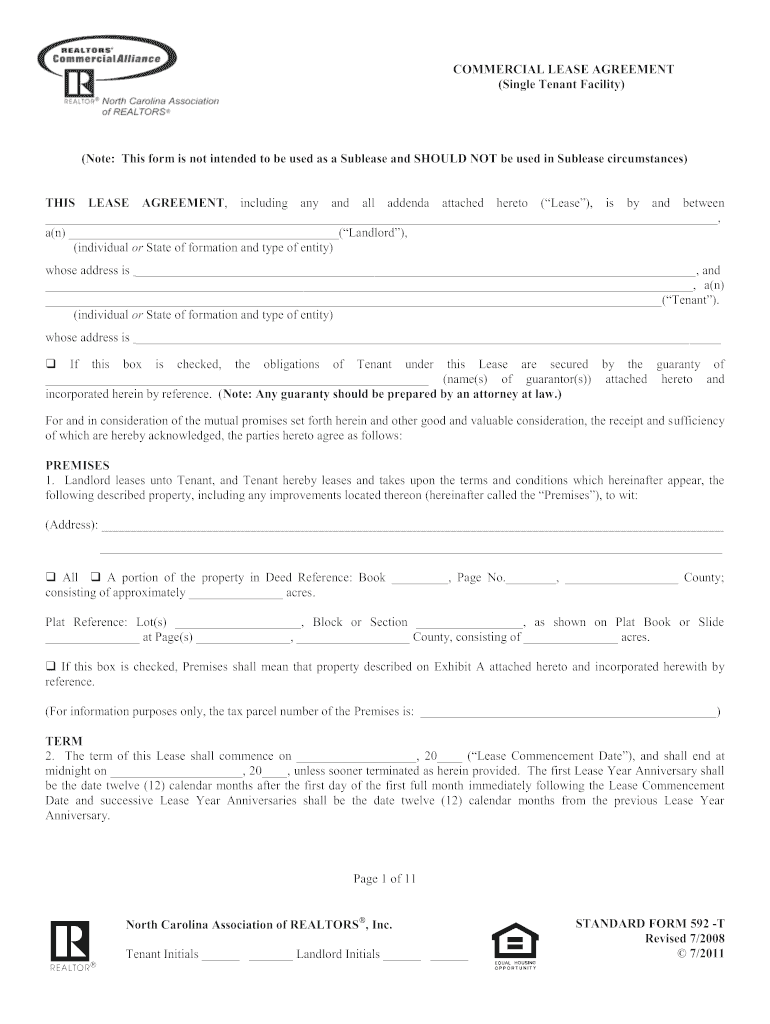
NCAR SF 592-T 2008 free printable template
pdfFiller is not affiliated with any government organization

Fill out
Complete the form online in a simple drag-and-drop editor.

eSign
Add your legally binding signature or send the form for signing.

Share
Share the form via a link, letting anyone fill it out from any device.

Export
Download, print, email, or move the form to your cloud storage.
Why pdfFiller is the best tool for your documents and forms


End-to-end document management
From editing and signing to collaboration and tracking, pdfFiller has everything you need to get your documents done quickly and efficiently.
Accessible from anywhere
pdfFiller is fully cloud-based. This means you can edit, sign, and share documents from anywhere using your computer, smartphone, or tablet.
Secure and compliant
pdfFiller lets you securely manage documents following global laws like ESIGN, CCPA, and GDPR. It's also HIPAA and SOC 2 compliant.
What is NCAR SF 592-T
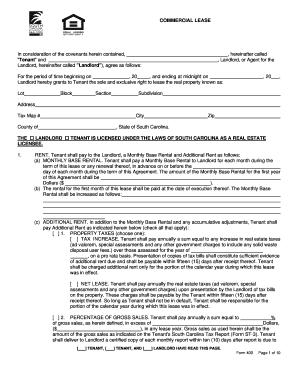
The Commercial Lease Agreement is a legal document used by landlords and tenants in North Carolina to formalize the leasing of commercial property.
pdfFiller scores top ratings on review platforms




Its easy and helps me get contracts in and out quickly
I really love this program! It's easy to use and makes my documents look so professional!
Once you understand how everything works. its a pretty awesome site.
This has given my companies ability to change PDF to word with minimal effort.
Works great! I like being able to convert a .pdf to a .docx format.
Great for people like me that have not so neat handwriting when filling out a PDF form. Also signature feature is a real plus. 5 Stars
Who needs NCAR SF 592-T?
Explore how professionals across industries use pdfFiller.

NCAR SF 592-T is needed by:
-
Business owners seeking to rent commercial space
-
Real estate agents facilitating commercial leases
-
Landlords leasing properties for business use
-
Investors in commercial real estate
-
Legal professionals drafting lease agreements
-
Property management companies handling rentals
Comprehensive Guide to NCAR SF 592-T
What is a Commercial Lease Agreement?
A Commercial Lease Agreement is a crucial legal document within North Carolina's real estate landscape. It defines the relationship between a landlord and tenant, detailing the terms for leasing commercial property. This formal document serves multiple functions, including establishing clear rental terms, protecting the interests of both parties, and ensuring compliance with local laws. Related terms such as "commercial property lease" and "landlord tenant agreement" are often used interchangeably, underscoring the significance of having a well-crafted lease.
Purpose and Benefits of the Commercial Lease Agreement
The Commercial Lease Agreement is essential for both landlords and tenants. For landlords, the key benefits include legal protection against potential disputes and a clear outline of rental terms, which helps in managing expectations. Tenants benefit from having a structured agreement that provides security and clearly states their obligations, which can prevent future conflicts. By laying out the foundational elements of the leasing relationship, a formal agreement contributes significantly to a smooth leasing process.
Key Features of the Commercial Lease Agreement
In North Carolina, a Commercial Lease Agreement includes several fundamental components:
-
Premises description: Clearly defines the space being leased.
-
Lease term: Specifies the duration of the lease.
-
Rental payments: Outlines payment structure and due dates.
-
Security deposits: Details any initial funds required to secure the lease.
-
Utility responsibilities: Clarifies who pays for utilities.
-
Permitted uses: Indicates acceptable activities within the leased space.
-
Insurance requirements: Specifies the necessary insurance coverage for both landlord and tenant.
Who Needs a Commercial Lease Agreement?
The primary users of a Commercial Lease Agreement are landlords and tenants. Landlords utilize this document to ensure they have protection and clarity regarding rental terms, while tenants seek clearly defined rights and responsibilities when leasing spaces. This agreement is particularly relevant for various business types in North Carolina, as it establishes the legal and operational framework necessary for a successful landlord-tenant relationship.
How to Fill Out the Commercial Lease Agreement Online
Filling out the Commercial Lease Agreement online is a straightforward process with pdfFiller. Follow these steps:
-
Access pdfFiller and locate the Commercial Lease Agreement template.
-
Edit the document directly within the platform, where you can fill out fields such as ‘Name: ____’ and ‘Address: ________________’.
-
Provide tenant initials and landlord initials as requested, ensuring all fields are completed accurately.
-
Review the information entered to validate details before final submission.
Common Errors and How to Avoid Them
When completing a Commercial Lease Agreement, users often encounter several common pitfalls:
-
Missing signatures from either party, which can render the agreement invalid.
-
Incorrect or incomplete details in critical fields, leading to potential disputes.
-
Failure to adhere to North Carolina’s leasing norms, causing legal issues.
To ensure accuracy, double-check all entries before finalizing the document.
How to Sign the Commercial Lease Agreement
The signing process for a Commercial Lease Agreement has evolved with digital advancements. Users can leverage e-signature features on pdfFiller, allowing for quick and secure signing. Digital signatures are legally recognized and offer a practical alternative to wet signatures. Furthermore, pdfFiller implements stringent security measures to protect confidential data during the signing process.
How to Submit the Commercial Lease Agreement
Submitting the completed Commercial Lease Agreement can be done in various ways:
-
Digital submission through email or an online portal established by the landlord.
-
Traditional submission via postal mail or in-person delivery to the landlord’s office.
It’s important to track receipt and confirmation of submission to maintain a record of the lease agreement.
Security and Compliance for the Commercial Lease Agreement
Handling a Commercial Lease Agreement responsibly requires adherence to security and regulatory standards. pdfFiller ensures the protection of sensitive documents with features like 256-bit encryption, making it compliant with HIPAA and GDPR regulations. Users are encouraged to manage data retention and deletion following signing to maintain confidentiality and compliance with relevant laws.
Experience the Ease of Using pdfFiller Today
pdfFiller offers a user-friendly platform designed to streamline the process of managing your Commercial Lease Agreement. The intuitive features simplify filling out the lease and ensure it is completed accurately and securely. Potential users are encouraged to explore pdfFiller’s resources or start a trial to enhance their experience with commercial leasing documentation.
How to fill out the NCAR SF 592-T
-
1.Access the Commercial Lease Agreement on pdfFiller by visiting the website and searching for the form in the template section.
-
2.Once located, open the form in the pdfFiller editor to start filling it out.
-
3.Gather essential information, including the names of both the landlord and tenant, property details, lease duration, and payment terms, before beginning.
-
4.Navigate the form using the provided text fields and checkboxes, filling in each section accurately with the required information.
-
5.Ensure that the premises description and rental payment details are clearly specified to avoid any confusion.
-
6.Utilize the initial fields to gather signatures from both parties to finalize the lease agreement.
-
7.After completing the form, review all entries for accuracy, ensuring no sections are left blank and all necessary information is included.
-
8.Once satisfied with the form, save your work, download a copy for your records, or submit it directly through pdfFiller if needed.

Who should sign the Commercial Lease Agreement?
Both the landlord and tenant are required to sign the Commercial Lease Agreement to make it legally binding. Ensure both parties have the necessary authority to enter into the lease.
Are there any specific eligibility requirements for tenants?
While there are no specific legal requirements stated for tenants in the form metadata, typically, tenants should have a business license and a solid credit history. Ensure compliance with any local business regulations.
Can this form be completed online?
Yes, the Commercial Lease Agreement can be completed online using pdfFiller. The platform allows you to fill out, save, and submit the form electronically.
What supporting documents are needed with the lease agreement?
Typically, you may need to provide identification, proof of business registration, and financial documents. Check with your local regulations for any additional requirements.
How do I ensure the lease is legally valid?
To ensure the lease is valid, both parties must sign the document. While notarization is not required, it can provide additional legal protection.
What are common mistakes when filling out the lease agreement?
Common mistakes include incomplete sections, incorrect property descriptions, and not including all parties' signatures. Double-check all information before submitting.
Is there a specific deadline to submit the Commercial Lease Agreement?
There is no universal deadline for submitting a lease agreement as it depends on the negotiation between the landlord and tenant. Complete the agreement as soon as the terms are finalized.
NCAR SF 592-T Form Versions
Related Content
Related Forms



Related Catalogs
Get the latest insights from our blog


If you believe that this page should be taken down, please follow our DMCA take down process
here
.
This form may include fields for payment information. Data entered in these fields is not covered by PCI DSS compliance.