
Last updated on
Nov 10, 2026

NJ NJ E00-00317 2001 free printable template
pdfFiller is not affiliated with any government organization

Fill out
Complete the form online in a simple drag-and-drop editor.

eSign
Add your legally binding signature or send the form for signing.

Share
Share the form via a link, letting anyone fill it out from any device.

Export
Download, print, email, or move the form to your cloud storage.
Why pdfFiller is the best tool for your documents and forms


End-to-end document management
From editing and signing to collaboration and tracking, pdfFiller has everything you need to get your documents done quickly and efficiently.
Accessible from anywhere
pdfFiller is fully cloud-based. This means you can edit, sign, and share documents from anywhere using your computer, smartphone, or tablet.
Secure and compliant
pdfFiller lets you securely manage documents following global laws like ESIGN, CCPA, and GDPR. It's also HIPAA and SOC 2 compliant.
What is NJ NJ E00-00317
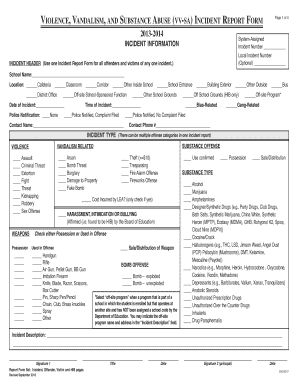
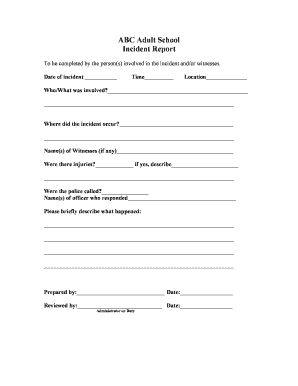
The Violence Vandalism Substance Abuse Incident Report Form is a school document used by educational institutions to document incidents of violence, vandalism, or substance abuse.
pdfFiller scores top ratings on review platforms




So far has made life easy, being able to work on pdf forms and send them!
First time with their form and so far so good--seems easy to work on so far. so far I would recommend highly!
Who needs NJ NJ E00-00317?
Explore how professionals across industries use pdfFiller.

NJ NJ E00-00317 is needed by:
-
School administrators overseeing incident reporting
-
Teachers involved in student discipline
-
Counselors addressing student safety concerns
-
Parents needing to report incidents
-
School safety officers managing security protocols
-
Disciplinary boards reviewing incidents
Comprehensive Guide to NJ NJ E00-00317
Overview of the Violence Vandalism Substance Abuse Incident Report Form
The Violence Vandalism Substance Abuse Incident Report Form is an essential document utilized by educational institutions to systematically capture incidents related to violence, vandalism, and substance abuse. This form plays a crucial role in ensuring that all incidents are documented accurately, facilitating a safe school environment. Proper documentation is vital for maintaining accountability and compliance with institutional policies and regulations.
By consistently using the school incident report form, schools can track patterns of behavior, respond to incidents effectively, and implement necessary interventions to promote a safe learning environment.
Purpose and Benefits of the Violence Vandalism Substance Abuse Incident Report Form
This incident report form assists educational institutions in maintaining safety and adherence to compliance standards. A structured approach to incident reporting offers numerous benefits, such as streamlining communication and enabling quicker responses to emergencies. By documenting incidents accurately, schools can analyze data to identify trends and proactively address safety issues.
-
Enhances incident tracking and response.
-
Promotes accountability among staff and students.
-
Facilitates compliance with local and federal regulations.
Key Features of the Violence Vandalism Substance Abuse Incident Report Form
The form includes essential components designed for ease of use, ensuring that all relevant information is captured effectively. It features fillable fields for incident details, victim/offender information, and sections requiring signatures. Each form includes clear instructions, guiding users on how to complete it properly.
-
Fillable fields for school name, incident type, and location.
-
Sections for detailed descriptions of the incident.
-
Signature boxes for the principal and other relevant authorities.
Who Should Use the Violence Vandalism Substance Abuse Incident Report Form?
The primary users of the violence vandalism substance abuse incident report form include school principals, administrative staff, and designated safety officers. Each role contributes to the completion and review of the report, ensuring that all incidents are managed appropriately. Understanding who should use the form is key to maintaining an organized documentation process.
-
Principals: Oversee and sign off on reports.
-
Administrative staff: Assist in filling out and reviewing forms.
-
Safety officers: Provide insights on incident management.
How to Fill Out the Violence Vandalism Substance Abuse Incident Report Form Online
To complete the form online using pdfFiller's platform, follow these steps: First, access the form through pdfFiller. Next, fill in the required fields accurately, ensuring you include all pertinent incident details. Review the form for any errors before submission. Accurate and clear documentation is crucial to ensure that incidents are reported effectively.
-
Open the violence vandalism substance abuse incident report form on pdfFiller.
-
Enter incident details in the designated fields.
-
Ensure information is complete and review for clarity.
-
Submit the form as per the outlined submission process.
Common Errors to Avoid When Completing the Violence Vandalism Substance Abuse Incident Report Form
Users often make common mistakes when filling out the report form. Avoiding these errors is essential for accurate documentation. Incomplete information can lead to complications during incident reviews and responses.
-
Neglecting to fill in all required fields.
-
Submitting the form without necessary signatures.
-
Using vague terms instead of specific details regarding the incident.
Submission Process for the Violence Vandalism Substance Abuse Incident Report Form
Once the form is completed, it is crucial to understand how and where to submit it. Typically, completed forms should be sent to the designated school administrator or safety officer responsible for processing incident reports. Deadlines for submission may vary, so it is important to be aware of specific timelines related to incident reporting.
-
Submit the completed form to the designated authority.
-
Adhere to any established deadlines for timely processing.
Privacy and Data Security for the Violence Vandalism Substance Abuse Incident Report Form
When handling sensitive information, it is essential to emphasize security measures in place to protect the data. Educational institutions are required to comply with privacy regulations to ensure that all reports are handled in a confidential manner. Robust security protocols are crucial in protecting the integrity of the data collected.
-
Adherence to HIPAA and GDPR compliance standards.
-
Implementation of 256-bit encryption for data protection.
Using pdfFiller for the Violence Vandalism Substance Abuse Incident Report Form
Utilizing pdfFiller for completing the report form offers several advantages. The platform allows users to fill out the form efficiently, eSign documents, and ensures that all submitted data is secure. Features such as real-time editing and document sharing enhance the user experience, making the process of reporting incidents smoother and more organized.
-
Easy form filling with fillable fields.
-
Option to eSign the document for authentication.
-
Secure storage of sensitive information.
Next Steps After Submitting the Violence Vandalism Substance Abuse Incident Report Form
After submitting the incident report form, users should be aware of the subsequent steps. It is important to anticipate follow-up actions, such as potential corrections or amendments to the submitted information. Staying informed about the processing of the report can help in managing expectations regarding incident resolution.
-
Monitor for feedback regarding the report processing.
-
Be prepared for any necessary follow-ups or additional information requests.
How to fill out the NJ NJ E00-00317
-
1.To access the Violence Vandalism Substance Abuse Incident Report Form on pdfFiller, go to the pdfFiller website and search for the form by its name in the search bar.
-
2.Once you find the form, click on it to open it in the online editor. This will allow you to fill out the necessary information directly in PDF format.
-
3.Before you begin filling out the form, gather all relevant details about the incident. This includes information such as the location, date, time, involved parties, and a description of the incident.
-
4.Utilize pdfFiller's interface to navigate through the form. Click on each field to enter the required information, and use checkboxes where applicable. If there are any form instructions included, read them carefully to ensure accuracy.
-
5.Make sure to fill out all mandatory fields, including sections for offender and victim information, as well as any disciplinary actions taken.
-
6.Once all information is entered, review the form thoroughly. Check that all fields are complete and that the details are accurate to avoid common mistakes.
-
7.After completing your review, you can save the form directly on pdfFiller. Choose the 'Save' option to keep a copy in your account or click on 'Download' to save it on your device.
-
8.Finally, submit the form according to your school's preferred submission method. This may involve emailing the form directly to a designated school official or printing it out for physical submission.

Who is required to sign the form?
The form must be signed by the principal, ensuring that an official authority validates the report of the incident.
What information is needed to complete the form?
You will need to provide details such as the incident's date, time, location, involved individuals, and descriptions of commotions or actions taken.
How can I submit the completed form?
The completed form can be submitted online if you fill it out through pdfFiller, or you may need to print and submit it to your school’s administration office physically.
Are there specific deadlines for submitting this form?
While specific deadlines may vary by school policy, it is recommended to submit the form as soon as possible after the incident to ensure thorough documentation.
Can I edit the form after saving it?
Yes, pdfFiller allows you to save your form and return to edit it later. Simply log back into your account to make any changes necessary.
What support documentation needs to accompany the form?
Generally, no specific supporting documents are required, but it may be helpful to include any notes or additional evidence related to the incident.
What should I do if I find an error after submission?
If you find an error after submitting the form, contact your school's administrative office immediately to discuss the issue and follow their guidance for corrections.
NJ NJ E00-00317 Form Versions
Related Content
Related Forms





Related Catalogs
Get the latest insights from our blog



If you believe that this page should be taken down, please follow our DMCA take down process
here
.
This form may include fields for payment information. Data entered in these fields is not covered by PCI DSS compliance.