
Last updated on
Oct 31, 2026

Get the free WOTC Disconnected Youth Self-Attestation Form
We are not affiliated with any brand or entity on this form

Fill out
Complete the form online in a simple drag-and-drop editor.

eSign
Add your legally binding signature or send the form for signing.

Share
Share the form via a link, letting anyone fill it out from any device.

Export
Download, print, email, or move the form to your cloud storage.
Why pdfFiller is the best tool for your documents and forms


End-to-end document management
From editing and signing to collaboration and tracking, pdfFiller has everything you need to get your documents done quickly and efficiently.
Accessible from anywhere
pdfFiller is fully cloud-based. This means you can edit, sign, and share documents from anywhere using your computer, smartphone, or tablet.
Secure and compliant
pdfFiller lets you securely manage documents following global laws like ESIGN, CCPA, and GDPR. It's also HIPAA and SOC 2 compliant.
What is WOTC Youth Form
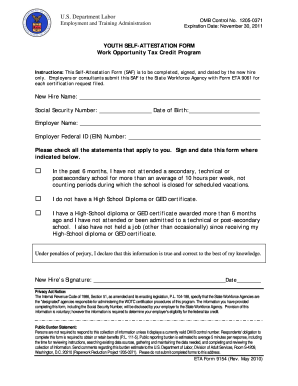
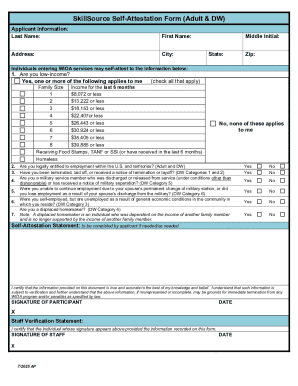
The WOTC Disconnected Youth Self-Attestation Form is a tax document used by employers to determine eligibility for federal Work Opportunity Tax Credits for disconnected youth.
pdfFiller scores top ratings on review platforms




Who needs WOTC Youth Form?
Explore how professionals across industries use pdfFiller.

WOTC Youth Form is needed by:
-
Employers seeking tax credits for hiring youth.
-
Applicants aged 16-24 applying for the program.
-
Parents or guardians of applicants under 18 years of age.
-
Tax professionals assisting clients with tax credit forms.
-
Youth service organizations helping clients access employment opportunities.
Comprehensive Guide to WOTC Youth Form
What is the WOTC Disconnected Youth Self-Attestation Form?
The WOTC Disconnected Youth Self-Attestation Form is a crucial document for determining if employers qualify for federal tax credits, specifically under the Work Opportunity Tax Credit program. This form serves the primary function of allowing disconnected youth to attest their status in order to benefit from available employment opportunities. Unlike other WOTC forms, this particular one focuses exclusively on disconnected youth, making it essential for targeting that demographic.
Purpose and Benefits of the WOTC Disconnected Youth Self-Attestation Form
This form is vital for employers as it helps them navigate the requirements necessary to secure federal tax credits. By completing the WOTC Disconnected Youth Self-Attestation Form, employers can gain access to financial incentives that support hiring efforts. For disconnected youth, the completion of the form presents numerous benefits, primarily in terms of enhanced employment opportunities that can lead to greater financial independence.
Who Needs the WOTC Disconnected Youth Self-Attestation Form?
The target audience for the WOTC Disconnected Youth Self-Attestation Form includes youths who meet specific eligibility requirements, as well as their parents or guardians. To qualify for this form, applicants must meet certain criteria that verify their disconnected status. Employers also need to align with these eligibility requirements to ensure they can properly utilize the form for tax benefits.
How to Fill Out the WOTC Disconnected Youth Self-Attestation Form Online
Completing the WOTC Disconnected Youth Self-Attestation Form online is a straightforward process. Follow these steps:
-
Access the form on pdfFiller.
-
Enter your personal information in the designated fields.
-
Check the applicable statements regarding your educational and employment status.
-
Ensure that all fields are filled accurately before submitting.
Key fields to pay attention to include your name, contact information, and educational details. It is advisable to keep a record of the information provided and review the form for common mistakes before submitting.
Field-by-Field Instructions for the WOTC Form
When filling out the WOTC Disconnected Youth Self-Attestation Form, each section has specific requirements that must be adhered to:
-
Applicant Information: Provide accurate personal details.
-
Educational Status: Indicate your current educational situation.
-
Disconnection Qualifications: Specify reasons for disconnection if applicable.
Being mindful of common errors, such as incomplete fields or incorrect signatures, can enhance the chances of successful submission.
How to Sign the WOTC Disconnected Youth Self-Attestation Form
Signing the WOTC Disconnected Youth Self-Attestation Form is an essential step in the process. Both the applicant and a parent or guardian must provide their signatures to validate the form. It’s crucial to understand the difference between digital signatures and wet signatures; both forms of signing are acceptable, but selecting the appropriate method based on your filing requirements is essential.
Where to Submit the WOTC Disconnected Youth Self-Attestation Form
Once the WOTC Disconnected Youth Self-Attestation Form has been completed, it must be submitted to the appropriate authorities. Possible submission methods include mailing the completed form or utilizing available online submission platforms. It’s important to be aware of the consequences of not filing or submitting late, which could affect your eligibility for tax credits.
Security and Compliance when Filling Out the WOTC Form
Filling out the WOTC Disconnected Youth Self-Attestation Form involves handling sensitive personal information, which demands attention to security. pdfFiller offers features such as 256-bit encryption and is compliant with both HIPAA and GDPR regulations, ensuring that your data is protected throughout the process. Data protection is paramount when dealing with forms like this.
Next Steps after Submitting the WOTC Disconnected Youth Self-Attestation Form
After the submission of the WOTC Disconnected Youth Self-Attestation Form, applicants should be aware of the following:
-
Track your application to ensure it has been processed.
-
Wait for confirmation of submission which may take several weeks.
-
Check the application status periodically to stay informed.
A clear understanding of what happens after filing can ease anxiety and help manage expectations regarding processing timelines.
Enhance Your Filing Experience with pdfFiller
Utilizing pdfFiller for the completion of the WOTC Disconnected Youth Self-Attestation Form can significantly enhance your filing experience. The platform's features such as form editing, electronic signing, and cloud-based management make it incredibly user-friendly. Additionally, pdfFiller ensures compliance and security, allowing users to focus on completing the necessary forms accurately and efficiently.
How to fill out the WOTC Youth Form
-
1.To begin, access the WOTC Disconnected Youth Self-Attestation Form on pdfFiller by searching for the form name in the search bar or navigating to your documents if previously uploaded.
-
2.Once opened, familiarize yourself with the interface. The form will display various fields that require your information, including personal details and checkboxes relevant to your educational and employment status.
-
3.Before starting the form, gather all necessary information such as your Social Security number, contact information, and details about your employment status. Ensure you have any documentation that supports the statements you need to check.
-
4.As you fill in the form, click on the blank fields to type your information. For checkboxes, simply click on the appropriate box to indicate your status. Ensure that all required fields are completed accurately.
-
5.After completing the form, review all entered information for accuracy. Verify that every statement checked is applicable, and ensure both the applicant's and, if necessary, parent or guardian's signatures are included.
-
6.Once you are satisfied with the completed form, click the save option to keep a digital copy on pdfFiller. You can choose to download the form directly to your device or submit it electronically through provided submission options.
-
7.If you choose to submit the form electronically, follow on-screen instructions for submission and confirm that you’ve received a submission confirmation for your records.

Who is eligible to use the WOTC Disconnected Youth Self-Attestation Form?
Eligibility for this form includes youth aged 16-24 who are disconnected from traditional education or employment models. Employers can also use the form to claim tax credits for hiring these youths.
What documents do I need to complete this form?
You will need personal identification such as your Social Security number, and information regarding your educational and employment background. Ensure you have details ready to accurately check relevant statements on the form.
How do I submit the completed WOTC form?
After filling out the form, you can submit it electronically through pdfFiller or download a copy to send via mail or email. Ensure to check submission guidelines applicable to the tax credits.
Is there a deadline for submitting the WOTC Disconnected Youth Self-Attestation Form?
Typically, this form must be submitted within 28 days of the employee's start date to be eligible for the Work Opportunity Tax Credit. Always verify the latest guidelines for any changes.
What are common mistakes to avoid when filling out the form?
Common mistakes include not signing the form, failing to check all applicable statements, and inaccurate personal information. Review your entries thoroughly before submission to avoid these issues.
What happens if I make an error on the form?
If you realize there's an error after submission, you may need to file a correction form or contact the appropriate tax department for guidance on how to amend your submission.
Can I access the WOTC form in languages other than English?
Currently, the WOTC Disconnected Youth Self-Attestation Form is available in English. For assistance in other languages, consider seeking help from community organizations or legal resources.
Related Content
Related Forms



Get the latest insights from our blog


If you believe that this page should be taken down, please follow our DMCA take down process
here
.
This form may include fields for payment information. Data entered in these fields is not covered by PCI DSS compliance.