
Last updated on
Oct 23, 2026

Get the free Property Control Transfer Form
We are not affiliated with any brand or entity on this form

Fill out
Complete the form online in a simple drag-and-drop editor.

eSign
Add your legally binding signature or send the form for signing.

Share
Share the form via a link, letting anyone fill it out from any device.

Export
Download, print, email, or move the form to your cloud storage.
Why pdfFiller is the best tool for your documents and forms


End-to-end document management
From editing and signing to collaboration and tracking, pdfFiller has everything you need to get your documents done quickly and efficiently.
Accessible from anywhere
pdfFiller is fully cloud-based. This means you can edit, sign, and share documents from anywhere using your computer, smartphone, or tablet.
Secure and compliant
pdfFiller lets you securely manage documents following global laws like ESIGN, CCPA, and GDPR. It's also HIPAA and SOC 2 compliant.
What is Property Transfer Form
The Property Control Transfer Form is a government document used by employees to document the transfer of state-owned property for official business use.
pdfFiller scores top ratings on review platforms




Who needs Property Transfer Form?
Explore how professionals across industries use pdfFiller.

Property Transfer Form is needed by:
-
State employees needing to transfer property.
-
Supervisors overseeing property control transfers.
-
Property Control Liaisons managing state assets.
-
Administrative staff handling equipment allocations.
-
Facilities management personnel.
-
Compliance officers ensuring government regulations are met.
Comprehensive Guide to Property Transfer Form
Understanding the Property Control Transfer Form
The Property Control Transfer Form serves as a critical document for managing the transfer of state-owned property to employees for official business use. This form is essential in documenting property transfer, ensuring accountability, and outlining employee responsibilities.
State-owned property management relies on this form to enforce compliance and keep proper records. Employees who take possession of state property must fill out this form to fulfill their obligations.
Why Use the Property Control Transfer Form?
Utilizing the Property Control Transfer Form has multiple benefits. It ensures that all transfers are properly documented, which is vital for tracking and managing state property effectively.
-
The form protects employees by clearly defining their responsibilities and liabilities regarding the property.
-
It facilitates smooth property transitions, which is crucial for uninterrupted official business operations.
Key Features of the Property Control Transfer Form
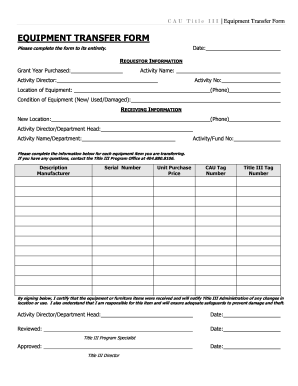
The Property Control Transfer Form includes various essential components designed to ensure comprehensive documentation. Key sections encompass detailed property information such as descriptions, serial numbers, and state tag numbers.
-
It requires the necessary signatures and certifications that confirm accountability.
-
An acknowledgment section is included for employees to confirm the return of the property is in working condition.
Who Needs to Complete the Property Control Transfer Form?
Several key roles are involved in completing the Property Control Transfer Form. Primarily, employees who receive state property for official business use are responsible for filling out the form.
-
Immediate supervisors must approve the transfer and sign the document.
-
The property control liaison oversees the entire property management process and ensures compliance.
Instructions for Completing the Property Control Transfer Form
To successfully complete the Property Control Transfer Form, follow these instructions. First, ensure that you gather all necessary information, including property descriptions and identification numbers.
-
Review each field carefully to validate the accuracy of the provided information.
-
Avoid common mistakes such as overlooking required signatures or leaving fields blank.
How to Submit the Property Control Transfer Form
Submitting the Property Control Transfer Form can be done through various methods. Employees can choose to submit the form online, in person, or according to specific departmental protocols.
-
Be aware of important deadlines for submission and any fees that may come into play.
-
For assistance and tracking, refer to the designated contact information provided for submission support.
Post-Submission Process for the Property Control Transfer Form
After submitting the Property Control Transfer Form, several follow-up actions are necessary. Employees should know how to check the application status and be aware of common reasons for rejection.
-
If amendments are needed, follow the steps outlined for correcting the form.
-
Maintain proper documentation, adhering to retention requirements for record-keeping.
Security Considerations When Handling the Property Control Transfer Form
Handling the Property Control Transfer Form necessitates attention to security measures to protect sensitive information. Implementation of security protocols, such as encryption and compliance with necessary standards, is vital.
-
Using platforms like pdfFiller enhances user data protection during the form management process.
-
Prioritize privacy and data protection to ensure safe handling of all documents.
Utilizing pdfFiller for Your Property Control Transfer Form Needs
pdfFiller offers a robust solution for managing the Property Control Transfer Form with ease. The platform enables users to create, edit, and submit forms efficiently, enhancing overall productivity.
-
Features such as e-signing, fillable forms, and document storage streamline the process.
-
Users can follow an easy-to-understand procedure for completing and managing this important form using pdfFiller.
How to fill out the Property Transfer Form
-
1.To access the Property Control Transfer Form on pdfFiller, navigate to the website and use the search functionality to locate the form by name.
-
2.Once opened, review the form layout and familiarize yourself with the fields available for input.
-
3.Gather essential information required for the form completion, including property descriptions, serial numbers, and state tag numbers.
-
4.Begin filling out the form by clicking on each field; enter your name as the employee requesting the property transfer.
-
5.Proceed to fill in the property's description along with serial numbers and state tag numbers in the designated fields.
-
6.After completing the details, ensure you read through any certification statements and acknowledge your responsibilities regarding the property.
-
7.Next, gather signatures by having the immediate supervisor and property control liaison complete their respective sections.
-
8.Once all fields are filled and signatures obtained, review the entire form for completeness and accuracy.
-
9.To save your work, click on the save option in pdfFiller. If necessary, download the form in your preferred format for records.
-
10.Finally, submit the completed form according to your agency's procedure, whether electronically through pdfFiller or by printing and handing in a physical copy.

Who is eligible to use the Property Control Transfer Form?
Any state employee responsible for managing, taking possession of, or transferring state-owned property for official business use is eligible to complete this form.
What is the submission procedure for the form?
The completed Property Control Transfer Form should be submitted to your immediate supervisor and then forwarded to the Property Control Liaison. Make sure to follow your organization's guidelines for electronic or physical submissions.
Are there deadlines for submitting the Property Control Transfer Form?
While specific deadlines may vary by department, it is recommended to submit the form as soon as the property transfer is initiated to ensure proper tracking and compliance.
What supporting documents are required with the form?
Typically, no additional supporting documents are required, but it is advisable to have relevant property documentation on hand, such as purchase orders or previous transfer records.
What common mistakes should I avoid when filling out the form?
Ensure that all required fields are filled out completely, especially property descriptions and serial numbers. Incomplete forms may delay processing or result in rejection.
How long does it take to process the Property Control Transfer Form?
Processing times can vary based on departmental workload, but typically expect processing to take between a few days up to two weeks, depending on approval protocols.
What if I need to make changes after submitting the form?
If you need to make changes after submission, contact your supervisor or Property Control Liaison immediately to discuss the necessary revisions and follow procedures for amendments.
Related Content
Related Forms






Get the latest insights from our blog



If you believe that this page should be taken down, please follow our DMCA take down process
here
.
This form may include fields for payment information. Data entered in these fields is not covered by PCI DSS compliance.