
Last updated on
Oct 2, 2026

Get the free Annual Business Name Declaration Form
We are not affiliated with any brand or entity on this form

Fill out
Complete the form online in a simple drag-and-drop editor.

eSign
Add your legally binding signature or send the form for signing.

Share
Share the form via a link, letting anyone fill it out from any device.

Export
Download, print, email, or move the form to your cloud storage.
Why pdfFiller is the best tool for your documents and forms


End-to-end document management
From editing and signing to collaboration and tracking, pdfFiller has everything you need to get your documents done quickly and efficiently.
Accessible from anywhere
pdfFiller is fully cloud-based. This means you can edit, sign, and share documents from anywhere using your computer, smartphone, or tablet.
Secure and compliant
pdfFiller lets you securely manage documents following global laws like ESIGN, CCPA, and GDPR. It's also HIPAA and SOC 2 compliant.
What is Business Name Declaration
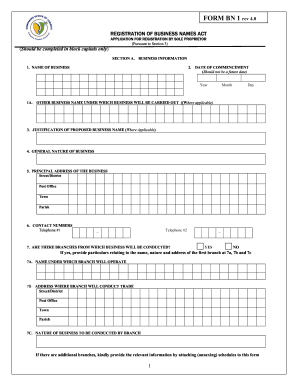
The Annual Business Name Declaration Form is a compliance document used by business owners in the Isle of Man to confirm that their business continues to operate under its registered name and maintains its particulars.
pdfFiller scores top ratings on review platforms




Who needs Business Name Declaration?
Explore how professionals across industries use pdfFiller.

Business Name Declaration is needed by:
-
Business owners operating in the Isle of Man
-
Entrepreneurs registering a new business name
-
Individuals involved in annual business compliance
-
Companies wishing to maintain their business name registration
-
Accountants handling business filings
-
Legal advisors assisting businesses in compliance
Comprehensive Guide to Business Name Declaration
What is the Annual Business Name Declaration Form?
The Annual Business Name Declaration Form is a key document for businesses in the Isle of Man, utilized for confirming that a business continues to operate under its registered name. This declaration is vital for ensuring compliance with local business regulations, thereby maintaining a business's legal standing. The form is governed by the Registration of Business Names Act 1918, highlighting its importance in the annual business registration process.
Purpose and Benefits of the Annual Business Name Declaration Form
Filing the Annual Business Name Declaration Form helps ensure that business registrations remain up to date. This process not only supports legal compliance but also helps businesses avoid potential fines and penalties associated with non-compliance. Additionally, regular submission of this form asserts the ongoing legal operation of the business, fostering trust among clients and stakeholders.
Who Needs the Annual Business Name Declaration Form?
The Annual Business Name Declaration Form is required for all business owners operating within the Isle of Man. This includes sole proprietors, partnerships, and corporate entities. Businesses must file the form to comply with local laws. Certain exceptions may apply, making it crucial for business owners to understand their responsibilities regarding filing this declaration.
When and How to File the Annual Business Name Declaration Form
Business owners must adhere to specific deadlines for filing the Annual Business Name Declaration Form. Generally, the form must be submitted annually, within a set timeframe dictated by the local regulations. To file the declaration, follow these steps:
-
Gather necessary business information and updates.
-
Visit the appropriate submission portal or obtain a paper form.
-
Complete the form accurately.
-
Submit the form by the established deadline.
Failure to file on time can result in late fees or other penalties, underscoring the importance of timely submission.
How to Fill Out the Annual Business Name Declaration Form Online (Step-by-Step)
Completing the Annual Business Name Declaration Form online can be efficient and straightforward. Follow these detailed steps to ensure accuracy:
-
Access the online form via the designated platform.
-
Fill in each required field, including the business name and registration details.
-
Ensure all information is accurate and up to date.
-
Provide your signature digitally where indicated.
Be mindful of common mistakes, such as missing signatures or incorrect business details. Utilizing platforms like pdfFiller can streamline this process by providing user-friendly tools for form filling.
Security and Compliance for the Annual Business Name Declaration Form
Ensuring the safety of sensitive business information during the filing process is paramount. pdfFiller employs robust security measures, including 256-bit encryption, to protect user data. Compliance with GDPR is also a key feature, ensuring that all filed information is handled responsibly. To enhance security, consider the following:
-
Use strong passwords for accounts where forms are stored.
-
Regularly update access permissions for team members.
By prioritizing security, businesses can confidently submit their declarations.
How to Submit the Annual Business Name Declaration Form
Submission of the Annual Business Name Declaration Form can be done through various methods, offering flexibility for business owners. Consider the following submission options:
-
Online through the official business registration portal.
-
By mail, using the appropriate forms and addresses provided.
After submission, tracking the status of your form is essential. Business owners should look for confirmation of receipt and be aware of processing times to ensure compliance with local regulations.
Renewal or Resubmission Process for the Annual Business Name Declaration Form
If issues arise with submitted declarations, it is critical to understand the renewal or resubmission process. Steps to correct a previously submitted form include:
-
Review the rejected declaration to identify discrepancies.
-
Gather updated information or necessary amendments.
-
Complete the form again with accurate details.
Understanding common reasons for rejections can help prevent further complications during filing.
Using pdfFiller for Your Annual Business Name Declaration Form
pdfFiller provides an excellent resource for businesses looking to navigate the filing of the Annual Business Name Declaration Form. Utilizing tools offered by pdfFiller can enhance the experience in several ways:
-
Easy editing and filling of forms with intuitive design.
-
Secure document management to protect sensitive information.
-
eSigning capabilities for a more efficient submission process.
Choosing pdfFiller can lead to a streamlined filing experience, making the annual declaration process simpler and more effective.
Sample Completed Annual Business Name Declaration Form
For a clearer understanding of the format and requirements of the Annual Business Name Declaration Form, here is a visual representation of a filled-out form:
-
Annotated sections highlighting required fields.
-
Common values and entries that demonstrate accuracy and compliance.
This example serves as a helpful reference for users to follow when completing their own declarations, ensuring a better understanding of the form's structure.
How to fill out the Business Name Declaration
-
1.Begin by accessing the pdfFiller website and search for the 'Annual Business Name Declaration Form'.
-
2.Once located, click on the form to open it in the pdfFiller interface. Ensure your browser is up-to-date for optimal performance.
-
3.Before filling out the form, gather all relevant business information, including your registered business name, address, and any documentation related to business particulars.
-
4.As you navigate the form, click on each blank field to begin inputting your information. Use the provided fields for your business name, current address, and other required details.
-
5.Make sure to include your signature where indicated. pdfFiller offers a signature tool to create or upload your signature directly to the form.
-
6.After completing all fields, carefully review your entries for accuracy, ensuring all required information is filled out completely.
-
7.Once satisfied with your entries, follow the prompts in pdfFiller to save your document. You can either download a copy for your records or submit it directly to the Companies Registry.
-
8.If you choose to submit online, ensure you follow any specific submission instructions provided by the Companies Registry for timely processing.

Who needs to complete the Annual Business Name Declaration Form?
This form must be completed by business owners in the Isle of Man to confirm their business's ongoing operation and maintain adherence to the Registration of Business Names Acts 1918 and 1954.
Is there a deadline for submitting the form?
Yes, the form should be submitted annually to ensure compliance. It is best practice to complete and submit it before the end of the business's registered financial year.
How is the completed form submitted?
The form can be submitted online through pdfFiller and directly to the Companies Registry. You may also print and mail the form if preferred.
What documents are required to complete the form?
Typically, you will need your business registration details, including the registered name and particulars. Make sure to have identification ready, typically a government-issued ID.
What are common mistakes when filling this form?
Common errors include forgetting to include your signature, leaving required fields blank, or submitting after the deadline. Be sure to double-check all entries before submission.
How long does processing take after submitting the form?
Processing times can vary; however, it generally takes a few weeks for the Companies Registry to process submissions. It's advisable to check directly with their office for specific timelines.
Can I modify the form after I begin filling it out?
Yes, if you are using pdfFiller, you can easily modify any field. Just click on the field you want to change and enter the correct information.
Related Content
Related Forms



Get the latest insights from our blog


If you believe that this page should be taken down, please follow our DMCA take down process
here
.
This form may include fields for payment information. Data entered in these fields is not covered by PCI DSS compliance.