
Last updated on
Oct 2, 2026

Get the free Staff Performance Evaluation Form
We are not affiliated with any brand or entity on this form

Fill out
Complete the form online in a simple drag-and-drop editor.

eSign
Add your legally binding signature or send the form for signing.

Share
Share the form via a link, letting anyone fill it out from any device.

Export
Download, print, email, or move the form to your cloud storage.
Why pdfFiller is the best tool for your documents and forms


End-to-end document management
From editing and signing to collaboration and tracking, pdfFiller has everything you need to get your documents done quickly and efficiently.
Accessible from anywhere
pdfFiller is fully cloud-based. This means you can edit, sign, and share documents from anywhere using your computer, smartphone, or tablet.
Secure and compliant
pdfFiller lets you securely manage documents following global laws like ESIGN, CCPA, and GDPR. It's also HIPAA and SOC 2 compliant.
What is Staff Performance Evaluation Form
The Staff Performance Evaluation Form is a performance review document used by employers to assess and document employee performance effectively.
pdfFiller scores top ratings on review platforms




Who needs Staff Performance Evaluation Form?
Explore how professionals across industries use pdfFiller.

Staff Performance Evaluation Form is needed by:
-
Human Resources professionals requiring structured evaluations
-
Supervisors conducting performance reviews of their team members
-
Employees preparing for performance evaluations
-
Organizations implementing formal appraisal systems
-
Managers seeking to provide constructive feedback
-
Businesses ensuring compliance with evaluation standards
Comprehensive Guide to Staff Performance Evaluation Form
What is the Staff Performance Evaluation Form?
The Staff Performance Evaluation Form is a critical tool used by organizations to assess employee performance. It serves as both a formal record of evaluations and a structured method for supervisors to provide feedback. This form requires input from both employees and supervisors, ensuring a comprehensive review of performance that contributes to official personnel records.
This form’s significance lies in its ability to facilitate a transparent evaluation process that enhances employee growth and accountability.
Purpose and Benefits of the Staff Performance Evaluation Form
Employers utilize the Staff Performance Evaluation Form to identify employee strengths and weaknesses effectively. By providing a clear structure for feedback, this form fosters open communication between management and staff.
-
Encourages structured feedback that highlights areas for improvement.
-
Supports continuous employee development through constructive criticism.
-
Promotes accountability and ownership of job performance among employees.
Key Features of the Staff Performance Evaluation Form
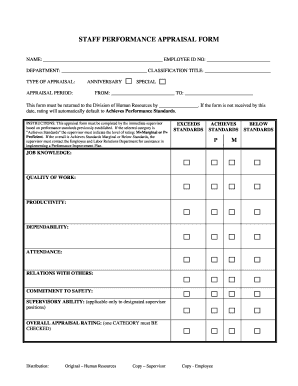
This staff performance evaluation form includes essential components necessary for a thorough assessment. Key features include sections dedicated to job duties, performance criteria, and overall performance ratings.
-
Clearly defined sections for job responsibilities and performance metrics.
-
A rating scale to quantify various performance factors effectively.
-
Instructions for completion, including common fields like 'Employee Name' and 'Position Title.'
Who Needs the Staff Performance Evaluation Form?
The Staff Performance Evaluation Form is essential for various stakeholders within an organization. It serves the needs of employers and managers responsible for conducting performance reviews.
-
Employers and managers performing regular evaluations of their team members.
-
Employees who are subject to evaluations across diverse roles and settings.
-
Human resources departments that manage and maintain employee records related to appraisals.
How to Fill Out the Staff Performance Evaluation Form Online
Completing the Staff Performance Evaluation Form online is straightforward with pdfFiller. Here is a step-by-step guide to ensure the form is filled out correctly.
-
Navigate to the fillable form on pdfFiller.
-
Complete each major section, ensuring to fill in all required fields.
-
Review the form for accuracy and completeness before submission.
Common Errors and How to Avoid Them
Avoiding mistakes when filling out the Staff Performance Evaluation Form is crucial for accurate evaluations. Common errors can lead to misunderstandings or incomplete assessments.
-
Watch for missing signatures and ensure all required fields are filled.
-
Use a validation checklist to confirm that the form is filled out correctly.
-
Double-check your entries prior to submission to eliminate oversight.
Secure Submission of the Staff Performance Evaluation Form
The security of submitted forms is paramount. Safeguarding personal information and maintaining confidentiality are critical during the submission process.
-
Ensure compliance with data protection regulations such as HIPAA and GDPR.
-
Utilize secure submission methods provided by pdfFiller.
-
Prioritize confidentiality to protect sensitive employee evaluations.
What Happens After You Submit the Staff Performance Evaluation Form?
After submitting the Staff Performance Evaluation Form, it undergoes a systematic processing by HR. This phase may involve several follow-up actions.
-
HR will review the submissions for accuracy and completeness.
-
Possible follow-up actions may include discussions or additional evaluations.
-
You can track the status of your submitted form to stay informed.
Sample Staff Performance Evaluation Form
To aid in the completion of your form, a sample Staff Performance Evaluation Form provides valuable reference points. This example illustrates the layout and structure of a completed evaluation.
-
Features a visual representation of a filled-out form covering all key sections.
-
Explains how to interpret ratings and comments sections effectively.
-
Utilizing a sample can guide you in your own form completion process.
Explore pdfFiller's Features for Your Performance Evaluations
pdfFiller offers powerful tools that facilitate the efficient completion of the Staff Performance Evaluation Form. Its capabilities enhance user experience and simplify the evaluation process.
-
Edit and share forms with ease using user-friendly features.
-
Enjoy the benefits of eSigning, ensuring forms are finalized quickly.
-
Access support to navigate the platform and maximize form management efficiency.
How to fill out the Staff Performance Evaluation Form
-
1.Access the Staff Performance Evaluation Form on pdfFiller by entering the platform and searching for the form name in the search bar.
-
2.Open the form by clicking on it in the search results, which will lead you to an editable version of the document on your dashboard.
-
3.Familiarize yourself with the form layout; locate fields for employee name, position, and review type to understand where to enter details.
-
4.Gather all necessary information before starting; consult performance records, objectives, and feedback from monthly assessments for a comprehensive evaluation.
-
5.Begin filling in the fields starting with the employee's name and position title as indicated at the top of the form.
-
6.Use the rating scale provided on the form to evaluate different performance factors; check off the ratings corresponding to each criterion based on your assessment.
-
7.After completing the evaluation, review all sections thoroughly to ensure accuracy and completeness; make any necessary edits as you review.
-
8.Once satisfied with the form, save your progress on pdfFiller to avoid losing any information.
-
9.You can then choose to download the completed form as a PDF or submit it directly through your HR management system, following the instructions provided by your organization.

Who is eligible to use the Staff Performance Evaluation Form?
Any employer or HR professional who needs to evaluate employee performance can use the Staff Performance Evaluation Form.
Are there deadlines for submitting the performance evaluation form?
Submission deadlines typically depend on your organization's performance review schedule; check with your HR department for specific dates.
How do I submit the completed Staff Performance Evaluation Form?
You can submit the completed form by downloading it as a PDF or directly uploading it to your HR system via pdfFiller.
What supporting documents are needed for the evaluation?
Supporting documents may include previous performance reviews, employee goals, and any feedback from peers or mentors relevant to the evaluation.
What are common mistakes to avoid when completing this evaluation form?
Common mistakes include providing vague ratings, failing to gather sufficient feedback, and not reviewing the form for clarity before submission.
How long does it take to process the evaluation form?
Processing times for evaluations vary based on organizational workflows; expect 1-2 weeks for reviews and approvals typically.
Can I edit the Staff Performance Evaluation Form after completing it?
Yes, you can edit the form using pdfFiller at any point before saving or submitting the final version.
Related Content
Related Forms


Related Catalogs
Get the latest insights from our blog


If you believe that this page should be taken down, please follow our DMCA take down process
here
.
This form may include fields for payment information. Data entered in these fields is not covered by PCI DSS compliance.