
Last updated on
Nov 9, 2026

Azusa Pacific University Minimum Cleaning Requirements free printable template
pdfFiller is not affiliated with any government organization

Fill out
Complete the form online in a simple drag-and-drop editor.

eSign
Add your legally binding signature or send the form for signing.

Share
Share the form via a link, letting anyone fill it out from any device.

Export
Download, print, email, or move the form to your cloud storage.
Why pdfFiller is the best tool for your documents and forms


End-to-end document management
From editing and signing to collaboration and tracking, pdfFiller has everything you need to get your documents done quickly and efficiently.
Accessible from anywhere
pdfFiller is fully cloud-based. This means you can edit, sign, and share documents from anywhere using your computer, smartphone, or tablet.
Secure and compliant
pdfFiller lets you securely manage documents following global laws like ESIGN, CCPA, and GDPR. It's also HIPAA and SOC 2 compliant.
What is Azusa Pacific University Minimum Cleaning Requirements
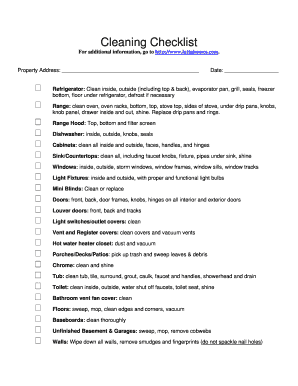
The Campus Housing Checkout Checklist is a form used by students to ensure their living space meets cleaning requirements before moving out of campus housing.
pdfFiller scores top ratings on review platforms




Who needs Azusa Pacific University Minimum Cleaning Requirements?
Explore how professionals across industries use pdfFiller.

Azusa Pacific University Minimum Cleaning Requirements is needed by:
-
Students preparing to move out of campus housing
-
University housing office staff
-
Residential advisors or hall directors
-
Individuals responsible for final housing inspections
-
Parents assisting students with move-out procedures
Comprehensive Guide to Azusa Pacific University Minimum Cleaning Requirements
What is the Campus Housing Checkout Checklist?
The Campus Housing Checkout Checklist is a crucial tool for students transitioning from college housing. This form is designed to help ensure that the living space complies with specified cleaning standards, including thorough cleaning of general areas, bathrooms, bedrooms, kitchens, and closets. Utilizing this checklist is essential, as it can prevent unexpected charges on students' accounts due to inadequate cleaning.
Purpose and Benefits of the Campus Housing Checkout Checklist
This checklist serves several purposes, primarily aiding students in adhering to university housing regulations. By systematically completing the checklist, students can facilitate a smoother move-out process. Achieving compliance with the cleanup standards outlined in the form can have significant financial implications, allowing students to avoid unnecessary fees associated with insufficient cleaning.
Key Features of the Campus Housing Checkout Checklist
The checklist includes specific tasks and sections that guide students through the cleaning process, ensuring that no area is overlooked. The layout incorporates blank fields and checkboxes, making it user-friendly and straightforward. These features are designed for easy completion, allowing students to effectively manage their move-out obligations.
Who Needs the Campus Housing Checkout Checklist?
Primarily, the Campus Housing Checkout Checklist is intended for students currently residing in campus housing, such as dormitories or apartments. It is essential for both domestic and international students, ensuring all residents are informed of their cleaning responsibilities. This form is also relevant for guests temporarily using campus facilities, who must adhere to similar standards.
How to Fill Out the Campus Housing Checkout Checklist Online (Step-by-Step)
Filling out the Campus Housing Checkout Checklist is a straightforward process. Follow these simple steps:
-
Access the form through the designated online portal.
-
Begin by entering your personal information in the specified fields.
-
Move through each section, checking off tasks as you complete them.
-
Ensure all relevant areas, such as bathrooms and kitchen, are covered in your cleaning.
-
Review your entries for accuracy before finalizing the form.
Taking the time to be thorough can prevent any potential issues during the move-out process.
Common Errors and How to Avoid Them
Students often make several common mistakes when completing the checklist. To avoid these errors, consider the following tips:
-
Double-check that all required fields are filled out completely.
-
Be sure to review each task to ensure it has been marked as completed where applicable.
-
Avoid rushing through the form; take your time to ensure thoroughness.
Validation of your checklist is essential for preventing unnecessary fees or delays later on.
How to Save and Submit the Campus Housing Checkout Checklist
After completing the checklist, you have several options for saving and submitting the form:
-
Download your completed checklist in PDF format.
-
Print a physical copy for in-person submission.
-
Email the checklist directly to the appropriate housing office.
Be mindful of submission deadlines, as timely processing is crucial for a smooth transition out of campus housing.
What Happens After You Submit the Campus Housing Checkout Checklist?
Once you submit the checklist, expect a review process to be initiated. Students can anticipate potential follow-up inspections and feedback from housing coordinators regarding compliance with cleaning standards. Failure to properly complete the checklist or late submissions may lead to financial penalties, making it important to adhere to all protocols.
Security and Compliance for the Campus Housing Checkout Checklist
pdfFiller takes multiple security measures to ensure that sensitive student information is handled safely. Users can rest assured that the submission of the Campus Housing Checkout Checklist complies with all relevant privacy regulations. Data protection practices are strictly followed to maintain confidentiality during the submission process.
Experience Easy Form Management with pdfFiller
Students are encouraged to use pdfFiller for efficient completion of the Campus Housing Checkout Checklist. The platform offers key features such as eSigning, editing, and secure sharing of PDFs. The user-friendly interface allows students to access and manage their forms conveniently, saving time and ensuring compliance during the move-out process.
How to fill out the Azusa Pacific University Minimum Cleaning Requirements
-
1.Access the Campus Housing Checkout Checklist on pdfFiller by searching for the form in the 'Education Forms' section or using the provided link.
-
2.Once the form is open, review the sections to understand what tasks need to be completed. Familiarize yourself with the layout and fields.
-
3.Gather any necessary information, such as previous inspections, cleaning supplies needed, or university-specific requirements.
-
4.Begin filling in the form by clicking on the blank fields or checkboxes. Use the type tool to enter text where necessary and check off tasks as they are completed.
-
5.As you fill in each section (general areas, bedrooms, kitchens, etc.), ensure that all tasks outlined in the checklist are marked to prevent any potential charges.
-
6.After you have completed all necessary fields, review the form for accuracy. Make sure that all checkboxes are filled and that all textual entries are clear and correct.
-
7.Once reviewed, save your work by clicking on the 'Save' button. You can also download the completed form as a PDF or submit it directly through pdfFiller, depending on your university's requirements.
-
8.If submitting, follow any additional instructions provided by your housing office for the submission method.

Who is eligible to use the Campus Housing Checkout Checklist?
The Campus Housing Checkout Checklist is primarily for students moving out of campus housing who need to verify that their living spaces meet cleaning standards.
What is the deadline for completing the checklist?
Students should complete the Campus Housing Checkout Checklist before their specified move-out date. It's important to check with your housing office for any specific deadlines related to your housing contract.
How do I submit the completed checklist?
You can submit the completed Campus Housing Checkout Checklist directly through pdfFiller by following university-specific submission procedures. Always check with your housing office for the preferred method.
What supporting documents are needed with this form?
Typically, no additional supporting documents are required, but it's a good idea to have your housing contract and any previous inspection notes handy to ensure compliance with requirements.
What common mistakes should I avoid when filling out the checklist?
Ensure all items on the checklist are marked before submitting. Common mistakes include overlooking cleaning tasks or failing to review the document for errors before submission.
How long does it take to process the checklist once submitted?
Processing times may vary, but usually, the checklist is reviewed within a few days. Check with your housing office for specific timelines related to inspection processing.
What if I don't meet the cleaning requirements outlined in the checklist?
Not meeting the cleaning requirements can lead to additional charges on your account. Ensure all tasks are completed as indicated in the checklist to avoid any penalties.
Related Content
Related Forms





Related Catalogs
Get the latest insights from our blog


If you believe that this page should be taken down, please follow our DMCA take down process
here
.
This form may include fields for payment information. Data entered in these fields is not covered by PCI DSS compliance.