
Last updated on
Oct 23, 2026

Downstate Health Sciences University DMC101 F465 2009 free printable template
pdfFiller is not affiliated with any government organization

Fill out
Complete the form online in a simple drag-and-drop editor.

eSign
Add your legally binding signature or send the form for signing.

Share
Share the form via a link, letting anyone fill it out from any device.

Export
Download, print, email, or move the form to your cloud storage.
Why pdfFiller is the best tool for your documents and forms


End-to-end document management
From editing and signing to collaboration and tracking, pdfFiller has everything you need to get your documents done quickly and efficiently.
Accessible from anywhere
pdfFiller is fully cloud-based. This means you can edit, sign, and share documents from anywhere using your computer, smartphone, or tablet.
Secure and compliant
pdfFiller lets you securely manage documents following global laws like ESIGN, CCPA, and GDPR. It's also HIPAA and SOC 2 compliant.
What is Downstate Health Sciences University DMC101 F465
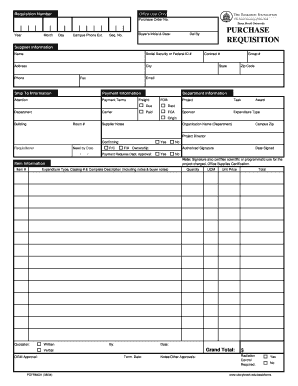
The Purchase Requisition Form is a business document used by the SUNY Health Science Center at Brooklyn to request purchases and initiate the procurement process.
pdfFiller scores top ratings on review platforms




Who needs Downstate Health Sciences University DMC101 F465?
Explore how professionals across industries use pdfFiller.

Downstate Health Sciences University DMC101 F465 is needed by:
-
Employees at SUNY Health Science Center
-
Department managers managing procurement
-
Authorized personnel requiring purchases
-
Finance team for budgeting and approvals
-
Suppliers and vendors involved in purchasing
Comprehensive Guide to Downstate Health Sciences University DMC101 F465
What is the Purchase Requisition Form?
The Purchase Requisition Form is a critical document utilized by the SUNY Health Science Center at Brooklyn to initiate the procurement process. This form serves as the first step in acquiring goods or services, ensuring that purchases align with organizational needs. It is essential that the form is filled out completely and signed by authorized personnel to proceed with the purchase.
By requiring specific signatures for authorization, the form guarantees accountability and compliance within organizational procurement policies.
Purpose and Benefits of the Purchase Requisition Form
The Purchase Requisition Form plays a crucial role in streamlining the procurement process. It offers several functional benefits, including enhancing compliance and promoting accountability. By maintaining a structured approach to purchasing, the form also aids in budgeting and financial planning for departments across the SUNY Health Science Center.
Utilizing this form can lead to greater efficiency, as it helps track spending and ensures that funds are allocated appropriately.
Key Features of the Purchase Requisition Form
The form includes essential components that facilitate its purpose. Key fields often included are:
-
Suggested supplier
-
Item descriptions
-
Quantities
-
Prices
Authorization signatures also play a vital role, not just for validation but also for maintaining the integrity of the procurement process. Additionally, the form comes with clear instructions for effective completion and timely submission.
Who Needs the Purchase Requisition Form?
Employees at SUNY Health Science Center who are involved in purchasing responsibilities are the primary users of the Purchase Requisition Form. This includes various departments that regularly require purchases to support their operations. Understanding the eligibility criteria for filling out this form is essential for ensuring that all procurement is conducted appropriately.
How to Fill Out the Purchase Requisition Form
Filling out the Purchase Requisition Form requires attention to detail to avoid common errors. Here are the steps to complete it accurately:
-
Enter the suggested supplier information.
-
Provide detailed item descriptions and specify the required quantities.
-
Include pricing for each item listed.
-
Ensure that all required authorization signatures are obtained.
Verifying that all information is accurate and following the completion guidelines can help prevent any potential issues during processing.
Where and How to Submit the Purchase Requisition Form
Submission of the Purchase Requisition Form can occur through various methods, depending on departmental policies. You can choose between online submission or physical delivery. The location for submitting the form depends on your department's specific guidelines.
Additionally, be mindful of submission deadlines and required processing times to ensure that your requests are addressed promptly.
Security and Compliance When Using the Purchase Requisition Form
Maintaining security and compliance when handling the Purchase Requisition Form is essential. Implementing data protection measures, including encryption, safeguards sensitive information as mandated by applicable regulations. It is crucial for users to handle this information responsibly and adhere to organizational policies regarding document retention.
Regular training on best practices for managing sensitive documents can further enhance data security.
How pdfFiller Simplifies Filling Out the Purchase Requisition Form
pdfFiller provides several features that assist users in completing the Purchase Requisition Form efficiently. The platform allows seamless editing, eSigning, and sharing of the document, making the completion process more straightforward.
Security is a priority at pdfFiller, with assurances of robust measures when handling sensitive documents to protect user data.
Example of a Completed Purchase Requisition Form
An annotated sample of a filled-out Purchase Requisition Form serves as a visual guide for users. Key sections and fields will be highlighted to enhance understanding of the completion process. Detailed explanations will clarify the intentions behind certain fields and how best to fill them out.
Next Steps After Submitting the Purchase Requisition Form
After submitting the Purchase Requisition Form, it is essential to understand the next steps in the process. Typically, this involves an approval process where designated personnel will review the submission. Guidelines for tracking the status of your submission or making necessary corrections are vital to avoid delays.
Using pdfFiller can facilitate updates and resubmissions if any modifications are required.
How to fill out the Downstate Health Sciences University DMC101 F465
-
1.Access the Purchase Requisition Form on pdfFiller by searching for it in the application or uploading the document from your computer.
-
2.Open the form and familiarize yourself with the fields available for completion, including supplier details and item descriptions.
-
3.Gather all necessary information such as suggested supplier names, item catalogs, prices, and quantities to ensure accuracy while filling out the form.
-
4.Begin filling out each field, typing directly into the available input boxes or selecting from checkboxes where applicable.
-
5.Review the provided instructions carefully, such as 'Please Type or Print Only', as you complete all required fields.
-
6.Check that signature lines are available for the Authorized Signature and Second Authorized Signature, and prepare to gather necessary approvals.
-
7.Utilize the toolbar to highlight, erase or edit entries as needed to ensure all information is correctly inputted.
-
8.Once completed, review the entire form for any errors or omissions before finalizing.
-
9.Save your progress regularly, and when finished, export the document to your desired format or submit directly through pdfFiller.
-
10.Check document options to download a copy for your records or print the form directly from pdfFiller.

Who is eligible to use the Purchase Requisition Form?
The Purchase Requisition Form is intended for employees and authorized personnel at the SUNY Health Science Center at Brooklyn who need to request purchases for their departments.
Are there any deadlines for submitting the Purchase Requisition Form?
While specific deadlines may vary by department, it is advised to submit the Purchase Requisition Form as early as possible to ensure timely processing and procurement.
How should I submit the completed Purchase Requisition Form?
Once completed, the Purchase Requisition Form can be submitted electronically through pdfFiller, or printed and submitted directly to the finance or procurement department.
What supporting documents are required when using this form?
It is recommended to include any quotes or supplier information as supporting documents when submitting the Purchase Requisition Form for easier approval.
What are common mistakes to avoid when filling out the form?
Ensure all required fields are properly completed and avoid errors in supplier names or item details, as these can delay the approval process.
How long does it take to process the Purchase Requisition Form?
Processing times for the Purchase Requisition Form can vary but are typically expedited if all required information is accurate and complete upon submission.
Can I edit my form after submission?
Once submitted, changes may require an additional submission. It's important to double-check all details before the initial submission to avoid revisions.
Downstate Health Sciences University DMC101 F465 Form Versions
Related Content
Related Forms




Related Catalogs
Get the latest insights from our blog


If you believe that this page should be taken down, please follow our DMCA take down process
here
.
This form may include fields for payment information. Data entered in these fields is not covered by PCI DSS compliance.