
Last updated on
Nov 9, 2026
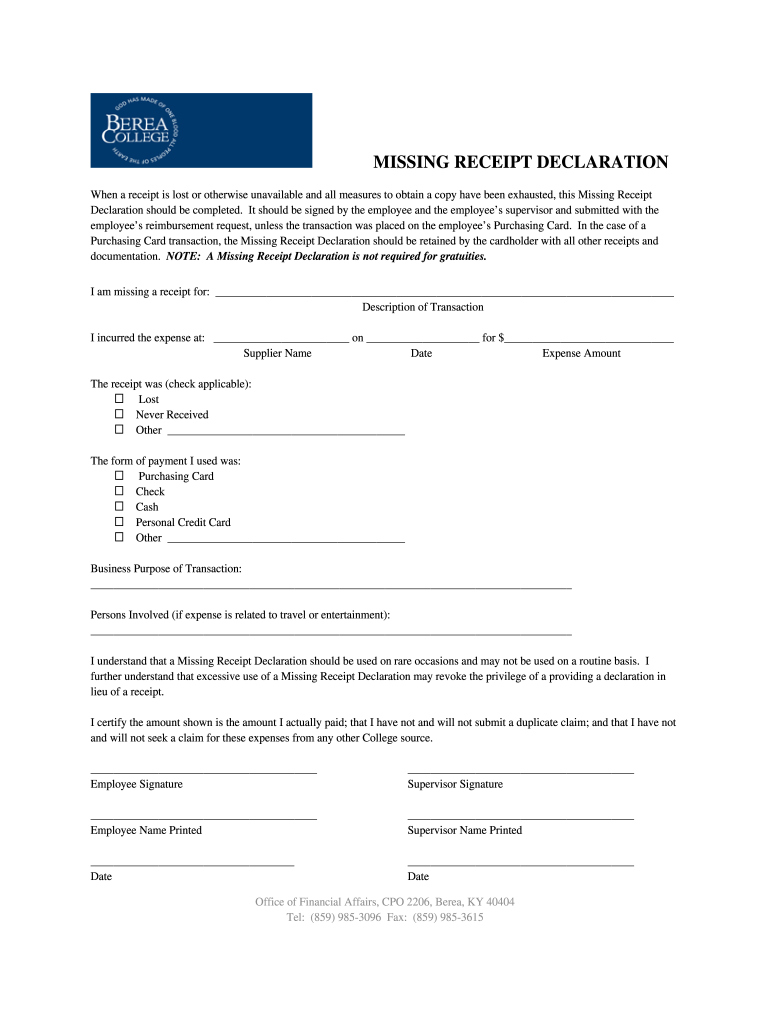
Berea College Missing Receipt Declaration free printable template
We are not affiliated with any brand or entity on this form

Fill out
Complete the form online in a simple drag-and-drop editor.

eSign
Add your legally binding signature or send the form for signing.

Share
Share the form via a link, letting anyone fill it out from any device.

Export
Download, print, email, or move the form to your cloud storage.
Why pdfFiller is the best tool for your documents and forms


End-to-end document management
From editing and signing to collaboration and tracking, pdfFiller has everything you need to get your documents done quickly and efficiently.
Accessible from anywhere
pdfFiller is fully cloud-based. This means you can edit, sign, and share documents from anywhere using your computer, smartphone, or tablet.
Secure and compliant
pdfFiller lets you securely manage documents following global laws like ESIGN, CCPA, and GDPR. It's also HIPAA and SOC 2 compliant.
What is Berea College Missing Receipt Declaration
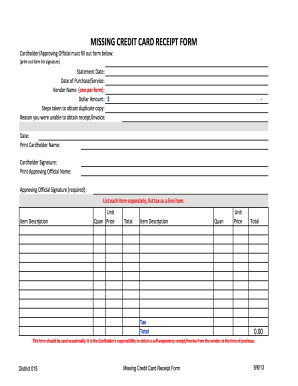
The Missing Receipt Declaration Form is a business document used by employees to declare lost or unavailable receipts for expense reimbursement.
pdfFiller scores top ratings on review platforms




Who needs Berea College Missing Receipt Declaration?
Explore how professionals across industries use pdfFiller.

Berea College Missing Receipt Declaration is needed by:
-
Employees seeking reimbursement for lost receipts
-
Supervisors approving expense claims for their team
-
HR personnel processing reimbursement requests
-
Finance departments managing expense reports
-
Accounting professionals verifying expense documentation
Comprehensive Guide to Berea College Missing Receipt Declaration
What is the Missing Receipt Declaration Form?
The Missing Receipt Declaration Form is a crucial document used by employees to declare a lost receipt when seeking reimbursement for business expenses. This form captures essential transaction details such as date, amount, and payment method, along with the reason for the missing receipt and the business purpose of the expense. Understanding and accurately completing this form is vital for smooth reimbursement processes.
Purpose and Benefits of the Missing Receipt Declaration Form
This form facilitates the reimbursement processes for employees who have lost receipts, ensuring that they can still claim their expenses without unnecessary delays. By utilizing the missing receipt declaration, both employees and employers benefit significantly. Employees can receive timely reimbursements, while employers maintain compliance and oversight in their financial operations.
Who Needs the Missing Receipt Declaration Form?
The primary users of the Missing Receipt Declaration Form include employees and supervisors, particularly in Kentucky. This form is essential in various scenarios where a receipt is unavailable, such as travel expenses or small purchases made on behalf of the company.
How to Fill Out the Missing Receipt Declaration Form Online
To fill out the Missing Receipt Declaration Form using pdfFiller, follow these steps:
-
Access the form on pdfFiller’s platform.
-
Prepare all required transaction information including date, amount, and payment method.
-
Complete each field accurately, specifying the reason for the missing receipt.
-
Review your entries for completeness.
-
Submit the form for signatures from both the employee and the supervisor.
Field-by-Field Instructions for the Missing Receipt Declaration Form
Each field in the Missing Receipt Declaration Form serves a specific purpose:
-
Transaction Details: Include the amount and date of the expense.
-
Reason for Missing Receipt: Explain why the receipt is unavailable.
-
Payment Method: Specify how the expense was paid, e.g., credit card or cash.
-
Business Purpose: Clearly outline the reason for the expense related to business activities.
Avoid common mistakes such as leaving fields blank or providing inaccurate details to ensure a smooth approval process.
Signing and Submitting the Missing Receipt Declaration Form
Both employees and supervisors need to sign the Missing Receipt Declaration Form. Options for signing include:
-
Digital signature through pdfFiller’s platform.
-
Wet signature on a printed version of the form.
After signing, submit the completed form according to company procedures for reimbursement reviews.
Common Errors and How to Avoid Them
Common mistakes when filling out the Missing Receipt Declaration Form include:
-
Inaccurate transaction details.
-
Omitting the reason for the missing receipt.
-
Not obtaining necessary signatures.
To avoid these errors, validate all information against supporting documentation before submission.
Security and Compliance Considerations
When using pdfFiller to fill out and submit the Missing Receipt Declaration Form, rest assured that your personal information is secure. pdfFiller utilizes strong 256-bit encryption and adheres to compliance regulations such as HIPAA and GDPR, ensuring your data remains protected throughout the process.
What Happens After You Submit the Missing Receipt Declaration Form?
After submitting the Missing Receipt Declaration Form, you can expect a processing timeline that varies based on your organization’s policies. Typically, you will receive updates regarding the status of your reimbursement request. Tracking your submission can help ensure timely resolution of your expense claims.
Start Your Missing Receipt Declaration Form with pdfFiller Today!
Utilize pdfFiller to easily create, fill out, and submit the Missing Receipt Declaration Form. The platform’s user-friendly interface minimizes errors and enhances security, making the reimbursement process efficient for employees and employers alike.
How to fill out the Berea College Missing Receipt Declaration
-
1.Access pdfFiller and log in to your account. If you don’t have an account, create one for free. Search for 'Missing Receipt Declaration Form' in the template library to locate the form.
-
2.Open the Missing Receipt Declaration Form within pdfFiller. Familiarize yourself with the layout and understand where to input the required information.
-
3.Gather necessary details before starting, including the date of the transaction, total amount, payment method, and the business purpose for the expense.
-
4.Begin by filling out the form fields provided. Click on each blank field to enter your information. Use the text-editing tools to adjust text size or style as needed.
-
5.Provide a brief explanation for the missing receipt in the designated section. Be succinct and clear as this may be essential for approval.
-
6.Add any relevant checkboxes where applicable to indicate the payment method or other options when filling out the form.
-
7.Before submitting, review all entries thoroughly to ensure accuracy and completeness. Use the 'Preview' option to visualize the final submission.
-
8.Once verified, save the form within pdfFiller. You can also download or print it for your records. Use the 'Share' feature to submit the form to your supervisor directly from pdfFiller.

Who is eligible to use the Missing Receipt Declaration Form?
Any employee in Kentucky who has lost a receipt for a business-related expense can use the Missing Receipt Declaration Form for reimbursement.
What supporting documents are needed to submit this form?
Typically, you only need to provide the Missing Receipt Declaration Form itself. However, any additional documentation that can support your reimbursement claim is advisable.
How do I submit the form once completed?
You can submit the completed Missing Receipt Declaration Form directly through pdfFiller using the 'Share' feature, which allows submission to your supervisor via email.
Are there specific deadlines for submitting this form?
Submission deadlines may vary by company policy. It's best to check with your HR department or supervisor to understand the time frame for submitting reimbursement requests.
What common mistakes should I avoid when filling out this form?
Common mistakes include incomplete fields, inaccurate descriptions of missing receipts, and failing to obtain necessary signatures from your supervisor before submission.
How long does it take to process the submitted form?
Processing times can vary depending on your employer's policies and workload. It’s advisable to follow up with your HR or finance department for specific timelines.
Is notarization required for this form?
No, notarization is not required for the Missing Receipt Declaration Form. You just need signatures from both the employee and their supervisor.
Related Content
Related Forms





Related Catalogs
Get the latest insights from our blog


If you believe that this page should be taken down, please follow our DMCA take down process
here
.
This form may include fields for payment information. Data entered in these fields is not covered by PCI DSS compliance.