
Last updated on
Nov 6, 2026

Get the free Signature Update Request Form
We are not affiliated with any brand or entity on this form

Fill out
Complete the form online in a simple drag-and-drop editor.

eSign
Add your legally binding signature or send the form for signing.

Share
Share the form via a link, letting anyone fill it out from any device.

Export
Download, print, email, or move the form to your cloud storage.
Why pdfFiller is the best tool for your documents and forms


End-to-end document management
From editing and signing to collaboration and tracking, pdfFiller has everything you need to get your documents done quickly and efficiently.
Accessible from anywhere
pdfFiller is fully cloud-based. This means you can edit, sign, and share documents from anywhere using your computer, smartphone, or tablet.
Secure and compliant
pdfFiller lets you securely manage documents following global laws like ESIGN, CCPA, and GDPR. It's also HIPAA and SOC 2 compliant.
What is Signature Update Form
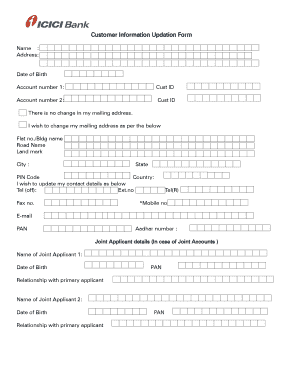
The Signature Update Request Form is a document used by account holders to update their signatures in their ICICI Bank accounts.
pdfFiller scores top ratings on review platforms




So easy and solved a real problem for me!
I love the ability to be able to fill-in my documents and PDFfiller does a great job of giving me that edge. Thanks!
Thanks, I'm getting used to how to use it.
Of all the form filers I've used, this is by far the most user-friendly
easy enough and works pretty intuitively
GREAT!
Great application. Easy to use.
Who needs Signature Update Form?
Explore how professionals across industries use pdfFiller.

Signature Update Form is needed by:
-
ICICI Bank account holders wishing to update their signatures.
-
Individuals requiring signature verification for bank processes.
-
Business entity representatives managing bank accounts.
-
Clients needing to comply with bank signature policies.
-
Customers submitting requests for signature change confirmations.
Comprehensive Guide to Signature Update Form
What is the Signature Update Request Form?
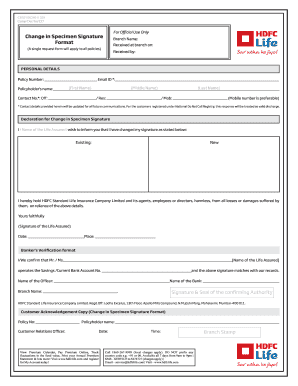
The Signature Update Request Form is a crucial document for account holders at ICICI Bank seeking to update their signatures. This form enables account holders to formally request changes to their signature on record, ensuring that all verification processes maintain their integrity and security.
To use the form, account holders need to provide specific information that includes their name, account number, and both the old and new signatures. This structured process streamlines the journey of updating your signature with ease.
Why You Need to Use the Signature Update Request Form
Maintaining an updated signature is vital for ensuring security and proper verification of account activities. If an account holder's signature is outdated or no longer matches the one on file, it can lead to complications in accessing services or validating identity.
Utilizing the Signature Update Request Form through platforms like pdfFiller offers several advantages, such as the simplicity and security of submitting requests digitally. Additionally, waiting too long to update your signature can result in potential delays or issues in account transactions.
Key Features of the Signature Update Request Form
The Signature Update Request Form includes multiple fillable fields that are essential for proper documentation:
-
Name of Account Holder
-
Account Number
-
Email Address
-
Contact Number
-
Old Signature
-
New Signature
Account holders are required to submit relevant documents for signature verification, which may include government-issued photo identities, declarations, or notarized copies of other relevant documents. This ensures that the bank thoroughly reviews each request for accuracy and compliance.
Who Should Use the Signature Update Request Form?
This form is specifically designed for ICICI Bank account holders who need to update their signatures due to various reasons such as signature mismatch or other discrepancies. Additionally, anyone who has recently changed their signature for personal reasons or due to legal changes should use this form.
Eligibility requires that the individual is a registered account holder with ICICI Bank and possesses the necessary documents to support their request.
Step-by-Step Guide on How to Fill Out the Signature Update Request Form
To ensure you complete the form correctly, follow these detailed steps:
-
Start by filling in your name as it appears on your account.
-
Enter your account number accurately.
-
Provide your email address and contact number for communication.
-
Insert your old signature in the designated space.
-
Clearly write your new signature in the specified area.
Be mindful of common mistakes such as incomplete fields or mismatched signatures. Review the required documents to prepare them for submission.
How to Submit the Signature Update Request Form
There are different methods available for submitting the Signature Update Request Form. You can choose to submit it online using pdfFiller or deliver it in person at your nearest ICICI Bank branch.
Consider any delivery fees that might apply and ensure you confirm the receipt of your submission. Checking in with the bank afterward can help track the progress of your request.
Tracking and Confirming Your Signature Update Request
After you submit the Signature Update Request Form, you’ll receive confirmation from ICICI Bank. This confirmation will outline what steps are next and the expected timelines.
Account holders can easily check the status of their requests by contacting customer support or using online banking features. Confirmation emails will provide updates on the progress and any potential reasons for rejection if applicable.
How pdfFiller Can Help You Complete Your Signature Update Request Form
Using pdfFiller simplifies the process of completing the Signature Update Request Form. Its secure platform allows users to fill out and eSign forms with ease, making it a reliable option.
To utilize pdfFiller, access the platform, and seamlessly edit the form as guided. Many users have successfully completed their submissions using this service, highlighting its efficiency and user-friendly features.
Understanding Security and Privacy in the Signature Update Process
In today’s digital era, safeguarding personal data during the signature update process is paramount. Compliance with regulations such as HIPAA and GDPR helps maintain privacy and data security.
pdfFiller ensures that all documents are protected with 256-bit encryption. It’s essential to follow best practices for handling sensitive information throughout the signature update process.
Get Started with Your Signature Update Request Form Today!
Don't delay in updating your signature. Leverage pdfFiller for a more streamlined experience in filling out your Signature Update Request Form securely. Compare the efficiency of pdfFiller with traditional forms and discover the benefits of using technology to simplify your banking needs.
How to fill out the Signature Update Form
-
1.To access the Signature Update Request Form on pdfFiller, begin by visiting the pdfFiller website and using the search function to find the form by name.
-
2.Open the form to display fillable fields where you will enter your information. This includes your name, account number, email address, contact number, old signature, and new signature.
-
3.Prepare your information before starting. Ensure you have your old signature and new signature images, along with government-issued photo identification documents ready.
-
4.Fill in the necessary fields accurately. Make sure that all information matches the records held by ICICI Bank to avoid processing delays.
-
5.Once you've completed the fields, carefully review your entries for any errors or omissions. Verify that your signatures are clearly visible and correct.
-
6.After confirming accuracy, you can save your progress. Choose the option to download the completed form, or use the submit option if directly allowed through pdfFiller.
-
7.Finally, submit the form as directed by ICICI Bank. You may receive an email confirmation regarding the status of your signature change request.

Who is eligible to use the Signature Update Request Form?
The Signature Update Request Form is intended for current ICICI Bank account holders who need to update their signatures on file with the bank.
What documents are required to accompany the form?
You'll need government-issued photo identification, like a passport or driver's license, along with a notarized copy if required to validate your identity during the signature update process.
How do I submit the Signature Update Request Form?
The form can be submitted electronically through pdfFiller if supported, or you can print it out and send it directly to your local ICICI Bank branch via mail or in person.
What mistakes should I avoid when filling out the form?
Ensure all information provided is accurate and matches your bank records. Common mistakes include misspelled names or incorrect account numbers, which can delay processing.
How long will it take to process my signature update request?
Processing times for signature updates can vary. Typically, you should expect a confirmation email regarding your request status within a few business days after submission.
Are there any fees associated with submitting this form?
Generally, there are no fees for submitting a Signature Update Request Form at ICICI Bank. However, double-check specifics with your bank branch.
What happens if my request is denied?
If your request for a signature update is denied, ICICI Bank will inform you via email regarding the reasons and the next steps to rectify any issues.
Related Content
Related Forms





Get the latest insights from our blog


If you believe that this page should be taken down, please follow our DMCA take down process
here
.
This form may include fields for payment information. Data entered in these fields is not covered by PCI DSS compliance.