
Last updated on
Nov 6, 2026
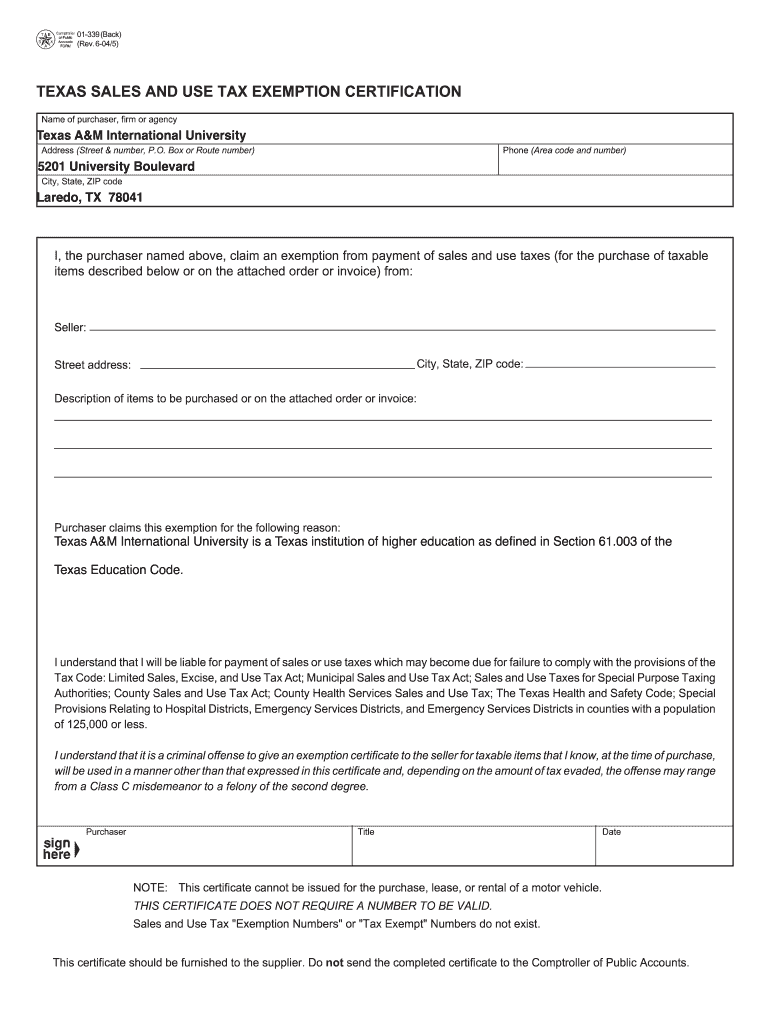
TX Comptroller 01-339 2004 free printable template
pdfFiller is not affiliated with any government organization

Fill out
Complete the form online in a simple drag-and-drop editor.

eSign
Add your legally binding signature or send the form for signing.

Share
Share the form via a link, letting anyone fill it out from any device.

Export
Download, print, email, or move the form to your cloud storage.
Why pdfFiller is the best tool for your documents and forms


End-to-end document management
From editing and signing to collaboration and tracking, pdfFiller has everything you need to get your documents done quickly and efficiently.
Accessible from anywhere
pdfFiller is fully cloud-based. This means you can edit, sign, and share documents from anywhere using your computer, smartphone, or tablet.
Secure and compliant
pdfFiller lets you securely manage documents following global laws like ESIGN, CCPA, and GDPR. It's also HIPAA and SOC 2 compliant.
What is TX Comptroller 01-339
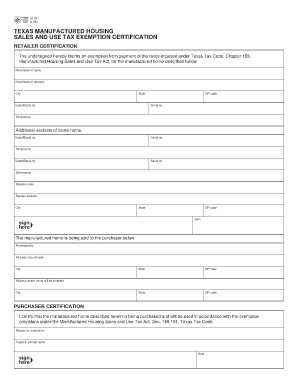
The Texas Sales and Use Tax Exemption Certification is a tax exemption certificate used by purchasers in Texas to claim an exemption from sales and use taxes for eligible purchases.
pdfFiller scores top ratings on review platforms




Makes it easy to fill out claim forms. Thank you.
IT IS REALLY AWESOME IT HELPS ME TO WORK IN PDF VERY FIRST THANKING FOR UR GIVING WONDERFUL APP
fast to do i love it make it easier than before
I like the flexibility of the program and the help options.
Great editor, Could have some more funcationality but does 90% of what I want to do. Previously purchased another program (Soda PDF) and couldn't get my head around it. PDFfiller is soo much easier to use, with heaps of online help on how to do anything you want to do.
Life Savers
Life Savers! Saved me so much time as a small business owner. Super appreciated!! Well organized and easy to use.
Who needs TX Comptroller 01-339?
Explore how professionals across industries use pdfFiller.

TX Comptroller 01-339 is needed by:
-
Businesses purchasing items for resale
-
Educational institutions seeking tax exemptions
-
Non-profit organizations making bulk purchases
-
State and local government entities
-
Individuals claiming exemptions for specific purchases
-
Purchasers of taxable items for exempt use
Comprehensive Guide to TX Comptroller 01-339
What is the Texas Sales and Use Tax Exemption Certification?
The Texas Sales and Use Tax Exemption Certification is a crucial document used by purchasers to claim exemptions from sales and use taxes on specific taxable purchases. This certification plays a significant role for educational institutions, such as Texas A&M International University, enabling them to exempt certain taxable items listed in the form or on accompanying invoices. The form requires the purchaser to provide essential details including their name, address, and the description of the items being purchased to validate the exemption claim.
Purpose and Benefits of the Texas Sales and Use Tax Exemption Certification
This certification offers substantial tax savings, particularly for educational institutions and qualified purchasers. By utilizing the Texas Sales and Use Tax Exemption Certification, these entities can significantly reduce the burden of sales tax on eligible items. Additionally, the form enhances compliance with state tax regulations by providing a legitimate means of asserting exemption status.
-
Tax savings for qualified purchasers
-
Reduced burden of sales tax on specific items
-
Assures adherence to state tax laws
Eligibility Criteria for the Texas Sales and Use Tax Exemption Certification
To be eligible for the Texas Sales and Use Tax Exemption Certification, purchasers must meet certain requirements. Typically, this includes individuals or entities that qualify under specific conditions set by state law. This can also encompass institutions such as universities, which may have additional criteria to ensure that they can fully benefit from the exemption.
-
Must be a qualified purchaser as defined by Texas law
-
Specific categories of goods may be exempt
-
Universities must verify institutional eligibility
How to Fill Out the Texas Sales and Use Tax Exemption Certification Online
Filling out the Texas Sales and Use Tax Exemption Certification online is straightforward. Users should begin by entering their name and address, followed by a detailed description of the items to be purchased. The certification also requires a signature to affirm the exemption claim, with convenient eSigning options available via platforms like pdfFiller.
Step-by-Step Instructions for Completing the Texas Sales and Use Tax Exemption Certification
When completing the Texas Sales and Use Tax Exemption Certification, it is crucial to provide precise information in each field. Failure to do so could lead to rejection of the claim. Below is a detailed breakdown of each required section.
-
Provide your full name as the purchaser.
-
Enter your complete address, ensuring accuracy.
-
Describe the items being purchased clearly.
-
Sign the form to validate your claim.
-
Review for common mistakes, such as spelling errors or missing information.
Where and How to Submit the Texas Sales and Use Tax Exemption Certification
Upon completing the Texas Sales and Use Tax Exemption Certification, you can submit it through various methods. Users can choose between electronic submission and traditional paper methods. Key addresses and online portals are available for ensuring timely filing of the exemption certification.
-
Electronic submission via designated online portals
-
Traditional mailing addresses for paper forms
-
Be aware of any relevant submission deadlines
What Happens After You Submit the Texas Sales and Use Tax Exemption Certification?
After submission, purchasers should anticipate a confirmation of receipt for their form. Tracking options may be available, providing assurance during the processing period. Users should also familiarize themselves with what to expect should their exemption be approved or denied.
-
Receive confirmation of your submitted form
-
Track processing status, if applicable
-
Know the next steps for both approval and denial
Common Issues and How to Avoid Them When Using the Texas Sales and Use Tax Exemption Certification
Identifying potential pitfalls when using the Texas Sales and Use Tax Exemption Certification can save time and frustration. Common reasons for rejection can usually be mitigated through proper documentation and attention to detail.
-
Ensure correct completion of all fields to avoid rejections
-
Gather necessary supporting documentation
-
Know how to amend or correct submissions if issues arise
How pdfFiller Can Help You with the Texas Sales and Use Tax Exemption Certification
pdfFiller enhances the process of managing the Texas Sales and Use Tax Exemption Certification. It offers features designed to streamline form-filling, including editing, eSigning, and maintaining security during the handling of sensitive information.
-
Intuitive editing and form creation functions
-
Secure eSigning options for validation
-
Compliance with data protection standards
Tips for Securely Managing Your Texas Sales and Use Tax Exemption Certification Documents
Effective document management and security are paramount when dealing with the Texas Sales and Use Tax Exemption Certification. Users should focus on retaining organized records and complying with relevant data protection laws.
-
Implement strategies for organizing certification documents
-
Understand encryption and compliance standards provided by pdfFiller
-
Regularly back up important records to prevent loss
How to fill out the TX Comptroller 01-339
-
1.Start by accessing the Texas Sales and Use Tax Exemption Certification form on pdfFiller. Enter the website and search for the form using the title for quick access.
-
2.Once the form is open in pdfFiller's interface, familiarize yourself with its layout. Identify the blank fields that need to be filled out including fields for your name, address, and item descriptions.
-
3.Before filling out the form, gather all necessary documents that prove eligibility for the exemption, such as previous invoices, item descriptions, and your tax identification number.
-
4.Begin by entering the purchaser's name and address in the designated fields. Be sure to provide accurate contact information to avoid processing delays.
-
5.Next, describe the items you are purchasing in detail. This may require consulting product descriptions or item numbers from invoices.
-
6.After filling in all necessary information, thoroughly review your entries. Ensure that everything is correct and matches your supporting documents.
-
7.Sign the form in the specified signature field. You may also need to include your title and date to certify the information provided.
-
8.Once you have completed and reviewed the form, save your work in pdfFiller. You can download it directly to your computer or submit it electronically as per your requirements.

Who is eligible to use the Texas Sales and Use Tax Exemption Certification?
Individuals or entities purchasing items that qualify for tax exemptions in Texas, such as educational institutions, non-profits, and businesses buying goods for resale, are eligible to use this form.
Are there deadlines for submitting the tax exemption form?
While there are no strict deadlines for submitting the Texas Sales and Use Tax Exemption Certification, it is advisable to complete it at the time of purchase to avoid tax liabilities.
How do I submit the Texas Sales and Use Tax Exemption Certification after completion?
The completed form can typically be submitted directly to the seller at the time of purchase. For electronic submissions, follow the guidelines provided by your vendor or use pdfFiller’s submission options.
What supporting documents are needed with this form?
You may need to provide additional documents that verify your exempt status or item descriptions. Common documents include tax identification numbers and previous invoices.
What are common mistakes to avoid when filling out the form?
Ensure that all fields are completed accurately, especially the signature and date. Double-check descriptions of exempt items and make sure your address information is current.
How long does it take to process the Texas Sales and Use Tax Exemption Certification?
Processing times may vary by the seller's policies. However, submitting the form correctly and promptly can help expedite acceptance for tax exemption claims.
Can I use the Texas Sales and Use Tax Exemption Certification for personal purchases?
The form is primarily for business and organizational purchases that qualify for sales tax exemptions. Personal purchases usually do not qualify for tax exemption under this form.
TX Comptroller 01-339 Form Versions
Related Content
Related Forms




Get the latest insights from our blog



If you believe that this page should be taken down, please follow our DMCA take down process
here
.
This form may include fields for payment information. Data entered in these fields is not covered by PCI DSS compliance.