
Last updated on
Nov 7, 2026
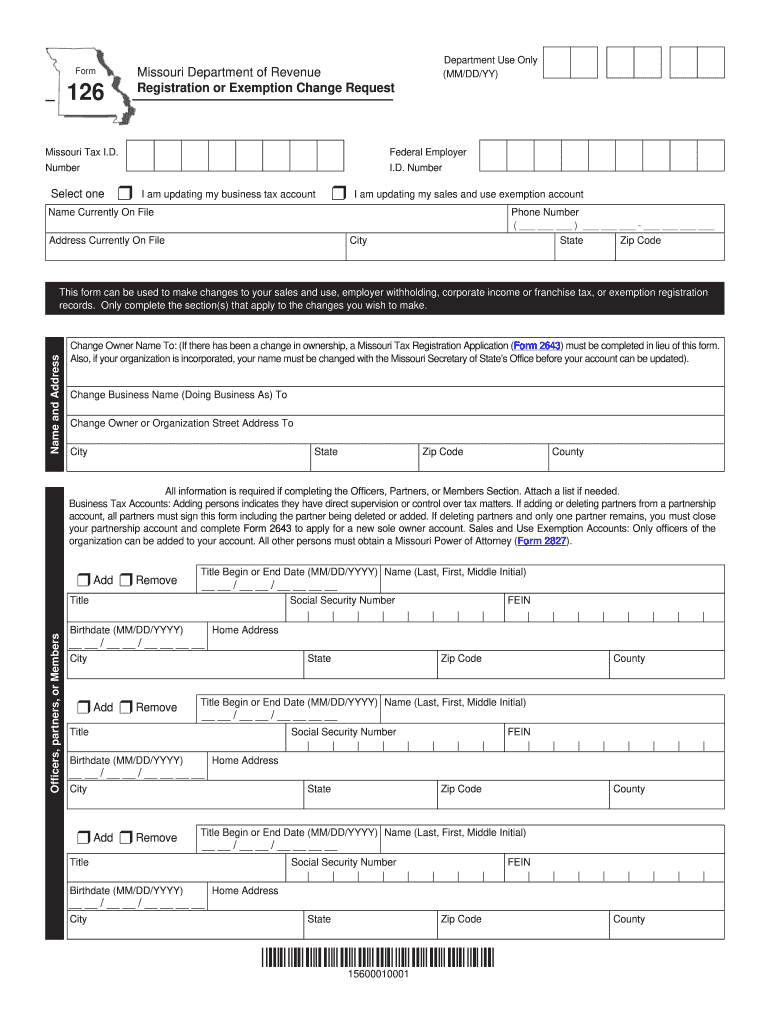
MO DOR Form 126 2012 free printable template
We are not affiliated with any brand or entity on this form

Fill out
Complete the form online in a simple drag-and-drop editor.

eSign
Add your legally binding signature or send the form for signing.

Share
Share the form via a link, letting anyone fill it out from any device.

Export
Download, print, email, or move the form to your cloud storage.
Why pdfFiller is the best tool for your documents and forms


End-to-end document management
From editing and signing to collaboration and tracking, pdfFiller has everything you need to get your documents done quickly and efficiently.
Accessible from anywhere
pdfFiller is fully cloud-based. This means you can edit, sign, and share documents from anywhere using your computer, smartphone, or tablet.
Secure and compliant
pdfFiller lets you securely manage documents following global laws like ESIGN, CCPA, and GDPR. It's also HIPAA and SOC 2 compliant.
What is MO DOR Form 126
The Missouri Form 126 Registration or Exemption Change Request is a tax form used by businesses to update their sales and use tax registration records or exemption status.
pdfFiller scores top ratings on review platforms




useful and intuitive maybe a webinar later when I am not so swamped
PDFfiller is very convenient and easy to use
It is a great tool. I love what it has and I am excited to learn how to better utilize it
Customer Support is A++ They were able to help me resolve the alignment problem I was having!
I thought I was signing up for the $6 option, but found out it was actually the $20 one. A bit deceptive. So glad I found this site though. Too bad the original PDF designers didn't create PDFs with the option of converting to Word. So, despite the deceptive billing, I am still happy I found this site, and that the website is so easy to use.
this is just what i needed
this is just what i needed. Thanks
Who needs MO DOR Form 126?
Explore how professionals across industries use pdfFiller.

MO DOR Form 126 is needed by:
-
Business Owners looking to change their tax registration details
-
Partners needing to update exemption records
-
Corporate Officers filing sales tax changes
-
Members of organizations managing tax documents
-
Businesses submitting updates to the Missouri Department of Revenue
-
Tax Professionals assisting clients with exemption requests
Comprehensive Guide to MO DOR Form 126
What is the Missouri Form 126 Registration or Exemption Change Request?
The Missouri Form 126 serves as a crucial document for managing tax registration and exemption statuses for businesses within the state. This form is designed to initiate necessary changes to various tax registrations such as sales and use, employer withholding, corporate income, and franchise tax records. Understanding the use of the Missouri Form 126 is essential for businesses to ensure compliance with tax regulations.
Through this form, businesses can update their registration details, including information about business owners and authorized representatives.
Purpose and Benefits of the Missouri Form 126
The Missouri Form 126 is vital for businesses seeking to maintain accurate tax records. Timely filing of this form allows businesses to remain compliant with state tax laws while benefiting from accurate sales, employer withholding, and corporate tax documentation. This accuracy aids businesses in avoiding potential penalties and complications during audits.
By utilizing this form, companies can ensure that their tax registration is current, which is particularly important for operational integrity and financial planning.
Key Features of the Missouri Form 126
The Missouri Form 126 features a user-friendly layout that includes sections for various business tax accounts and designated authorized representatives. This fillable form allows for electronic submission, enhancing convenience for users who prefer submitting documents online.
-
Sections dedicated to business tax accounts
-
Clean, organized layout for easy navigation
-
Electronic submission options to streamline the filing process
-
Fields for detailed information on ownership and representatives
Who Needs to Submit the Missouri Form 126?
Eligible parties required to sign and submit the Missouri Form 126 include owners, partners, officers, and members. Each of these roles plays a critical part in the corporate governance structure, ensuring that the form is completed accurately and responsibly.
Understanding the eligibility criteria is essential for those involved in the filing process to avoid delays or rejections.
When and How to File the Missouri Form 126
To avoid penalties, it is important to file the Missouri Form 126 within designated deadlines. Following is a step-by-step guide to completing the form online:
-
Access the Missouri Form 126 online.
-
Fill in all required fields accurately.
-
Review your entries for completeness.
-
Submit the form electronically or save for mailing.
Adherence to these steps ensures a smooth filing experience.
Common Errors to Avoid When Submitting the Missouri Form 126
When filing the Missouri Form 126, common mistakes can lead to rejections, including missing signature fields or incorrect business information. To enhance the accuracy of submissions, reviewing entries for completeness is crucial.
-
Double-check signatures, especially from required signatories
-
Verify the accuracy of entered business details
-
Ensure all necessary documents are attached
How to Download and Fill Out the Missouri Form 126 Online
Downloading the Missouri Form 126 is an easy process through the pdfFiller platform. Once downloaded, users can utilize various editing tools to complete the form securely. The platform's security features, such as 256-bit encryption, help protect sensitive information while filling out the form.
Users can take advantage of these tools to ensure an efficient and secure filing experience.
Submission Methods for the Missouri Form 126
There are multiple submission methods available for the Missouri Form 126, allowing businesses to choose the most convenient option for their needs:
-
Submit online through the Missouri Department of Revenue website
-
Mail the completed form to the appropriate department
-
Deliver the form in person at designated locations
Tracking submission status is also an option, with processing times varying based on the submission method chosen.
What Happens After Submitting the Missouri Form 126?
After submitting the Missouri Form 126, businesses can anticipate a number of follow-up actions. Tracking the status of the request is essential for ensuring that the submission is processed without issues. If any errors are identified post-submission, there are procedures in place to amend the application.
Monitoring the application's progress will aid in maintaining accurate business tax records.
Utilizing pdfFiller to Maximize Your Experience with the Missouri Form 126
pdfFiller offers a comprehensive suite of features designed to facilitate the process of filling out the Missouri Form 126. Users are encouraged to leverage its functionalities for ease of filling, signing, and submitting documents. The benefits of a cloud-based platform extend to secure document management.
Engaging with pdfFiller not only simplifies the filing process but ensures that sensitive information remains protected at all stages.
How to fill out the MO DOR Form 126
-
1.Access the Missouri Form 126 by visiting pdfFiller and searching for the form name.
-
2.Once located, open the form to begin editing using pdfFiller's intuitive online interface.
-
3.Before filling out the form, gather necessary business information, including your tax accounts and contact details for authorized representatives.
-
4.Navigate the form by clicking on the fields you need to complete. Enter your business tax information accurately.
-
5.Utilize any available checkboxes to indicate changes such as updates to owner or organization names.
-
6.Make sure to fill in signature fields. Owners, partners, officers, or members must sign as required.
-
7.Review all entered information for accuracy to ensure no mistakes are made that could delay processing.
-
8.Once satisfied, save your changes within pdfFiller to prevent data loss.
-
9.Choose to either download a copy of the filled form for your records or submit it directly through pdfFiller to the Missouri Department of Revenue.

Who is eligible to submit the Missouri Form 126?
Any business operating in Missouri that requires changes to its tax registration records or exemption status can submit the Missouri Form 126. This includes owners, partners, and officers of the organization.
Is there a deadline for submitting the form?
While specific deadlines may vary based on individual circumstances, it is advisable to submit the Missouri Form 126 as soon as possible after a change occurs to avoid complications with tax compliance.
How do I submit the completed Missouri Form 126?
Completed forms can be submitted directly to the Missouri Department of Revenue via mail after ensuring all necessary signatures are included. Alternatively, you can use pdfFiller to submit the form online.
What supporting documents are required with Form 126?
Typically, no additional documents are required unless the form specifies otherwise. However, it's prudent to check with the Missouri Department of Revenue for any specific requirements related to your business situation.
What is the expected processing time for the Missouri Form 126?
Processing times can vary, but generally, it may take several weeks to receive confirmation from the Missouri Department of Revenue once the form is submitted. Plan accordingly for any needed changes.
Is notarization required for this form?
No, notarization is not required for the Missouri Form 126. Ensure that the appropriate parties sign the form where indicated.
MO DOR Form 126 Form Versions
Related Content
Related Forms


Get the latest insights from our blog


If you believe that this page should be taken down, please follow our DMCA take down process
here
.
This form may include fields for payment information. Data entered in these fields is not covered by PCI DSS compliance.