
Last updated on
Oct 2, 2026
IE RF100 free printable template
We are not affiliated with any brand or entity on this form

Fill out
Complete the form online in a simple drag-and-drop editor.

eSign
Add your legally binding signature or send the form for signing.

Share
Share the form via a link, letting anyone fill it out from any device.

Export
Download, print, email, or move the form to your cloud storage.
Why pdfFiller is the best tool for your documents and forms


End-to-end document management
From editing and signing to collaboration and tracking, pdfFiller has everything you need to get your documents done quickly and efficiently.
Accessible from anywhere
pdfFiller is fully cloud-based. This means you can edit, sign, and share documents from anywhere using your computer, smartphone, or tablet.
Secure and compliant
pdfFiller lets you securely manage documents following global laws like ESIGN, CCPA, and GDPR. It's also HIPAA and SOC 2 compliant.
What is IE RF100
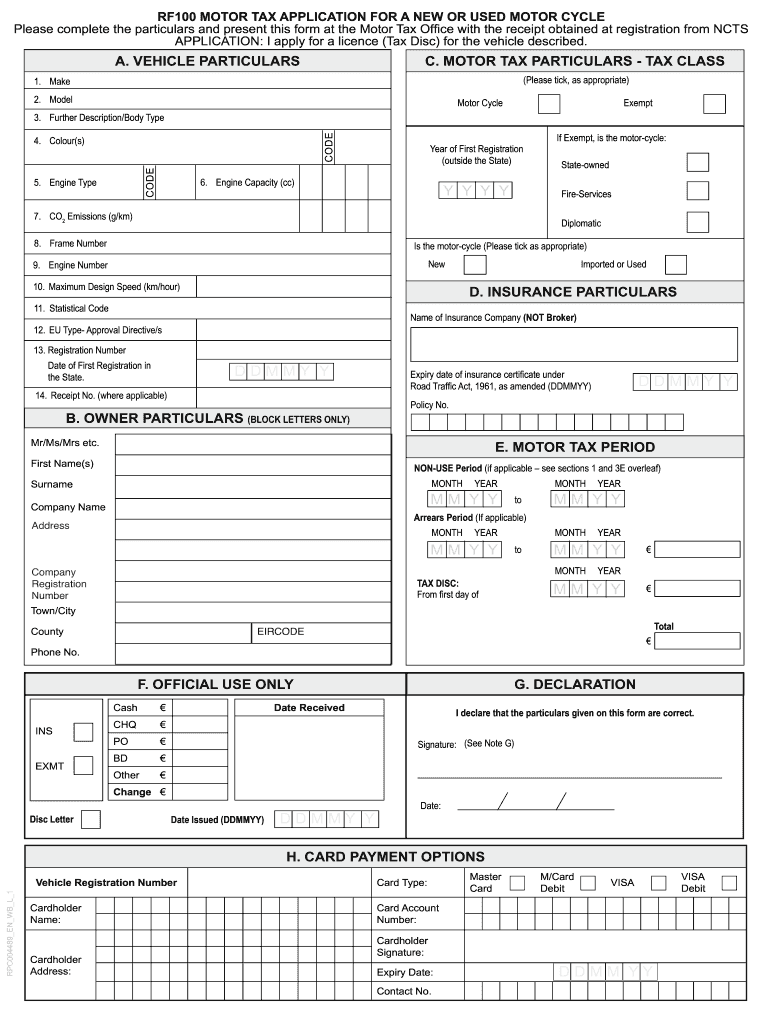
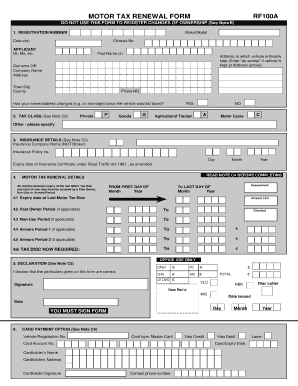
The RF100 Motor Tax Application is a government form used by vehicle owners in Ireland to apply for a Motor Tax Disc for a registered motor cycle.
pdfFiller scores top ratings on review platforms




Who needs IE RF100?
Explore how professionals across industries use pdfFiller.

IE RF100 is needed by:
-
Vehicle owners seeking to register their motor cycles
-
Those renewing an existing motor tax disc
-
Individuals who have recently purchased a motor cycle
-
People applying for a tax disc for the first time
-
Operators of motor cycles used for commercial purposes
-
Owners needing to change ownership details
Comprehensive Guide to IE RF100
What is the RF100 Motor Tax Application?
The RF100 motor tax application serves as the primary document for obtaining a motor tax disc in Ireland. This essential form is crucial for registering and taxing motor cycles, ensuring compliance with local regulations. As vehicle ownership in Ireland requires adherence to specific tax obligations, understanding the role of the RF100 is vital for all motor cycle owners.
Purpose and Benefits of the RF100 Motor Tax Application
The RF100 application offers several key advantages, including legal compliance with Irish motor tax laws. By submitting this form, vehicle owners can avoid penalties associated with untaxed vehicles and reinforce their vehicle registration status. Access to a valid motor tax disc is facilitated through this application, making the RF100 a critical element in responsible vehicle ownership.
Who Needs the RF100 Motor Tax Application?
Vehicle owners in Ireland must complete the RF100 motor tax application when they register a new motor cycle or change ownership of an existing one. Specific scenarios where the RF100 is required include purchasing a vehicle from a dealership or an individual, as well as when a vehicle is re-registered. Therefore, understanding who needs this application is essential for compliance.
How to Fill Out the RF100 Motor Tax Application Online (Step-by-Step)
-
Gather necessary information, including vehicle details, insurance data, and personal identification.
-
Access the RF100 form online through the official portal.
-
Fill out each section accurately, following the provided instructions for complex fields.
-
Review your entries to ensure all information is correct before submission.
-
Submit the completed form electronically to the Motor Tax Office.
Required Documents and Supporting Materials for the RF100 Form
-
Proof of vehicle ownership, such as a purchase invoice or title.
-
Current insurance documentation indicating valid coverage.
-
Personal identification to verify the vehicle owner's identity.
-
Any other relevant documents that reinforce compliance with tax regulations.
Submission Methods for the RF100 Motor Tax Application
Once completed, the RF100 motor tax application can be submitted through various methods, including online submission or by mail. For timely processing, ensure you choose the appropriate method according to your preference, and consider documenting the submission for your records to avoid delays.
Fees, Deadlines, and Processing Time for the RF100 Form
Submitting the RF100 application incurs specific fees that vary based on vehicle type and registration duration. Applicants must be aware of deadlines to avoid late submission penalties. Processing times typically range from a few days to several weeks, and potential fee waivers may apply for timely or special circumstances.
Security and Compliance During the RF100 Form Process
Handling personal and sensitive information while completing the RF100 form is crucial for data security. It's essential to utilize secure platforms for document submission to mitigate risks. Platforms like pdfFiller incorporate robust security measures, including 256-bit encryption, ensuring compliance with privacy standards during document handling.
How pdfFiller Helps with the RF100 Motor Tax Application
pdfFiller simplifies the RF100 motor tax application process by offering powerful tools for filling out and submitting forms. Users can edit, eSign, and manage their RF100 applications with confidence, thanks to the platform’s intuitive features. Engaging with pdfFiller enhances the user experience and ensures successful form completion without unnecessary complications.
Next Steps After Submitting the RF100 Motor Tax Application
After submitting your RF100 motor tax application, it’s essential to track the status of your application. Vehicle owners should keep an eye out for confirmation communications and know what to expect in terms of processing. If necessary, be prepared for the renewal or resubmission processes to maintain compliance with motor tax regulations.
How to fill out the IE RF100
-
1.Access the RF100 Motor Tax Application form on pdfFiller by searching for the title in the search bar or navigating through the forms library.
-
2.Open the form by clicking on it, which will launch the pdfFiller interface with the document accessible for editing.
-
3.Before filling out the form, gather necessary information such as your vehicle's registration number, owner details, and insurance information to ensure a smooth process.
-
4.Begin by clicking on each field to type in personal details like your name, address, and any specific vehicle particulars as required in the fillable fields.
-
5.Make use of checkboxes where applicable to confirm required declarations, such as agreement with the application statements outlined in the form.
-
6.Review the form thoroughly by ensuring all fields are completed correctly, and double-check the filling instructions provided to avoid common mistakes.
-
7.Finalize the form by saving your work in pdfFiller, clicking on the save icon to preserve your entries, or using the download option to get the completed document onto your device.
-
8.Submit your application by either printing it out to mail it to your local Motor Tax Office or following any provided submission instructions on the pdfFiller platform.

Who is eligible to fill out the RF100 Motor Tax Application?
The RF100 Motor Tax Application is intended for vehicle owners in Ireland who need to apply for a Motor Tax Disc for their registered motor cycles.
What documents do I need to submit with this form?
You will typically need documents such as proof of vehicle ownership, insurance coverage details, and a form of payment for the associated fees during the submission process.
What is the deadline for submitting the RF100 form?
You should submit the RF100 Motor Tax Application as promptly as possible to avoid any lapses in your motor tax, particularly if you're renewing an existing disc.
Can I submit this form online?
While the RF100 form itself must be printed and mailed to the Motor Tax Office, using pdfFiller allows you to complete the form digitally before printing for submission.
How long does it take to process the RF100 application?
Processing times for the RF100 Motor Tax Application can vary, but you can expect an average turnaround of a few weeks, depending on the volume of applications received by the Motor Tax Office.
What common mistakes should I avoid when filling out the RF100 form?
Be careful to fill in all required fields completely, avoid leaving blanks, and ensure that all declared information is accurate and verifiable to prevent delays in processing.
Is notarization required for this form?
No, the RF100 Motor Tax Application does not require notarizing, simplifying the process for applicants.
Related Content
Related Forms



Get the latest insights from our blog


If you believe that this page should be taken down, please follow our DMCA take down process
here
.
This form may include fields for payment information. Data entered in these fields is not covered by PCI DSS compliance.