
Last updated on
Oct 19, 2026

Get the free Incident/Accident Report Form
We are not affiliated with any brand or entity on this form

Fill out
Complete the form online in a simple drag-and-drop editor.

eSign
Add your legally binding signature or send the form for signing.

Share
Share the form via a link, letting anyone fill it out from any device.

Export
Download, print, email, or move the form to your cloud storage.
Why pdfFiller is the best tool for your documents and forms


End-to-end document management
From editing and signing to collaboration and tracking, pdfFiller has everything you need to get your documents done quickly and efficiently.
Accessible from anywhere
pdfFiller is fully cloud-based. This means you can edit, sign, and share documents from anywhere using your computer, smartphone, or tablet.
Secure and compliant
pdfFiller lets you securely manage documents following global laws like ESIGN, CCPA, and GDPR. It's also HIPAA and SOC 2 compliant.
What is Incident Accident Report
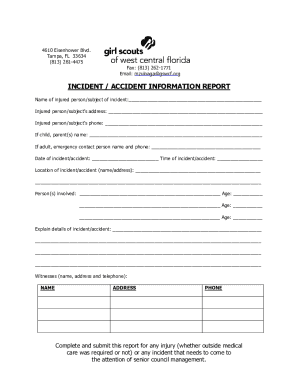
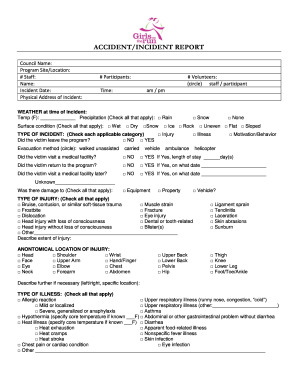
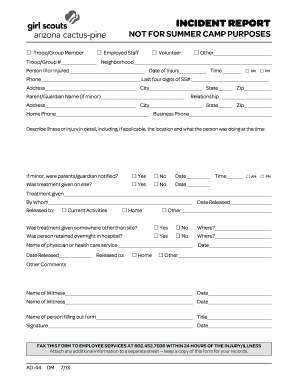
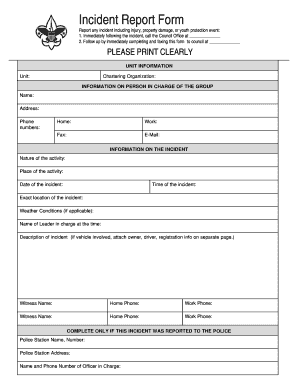
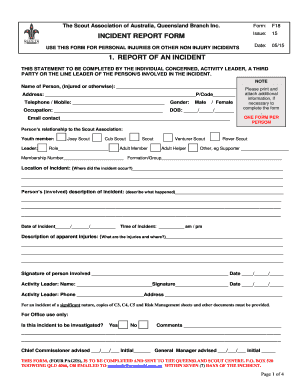
The Incident/Accident Report Form is a personal legal document used by individuals or organizations to document and manage details of an incident or accident.
pdfFiller scores top ratings on review platforms




Who needs Incident Accident Report?
Explore how professionals across industries use pdfFiller.

Incident Accident Report is needed by:
-
Individuals involved in accidents
-
Organizations managing events or activities
-
Parents or guardians of minors in incidents
-
Health and safety officers
-
Insurance claimants
-
Legal representatives
Comprehensive Guide to Incident Accident Report
What is the Incident/Accident Report Form?
The Incident/Accident Report Form is a crucial tool designed for documenting incidents and accidents. This form serves individuals and organizations in formalizing the details surrounding unexpected events.
It is indispensable for reporting various incidents, such as personal accidents or workplace mishaps. By utilizing this form, users can ensure that all necessary information is collected systematically, aiding in effective record-keeping and follow-up actions.
Purpose and Benefits of the Incident/Accident Report Form
Accurate documentation of events is essential for both individuals and organizations. This form provides a structured format that simplifies the reporting process, ensuring all vital details are captured efficiently.
The main advantages of using this form include enhanced clarity, consistency in documentation, and improved processing for insurance claims. Having a reliable framework encourages thoroughness and accuracy in reporting incidents.
Who Needs the Incident/Accident Report Form?
The Incident/Accident Report Form is necessary for various individuals and organizations. Personal accidents, such as those occurring during recreational activities, showcase scenarios where individuals should document events using this form.
Organizations, too, require this form for policy compliance and managing insurance claims related to incidents. Examples include non-profits, educational institutions, and corporate entities that prioritize safety and compliance.
How to Fill Out the Incident/Accident Report Form Online
To efficiently fill out the Incident/Accident Report Form online, follow these steps:
-
Access the form through a valid online platform like pdfFiller.
-
Begin by entering basic details, including the 'Name of person involved:' and 'Date of Incident (XX/XX/XXXX):'.
-
Complete additional fields such as witness information and incident specifics.
-
Review all entered information for accuracy.
-
Submit the completed form following the provided instructions.
Field-by-Field Instructions for the Incident/Accident Report Form
Each field in the Incident/Accident Report Form requires specific information:
-
Name of person involved: Ensure clarity and correct spelling.
-
Date of Incident: Double-check the format to ensure it is accurate.
-
Description of incident: Provide a concise and clear account of the events.
Common pitfalls include inadequate detail in descriptions and errors in date entries, so review your entries meticulously before submission.
Submission Methods and Where to Submit the Incident/Accident Report Form
Users have various options for submitting the Incident/Accident Report Form:
-
Online submission through platforms like pdfFiller.
-
Physical submission by mailing the form to the appropriate organization.
Post-submission, tracking the status is essential. Confirm receipt with the relevant authority to ensure the form is processed accordingly.
Common Errors and How to Avoid Them While Filling the Report Form
When filling out the Incident/Accident Report Form, users may encounter several common errors:
-
Omitting crucial information, leading to incomplete reports.
-
Incorrect formatting of dates and names.
-
Failing to review the form before submission, potentially resulting in inaccuracies.
To minimize these errors, take the time to review each field carefully, ensuring that all entries are complete and accurately reflect the incident details.
What Happens After You Submit the Incident/Accident Report Form?
Once submitted, the Incident/Accident Report Form enters a review process. Typically, the reviewing party will evaluate the information provided for completeness and accuracy.
Expect follow-up communications regarding the outcomes, including timelines for decisions or actions taken. Awareness of potential next steps can assist users in managing their expectations during this phase.
Security and Compliance for the Incident/Accident Report Form
Safety and privacy are critical when handling the Incident/Accident Report Form. pdfFiller employs 256-bit encryption to safeguard sensitive documents during the submission process.
Moreover, compliance with regulations such as HIPAA and GDPR ensures that personal information remains protected, making it a trustworthy platform for handling private documentation.
Unlock the Ease of Filling Out Your Incident/Accident Report Form with pdfFiller
Utilizing pdfFiller to fill out the Incident/Accident Report Form offers distinct advantages. The platform provides user-friendly features, including electronic signing and secure cloud storage, simplifying the documentation process.
This approach not only enhances user experience but also promotes efficient action regarding incident reporting and follow-up.
How to fill out the Incident Accident Report
-
1.Access the Incident/Accident Report Form by visiting pdfFiller’s website and searching for the form name in the search bar.
-
2.Open the form and familiarize yourself with the layout, noting the required fields and checkboxes indicated on the document.
-
3.Gather necessary information such as the name of the person involved, date of the incident, witness details, type of incident, and any injuries reported before starting to fill in the form.
-
4.Use the cursor to click on each fillable field and input the required information clearly and accurately.
-
5.Attach any additional documents or evidence that may support the report directly through pdfFiller’s interface if needed.
-
6.Once you have entered all the information, review your inputs carefully, checking for any errors or omissions in the details provided.
-
7.Utilize pdfFiller’s tools to add your signature in the designated section to validate the form.
-
8.Finalize the document by accessing the save or download options available on pdfFiller, ensuring your report is securely saved or completed for submission.

Who is eligible to submit the Incident/Accident Report Form?
Any individual who has experienced or witnessed an incident or accident can submit this form. It is often used by organizations to ensure proper documentation of events involving employees, participants, or clients.
What types of information are necessary to complete this form?
You will need personal information of individuals involved, details of the incident including date, time, location, injuries sustained, and witness accounts to complete the form accurately.
How do I submit the form once completed?
After filling out the form on pdfFiller, you can submit it electronically by following the provided submission methods, or download it for physical submission as per your organization's requirements.
Are there any supporting documents required with the form?
While supporting documents may not be mandatory, attaching any relevant evidence, such as photos or witness statements, can strengthen your report and is often recommended.
What are common mistakes to avoid when filling out this form?
Ensure all required fields are filled out completely, provide accurate details without assumptions, and review the document for grammatical or spelling errors before submission.
How long does it take to process an Incident/Accident Report Form?
Processing times can vary based on the organization handling the form. Typically, you should expect confirmation of receipt and follow-up actions within a few days.
Is there a fee for submitting the form?
Generally, there is no fee associated with submitting an Incident/Accident Report Form unless specified by the organization or entity managing the reports.
Related Content
Related Forms





Get the latest insights from our blog


If you believe that this page should be taken down, please follow our DMCA take down process
here
.
This form may include fields for payment information. Data entered in these fields is not covered by PCI DSS compliance.