
Last updated on
Oct 31, 2026

VA 032-03-0051 2005 free printable template
pdfFiller is not affiliated with any government organization

Fill out
Complete the form online in a simple drag-and-drop editor.

eSign
Add your legally binding signature or send the form for signing.

Share
Share the form via a link, letting anyone fill it out from any device.

Export
Download, print, email, or move the form to your cloud storage.
Why pdfFiller is the best tool for your documents and forms


End-to-end document management
From editing and signing to collaboration and tracking, pdfFiller has everything you need to get your documents done quickly and efficiently.
Accessible from anywhere
pdfFiller is fully cloud-based. This means you can edit, sign, and share documents from anywhere using your computer, smartphone, or tablet.
Secure and compliant
pdfFiller lets you securely manage documents following global laws like ESIGN, CCPA, and GDPR. It's also HIPAA and SOC 2 compliant.
What is VA 032-03-0051
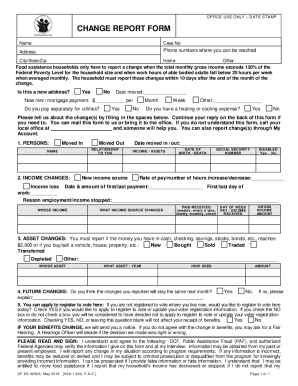
The Virginia Change Report Form is a government document used by Virginia residents to report changes in their Food Stamps or TANF case to the Department of Social Services.
pdfFiller scores top ratings on review platforms




Who needs VA 032-03-0051?
Explore how professionals across industries use pdfFiller.

VA 032-03-0051 is needed by:
-
Virginia residents receiving Food Stamps
-
Individuals enrolled in TANF
-
Households reporting income changes
-
Families needing to update household composition
-
Applicants requiring Medicaid change notifications
Comprehensive Guide to VA 032-03-0051
What is the Virginia Change Report Form?
The Virginia Change Report Form is a crucial document utilized by residents to report changes in their Food Stamps or Temporary Assistance for Needy Families (TANF) case to the Department of Social Services. This form plays a vital role in ensuring that your household changes, such as income fluctuations or changes in composition, are adequately documented.
Timely reporting is essential, as it affects your eligibility for benefits like TANF and food stamps. All applicants are required to sign the form to confirm the accuracy of the information submitted to social services.
Why You Need to Use the Virginia Change Report Form
Utilizing the Virginia Change Report Form is not just a recommendation but a legal obligation. Recipients are required to report any changes within 10 days to maintain their eligibility. Keeping your information current is essential as it affects the assessment of your benefits.
Failure to report changes in a timely manner can lead to adverse consequences, including the reduction or loss of TANF or food stamp benefits. It is critical to remain compliant with these obligations to ensure your household's food security and financial support.
Who Should Complete the Virginia Change Report Form?
The form should be completed by individuals or households who need to report significant changes to their circumstances. This primarily includes TANF recipients and food stamp beneficiaries who encounter relevant changes.
Situations that typically necessitate the completion of this form include changes in income, household composition, or family members living in the home. If you're receiving assistance, ensuring that these details are up-to-date is essential for continued eligibility.
Key Features of the Virginia Change Report Form
The Virginia Change Report Form includes several key sections designed to capture essential information. These sections encompass address changes, income adjustments, work hours, and modifications to household composition.
-
Address changes
-
Income changes
-
Work hours
-
Household composition
Each section features fillable fields along with clear instructions to assist users in completing the form correctly. Additionally, if applicable, information regarding reporting changes to Medicaid workers is also included.
How to Fill Out the Virginia Change Report Form Online
Filling out the Virginia Change Report Form online is straightforward. You can access the form through pdfFiller, which provides an efficient platform for document management.
-
Go to the pdfFiller website and locate the Virginia Change Report Form.
-
Fill out each section based on the specific changes in your household.
-
Review your entries for accuracy and completeness before submitting.
Validating your information is key to avoiding common errors that could delay your application process. Ensure that all fields are correctly filled to facilitate smooth processing.
Submitting Your Virginia Change Report Form
Once completed, there are various methods to submit your Virginia Change Report Form. You may choose to submit it online, through the mail, or in person at your local Department of Social Services.
-
Online submission through pdfFiller.
-
Mail the completed form to the appropriate address.
-
Submit the form in person at your local office.
It is important to save and print a copy of your submission for your records. Ensure you are aware of any deadlines or applicable fees associated with the submission process.
Security and Compliance When Using the Virginia Change Report Form
When handling sensitive personal information, security is paramount. pdfFiller incorporates robust security measures to protect users’ data while using the Virginia Change Report Form.
The platform adheres to stringent compliance standards, including HIPAA and GDPR, ensuring that your data is managed securely throughout the process. Users can trust that their information is protected when completing and submitting this form.
What Happens After You Submit the Virginia Change Report Form?
After submitting the Virginia Change Report Form, you can expect a processing timeline from the Department of Social Services. Confirmation of submission will usually be provided shortly after submission.
-
Check your application status online after submission.
-
Be aware of common reasons for rejection to avoid delays.
If there is a need to correct or amend the form, it’s important to follow the proper channels to ensure your changes are acknowledged by the department.
Make Your Virginia Change Report Form Process Easier with pdfFiller
Using pdfFiller to manage your Virginia Change Report Form enhances your experience significantly. The platform offers tools that simplify filling out, eSigning, and submitting the form efficiently.
Experience ease of use, strong security, and time-saving features that allow you to focus more on securing your household's needs without stress. Get started immediately to enjoy a seamless form management process.
How to fill out the VA 032-03-0051
-
1.Access the Virginia Change Report Form on pdfFiller by searching for it in the template library or by using a direct link provided by your social services department.
-
2.Open the form by clicking on it, which will launch the fillable PDF in your web browser.
-
3.Begin by reviewing the form thoroughly to familiarize yourself with the sections you need to fill in.
-
4.Gather all necessary information including changes in address, income, work hours, and household composition before starting to complete the form.
-
5.Click on each field to enter your information. Use the pdfFiller interface to type directly into the fields provided. Make sure to fill out every part that applies to your situation.
-
6.If any sections do not apply, leave them blank or check the appropriate boxes if applicable.
-
7.Carefully review all your entries for accuracy and completeness once you have filled in the necessary fields.
-
8.Use the feature to add your signature electronically by selecting the appropriate option for signing, ensuring the form is completed and valid.
-
9.Once satisfied with your entries, save your progress using the save icon or download the filled form to your device.
-
10.Submit the form electronically through pdfFiller, or download and print it for mailing or in-person submission to your local DSS office as needed.

Who is eligible to use the Virginia Change Report Form?
Eligible users for the Virginia Change Report Form include residents receiving Food Stamps or Temporary Assistance for Needy Families (TANF) who need to report changes related to their benefits.
What changes need to be reported using this form?
Changes that must be reported include any modifications to address, income, work hours, or household composition. It's essential to report these changes within 10 days of occurrence.
How do I submit the Virginia Change Report Form?
You can submit the completed form electronically via pdfFiller, or print and deliver it in person or by mail to your local Department of Social Services office.
Are there any supporting documents needed with the form?
Typically, additional documentation may be required when reporting significant changes, such as income verification. Always check with the Department of Social Services for specific requirements.
What are common mistakes to avoid when filling out this form?
Ensure all sections relevant to your situation are completed, double-check for accuracy, and remember to sign the form. Leaving fields blank or missing a signature can delay processing.
How long does processing take after submission?
Processing times can vary, but typically allow a few weeks for the Department of Social Services to review and respond to your submitted changes.
Is there a fee associated with submitting the Virginia Change Report Form?
There is no fee for submitting the Virginia Change Report Form as it is a government-related application for social services.
VA 032-03-0051 Form Versions
Related Content
Related Forms



Related Catalogs
Get the latest insights from our blog


If you believe that this page should be taken down, please follow our DMCA take down process
here
.
This form may include fields for payment information. Data entered in these fields is not covered by PCI DSS compliance.