
Last updated on
Nov 9, 2026

ARRT Instructions for Completing the Continuing Education Probation Report 2012-2026 free printa...
pdfFiller is not affiliated with any government organization

Fill out
Complete the form online in a simple drag-and-drop editor.

eSign
Add your legally binding signature or send the form for signing.

Share
Share the form via a link, letting anyone fill it out from any device.

Export
Download, print, email, or move the form to your cloud storage.
Why pdfFiller is the best tool for your documents and forms


End-to-end document management
From editing and signing to collaboration and tracking, pdfFiller has everything you need to get your documents done quickly and efficiently.
Accessible from anywhere
pdfFiller is fully cloud-based. This means you can edit, sign, and share documents from anywhere using your computer, smartphone, or tablet.
Secure and compliant
pdfFiller lets you securely manage documents following global laws like ESIGN, CCPA, and GDPR. It's also HIPAA and SOC 2 compliant.
What is ARRT Instructions for Completing the Continuing Education Probation Report
The Continuing Education Probation Report is a document used by individuals on probation status to report their continuing education credits to the ARRT.
pdfFiller scores top ratings on review platforms




Who needs ARRT Instructions for Completing the Continuing Education Probation Report?
Explore how professionals across industries use pdfFiller.

ARRT Instructions for Completing the Continuing Education Probation Report is needed by:
-
Radiologic technologists on probation status
-
ARRT-certified professionals looking to fulfill CE requirements
-
Education coordinators for radiologic programs
-
Healthcare professionals seeking Category A or A+ credits
-
Compliance officers in healthcare settings
Comprehensive Guide to ARRT Instructions for Completing the Continuing Education Probation Report
What is the Continuing Education Probation Report?
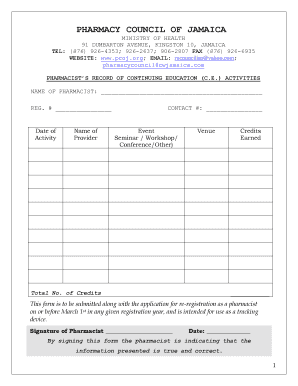
The Continuing Education Probation Report is a vital document that supports professionals on probation status as they report their continuing education credits to the American Registry of Radiologic Technologists (ARRT). This report is essential for maintaining compliance with ARRT standards, ensuring that professionals remain informed about their CE requirements. Typically, healthcare providers and radiologic technologists utilize this report to demonstrate their commitment to ongoing education during their probationary period. Accurate reporting is crucial for professionals to retain their credentials and uphold the integrity of their practices.
Purpose and Benefits of the Continuing Education Probation Report
The Continuing Education Probation Report serves several important purposes. Firstly, it ensures accurate reporting of continuing education (CE) credits, which is paramount for ARRT compliance. By providing a detailed account of CE activities, the report helps professionals maintain their standing with the ARRT during the probation period. Furthermore, compliance with these requirements can lead to valuable career benefits, such as enhanced job security and improved professional reputation. Ultimately, utilizing the ARRT CE probation may pave the way for career advancement and additional opportunities in the field.
Who Needs the Continuing Education Probation Report?
This report is primarily designed for individuals who are currently in a probation status with the ARRT. Professionals must be aware that failure to submit the Continuing Education Probation Report can lead to significant consequences, including delays in credential renewal or even revocation of certification. Understanding the ARRT CE requirements and the implications of the CE probation period is crucial for professionals aiming to navigate their probationary status successfully.
How to Fill Out the Continuing Education Probation Report Online
To complete the Continuing Education Probation Report effectively, users can utilize pdfFiller’s cloud-based platform. Follow these steps for a seamless experience:
-
Access the pdfFiller website and locate the Continuing Education Probation Report template.
-
Fill in the necessary information for each section of the form, ensuring all CE credits are accurately reported.
-
Double-check entries for accuracy and completeness before submission.
-
Save your completed report in PDF format for your records.
Additionally, users can benefit from tips that ensure precision in reporting, which is essential for compliance with ARRT standards.
Field-by-Field Instructions for the Continuing Education Probation Report
Each section of the Continuing Education Probation Report requires specific details concerning CE activities and credits. Here’s a guide on what to include:
-
Detail the CE activities completed, ensuring they align with ARRT’s Category A and A+ requirements.
-
Accurately list the number of CE credits earned for each activity.
-
Be aware of any particular documentation required for validation of CE activities, such as certificates or attendance verification.
Common mistakes include failing to include necessary documentation or miscalculating credits earned, so it's vital to understand these requirements thoroughly.
Common Errors to Avoid When Filing the Continuing Education Probation Report
Filing the Continuing Education Probation Report comes with its challenges. Here’s a list of frequent errors to avoid:
-
Inaccurate reporting of CE credits, which can lead to compliance issues.
-
Submitting incomplete forms, which may result in delayed processing.
-
Overlooking specific documentation requirements that can validate the reported CE activities.
To prevent these pitfalls, double-check your submission for accuracy and completeness, and ensure all required documents are included.
Submission Methods and Delivery for the Continuing Education Probation Report
Once the Continuing Education Probation Report is completed, users have several submission methods at their disposal:
-
Online submission via the ARRT website, which is the quickest method.
-
Mailing the completed report to the appropriate ARRT address, which may entail longer processing times.
Be aware of any potential delivery fees associated with mailing and keep in mind the expected processing time for each method of submission.
What Happens After You Submit the Continuing Education Probation Report?
After submission of the Continuing Education Probation Report, applicants can expect a confirmation process. Monitoring the status of your application is essential:
-
Allow a specified processing time before checking for confirmation.
-
Utilize ARRT’s online resources to track your application status effectively.
If necessary, be prepared to engage in a renewal or resubmission process should any issues arise with your initial submission.
Security Features When Handling the Continuing Education Probation Report
When using pdfFiller to manage the Continuing Education Probation Report, users can have peace of mind due to the robust security features in place. pdfFiller employs advanced encryption technology to safeguard sensitive information and adheres to strict data protection policies, including compliance with regulations such as HIPAA and GDPR. This ensures that all personal data remains secure and confidential during document handling.
Experience Effortless Filing with pdfFiller
pdfFiller makes completing the Continuing Education Probation Report simpler and more efficient. Users benefit from an intuitive interface that facilitates easy document editing and submission. With a commitment to customer support and over 100 million users, you can rely on pdfFiller for a seamless experience in managing your CE reports.
How to fill out the ARRT Instructions for Completing the Continuing Education Probation Report
-
1.Access pdfFiller and use the search bar to locate the Continuing Education Probation Report form.
-
2.Once opened, familiarize yourself with the form layout and identify the fields that need to be completed.
-
3.Before starting, gather all necessary documentation that details your continuing education activities, including proof of completed credits.
-
4.Begin completing the form by entering your personal information, including your full name, ARRT number, and contact details where required.
-
5.Proceed to input the details of your continuing education activities, ensuring that you specify the type of credits received—Category A or A+—for each entry.
-
6.Review the instructions thoroughly for any specific requirements regarding submission or additional documentation required.
-
7.Once you have filled in all necessary information, review the completed form for accuracy, ensuring that no fields are left blank and all calculations are correct.
-
8.After verifying the information, you can save your progress or finalize the document by selecting the option to download or submit the form directly through pdfFiller.
-
9.If you choose to download, save the file to your desired location on your device. Ensure you submit the form according to the guidelines provided by the ARRT.

Who is eligible to submit the Continuing Education Probation Report?
The Continuing Education Probation Report is primarily for individuals on probation status with the ARRT who need to report continuing education credits earned during this period.
What is the deadline for submitting this report?
The submission deadline for the Continuing Education Probation Report typically aligns with the end of the probation period, which is the first six months of the current CE biennium.
What methods can I use to submit the Continuing Education Probation Report?
You can submit the Continuing Education Probation Report directly online through pdfFiller by using the submission feature, or you may download and mail it to the ARRT depending on your preference.
Are there any supporting documents required with this form?
Yes, you may need to provide proof of completed continuing education activities, such as certificates or transcripts, to validate the credits claimed on the Continuing Education Probation Report.
What are common mistakes to avoid when filling out this form?
Common mistakes include leaving fields incomplete, not specifying the type of CE credits accurately, and failing to review the information for correctness before submission.
How long does it take to process the Continuing Education Probation Report once submitted?
Processing times can vary, but typically allow several weeks for the ARRT to review and respond to your submission. Always check the ARRT for specific time frames.
What should I do if I cannot submit the form on time?
If you're unable to submit the Continuing Education Probation Report on time, contact the ARRT's support for guidance on possible extensions or consequences of late submission.
Related Content
Related Forms





Get the latest insights from our blog


If you believe that this page should be taken down, please follow our DMCA take down process
here
.
This form may include fields for payment information. Data entered in these fields is not covered by PCI DSS compliance.